Manual for ACSM1

Manual for ACSM1

Brand: ABB

Category: Drives

Document Type: Manual

Language: EN
Uploaded: April 20, 2026, 7:47 p.m.

Manual Publish Date: 2009-08-12

Warranty Information

No warranty information is available in the provided document.

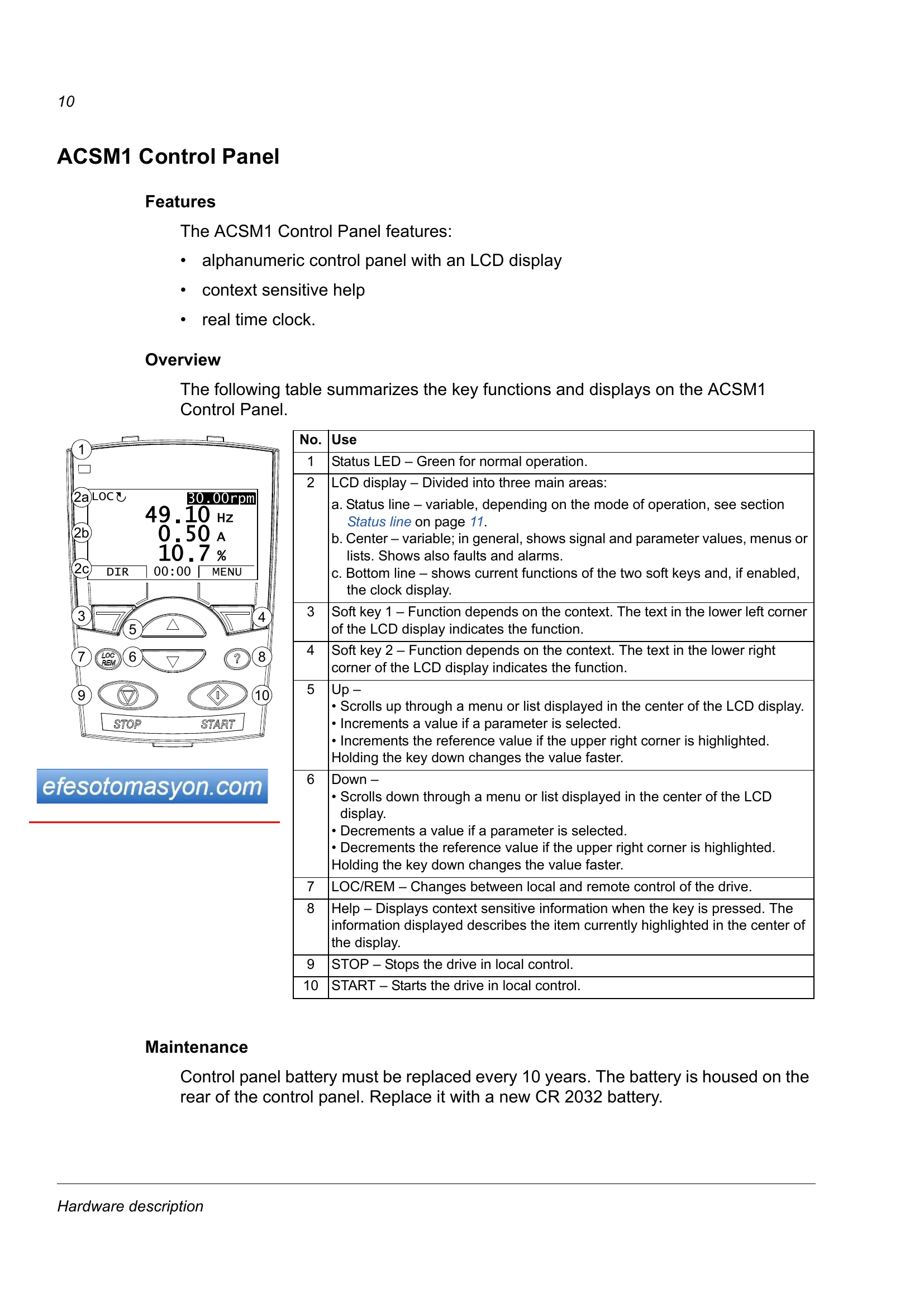
The ACSM1 Control Panel allows for operation, monitoring, and parameter adjustment of the ACSM1 drive. Users can start, stop, change motor direction, and switch between local and remote control. The panel features an LCD display, context-sensitive help, and a real-time clock. The main menu provides access to functions like Parameters, Fault Logger, Time & Date, Parameter Backup, Reference Edit, and Drive Info. The Output mode is the default, and the panel automatically enters Fault mode when an error occurs. Operation involves using menus and keys, with soft keys indicating context-sensitive functions. Users can navigate through menus and lists, adjust values, and select options to control the drive.

Troubleshooting and error codes

Task Mode / Main menu option Abbreviations of the Main menu options * Page
How to view faults Fault Logger FAULT LOGGER 31
How to reset faults and alarms Fault Logger FAULT LOGGER 31
Privacy Policy