Brand: ABB
Category: Other
Document Type: Manual
Language: EN
Brand: ABB
Category: Other
Document Type: Manual
Language: EN
Uploaded: April 20, 2026, 8:04 p.m.
Manual Publish Date: 2018-07-01
Warranty void if used improperly, without qualified personnel, or with unauthorized alterations.
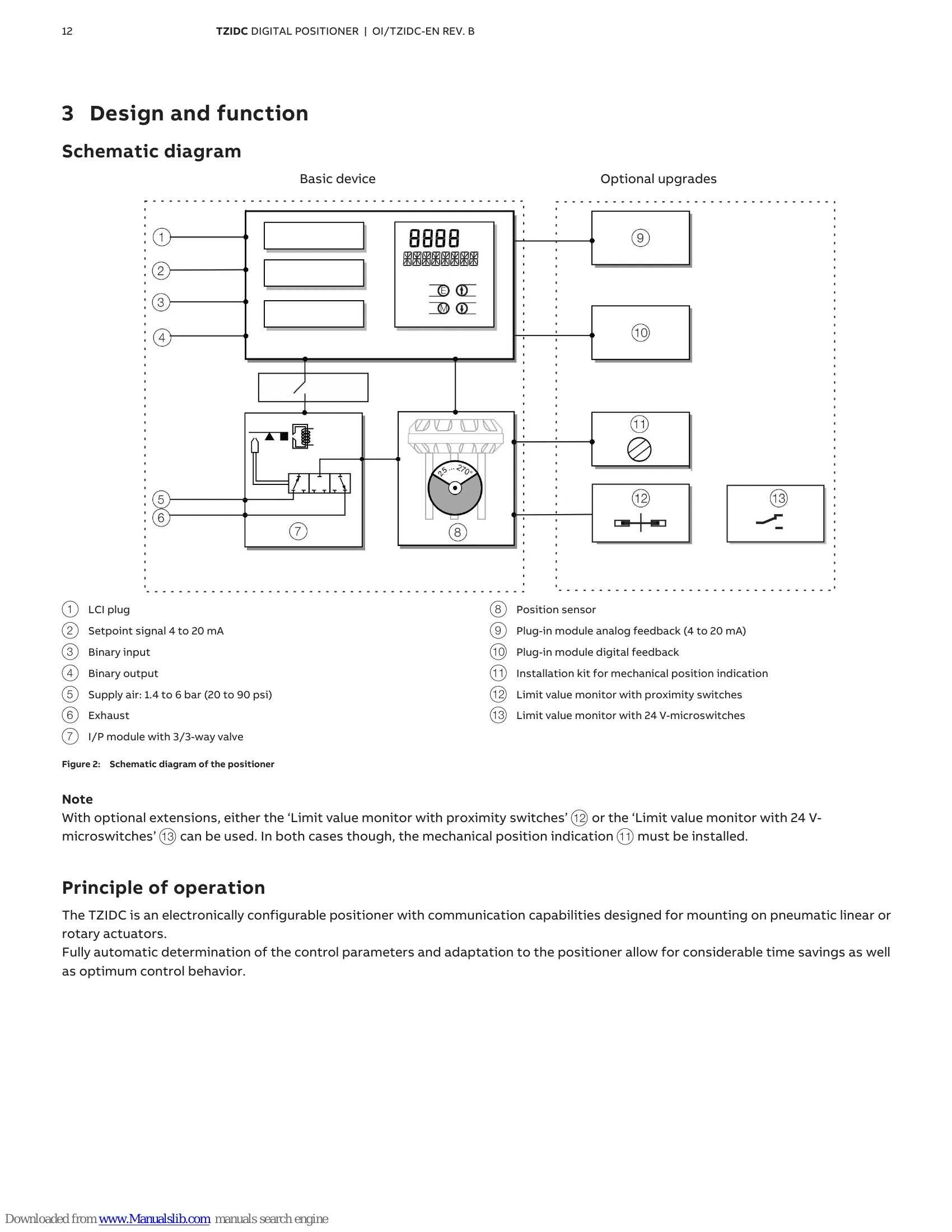
The TZIDC is an intelligent digital positioner for communication via HART® within the positioner product range. It is designed for positioning pneumatically controlled actuators and is distinguished by its unsurpassed shock absorption and vibration compensation. The device offers fully automatic determination of control parameters and adaptation to the positioner, ensuring time savings and optimum control behavior. It is intended for use in standard industrial atmospheres and requires careful installation and operation to ensure safety, especially in potentially explosive atmospheres.
| Error code | Possible cause | Impact | Troubleshooting the Instrument |
|---|---|---|---|
| ERROR 10 | The supply voltage was interrupted for at least 20 ms. | Check the power source and the wiring. | |
| ERROR 11 | The supply voltage has fallen below the minimum voltage. | The actuator is moved to the safe position. After approx. 5 seconds, the positioner is automatically reset and starts up again with the message ERROR 10. If a local communication interface (LCI) is plugged in, the device will enter the operating mode LCI supply. | Check the power source and the wiring. |
| ERROR 12 | The position is outside the measuring range. Possible reason is a malfunction in the position sensor. | In control mode: The actuator is moved to the safe position. On the configuration level: The output is set to neutral until a button is pressed. After approx. 5 seconds the positioner is automatically reset in control mode and on the configuration level. | Check the mounting. |
| ERROR 13 | Invalid input current. | This display indicates when the setpoint signal is overridden. The actuator is moved to the safe position. | Check the power source and the wiring. |
| ERROR 20 | No access possible to the data in the EEPROM. | The actuator is moved to the safe position. After approx. 5 seconds, the positioner is automatically reset. Attempts are made to restore the data. This compensates for intermittent errors in the communication environment with the EEPROM. | If there is still no access to the EEPROM data after resetting the device, load the factory settings. If the error still persists, the device must be returned for repair to the manufacturer. |
| ERROR 21 | Error while processing the measured values, pointing to an error in the working data (RAM). | The actuator is moved to the safe position. After approx. 5 seconds, the positioner is automatically reset and the RAM is reinitialized. | If the error persists even after the positioner has been reset, the device will need to be returned to the manufacturer for repair. |
| ERROR 22 | Error during the table processing, pointing to an error in the working data (RAM). | The actuator is moved to the safe position. After approx. 5 seconds, the positioner is automatically reset and the RAM is reinitialized. | If the error persists even after the positioner has been reset, the device will need to be returned to the manufacturer for repair. |
| ERROR 23 | Error when verifying the checksum of the configuration data (RAM). | The actuator is moved to the safe position. After approx. 5 seconds, the positioner is automatically reset and the RAM is reinitialized. | If the error persists even after the positioner has been reset, the device will need to be returned to the manufacturer for repair. |
| ERROR 24 | Error in the processor function registers (RAM). | The actuator is moved to the safe position. After approx. 5 seconds, the positioner is automatically reset and the RAM is reinitialized. | If the error persists even after the positioner has been reset, the device will need to be returned to the manufacturer for repair. |
| ERROR 50: | Internal error. | The actuator is moved to the safe position. After approx. 5 seconds, the positioner is automatically reset. | If the error can be reproduced and occurs in the same position after resetting, the device must be returned for repair to the manufacturer. |