Brand: Acer
Category: Handheld Device
Document Type: Manual
Language: EN
Brand: Acer
Category: Handheld Device
Document Type: Manual
Language: EN
Uploaded: April 20, 2026, 8:12 p.m.
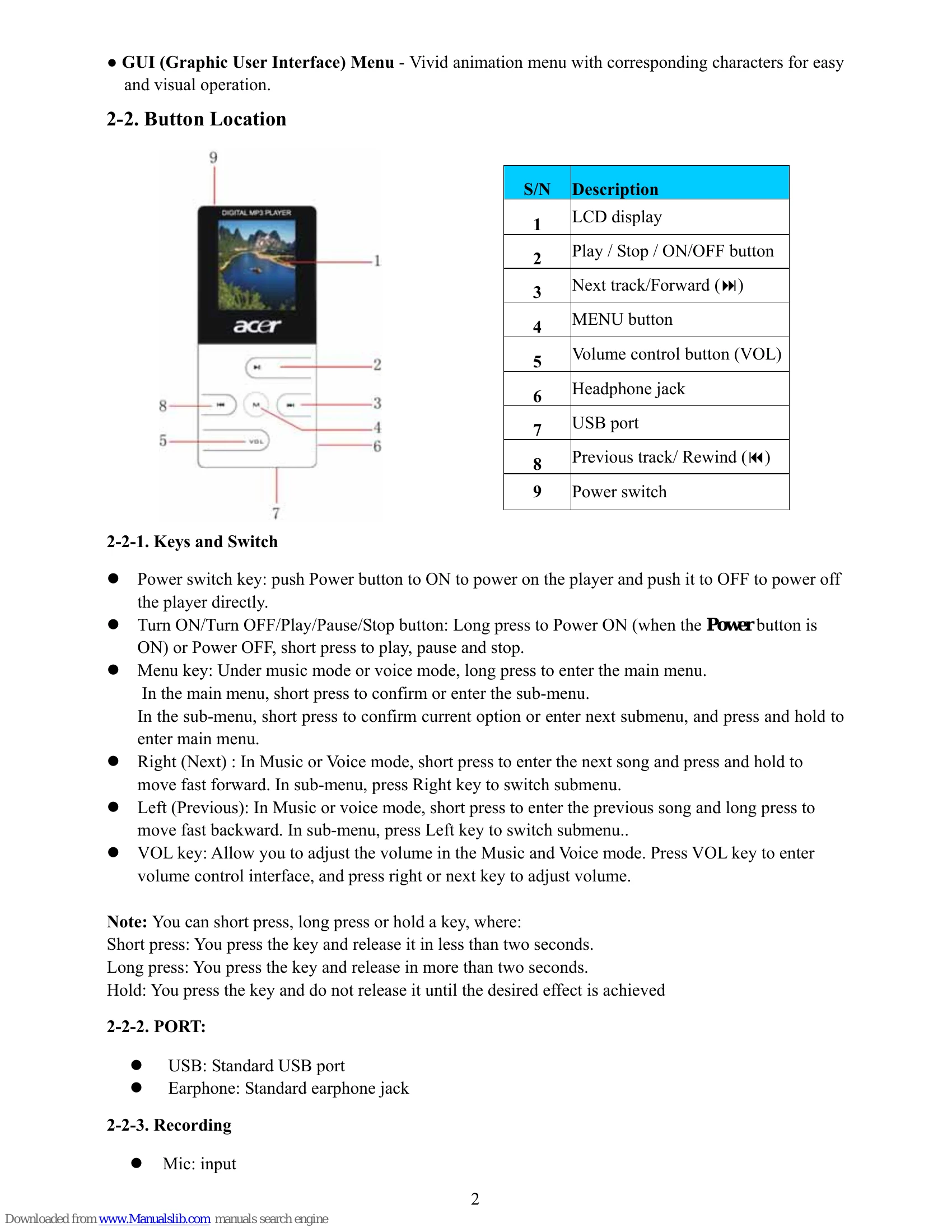
Pressing MENU button enters the menu system, including main menu (long press MENU button at Stop state), submenu at Play state (press MENU button to enter) and submenu at stop state (press MENU button to enter).
In music mode and voice mode short press VOL buttons to enter the volume control interface and then press the /◄ button to adjust volume.
Short press the PLAY button.
In the main menu, you can select and enter different modes such as Music, Movie, Record, Voice, E-Book, Album, Game, System setting, and USB mode.
| Problem | Solution |
|---|---|
| No sound is heard from the headphones. | Check whether Volume is set to “0” and connect the headphone plugs firmly. Check whether the headphone plug is dirty. Corrupted MP3 files may make a static noise and the sound may cut off. Ensure that the music files are not corrupted. |
| Characters in OLCD are corrupted | Check whether the right language has been selected. |
| Download of music files fails. | Check whether USB cable is not damaged and is connected properly. Check whether driver is installed correctly. Check whether the player's memory is full. |