Brand: acer
Category: Handheld Device
Document Type: Manual
Language: EN
Brand: acer
Category: Handheld Device
Document Type: Manual
Language: EN
Uploaded: April 20, 2026, 7:56 p.m.
Manual Publish Date: 2006
No specific warranty period is mentioned in the document.
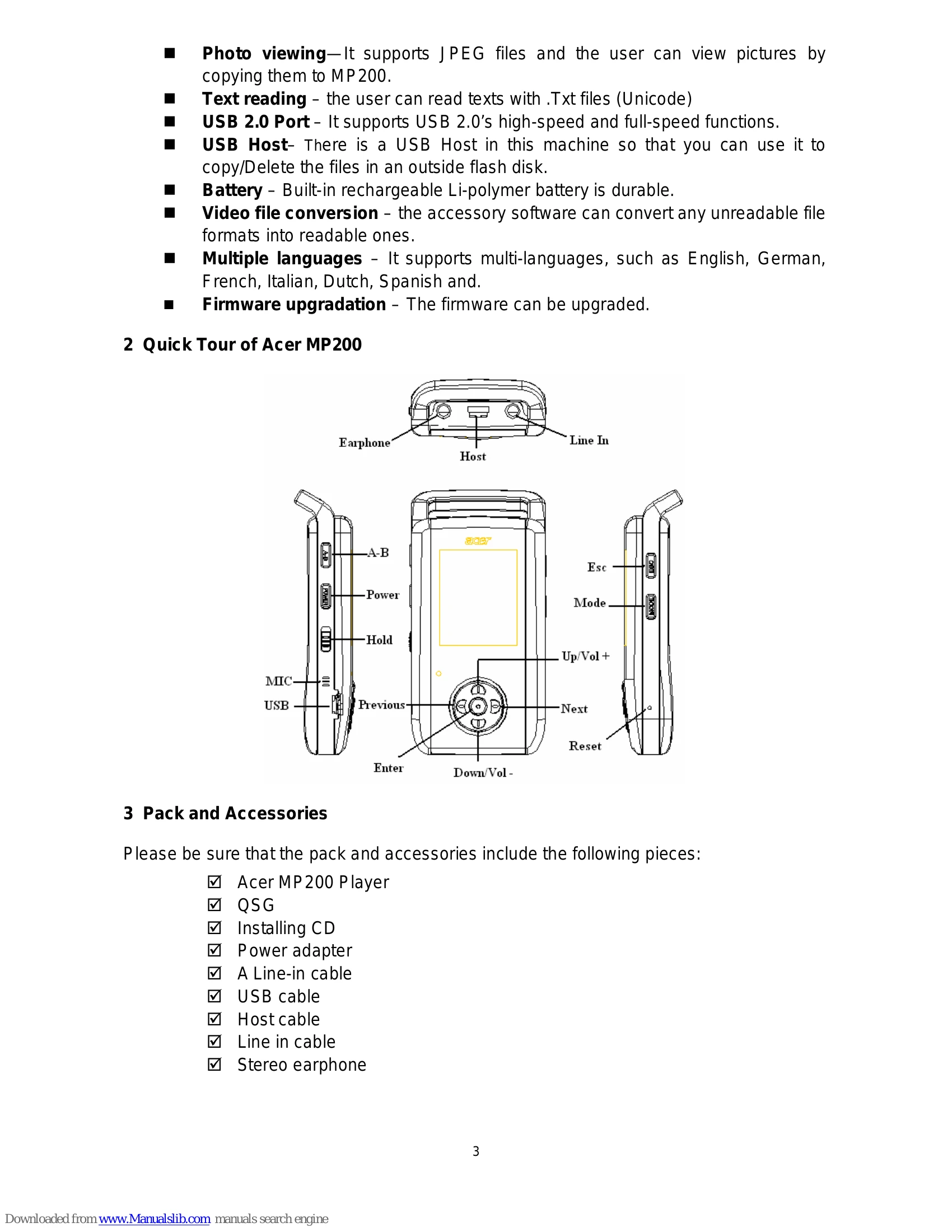
Turning On/Off: Press and hold the Power Button for 3 seconds. The Acer logo appears on startup, and a "Good bye" message on shutdown.
Reset: A short press of the Reset button can revive the device if it becomes unresponsive.
Navigation: Use the directional buttons (Up/Down/Left/Right) to navigate menus and ENTER to confirm. ESC returns to the previous menu or main menu.
Music Playback: Select "Music" from the main menu. Use directional buttons to select songs and ENTER to play. MODE accesses copy/delete options. Volume is adjusted with Up/Down buttons.
Video Playback: Select "Video". Supports ACV format; other formats require conversion. Use directional buttons to select videos and ENTER to play.
Picture Viewing: Select "Photo". Supports JPG files. Use directional buttons to select images and ENTER to view. Left/Right navigates between pictures.
Recording: Select "Record". Press ENTER to start/stop recording. Files are saved in the "Record" folder.
Games: Select "Game" to access four available games.
E-book: Select "Ebook" to read TXT files. Supports simultaneous music playback.
File Operations: Select "Files" to manage files on the device or connected USB storage (HDD/UFD).
USB Host: Connect external storage devices to copy/delete files.
Setup: Access settings for Music, Record, Display, and System (Sleep, Auto shutdown, etc.).
Firmware Upgradation: Download new firmware from the Acer website and copy it to the device's root directory.
Video Conversion: Use the provided tool to convert video formats to ACV.
| Problem | Possible Cause | Solution |
|---|---|---|
| Player cannot be started and LCD is blank. | Battery is not fully charged. | Make sure the battery is fully charged. |
| Keys are not functioning. | "Hold" sign is displayed on LCD. | Push the "Hold" button down to unlock the keys. |
| Player turns off suddenly. | Incorrect "Auto Shutdown" setup. | Check the "Auto Shutdown" setting in the "System" submenu. |
| Player turns off suddenly. | Insufficient battery power. | Check if there is enough battery power. |
| Cannot play video files. | Video format is not supported (e.g., not ACV). | Convert video files to ACV format using the accessory conversion software. |
| No voice or little voice during playback. | Volume is too low. | Check and adjust the volume. |
| No voice or little voice during playback. | Earphone is not plugged in properly. | Make sure the earphone is plugged in properly. |
| Lyrics are not shown during music playback. | LRC file name does not match MP3 file name. | Ensure the LRC file has the same name as the MP3 file. |