Manual for AT2055/AT2056, AT2355/AT2356

Manual for AT2055/AT2056, AT2355/AT2356

Brand: Acer

Category: LCD TV

Document Type: Manual

Language: EN
Uploaded: April 20, 2026, 8:12 p.m.

Manual Publish Date: 2009-04-01

Warranty Information

No explicit warranty period is stated in the provided sections of the manual.

Basic Operations

Connecting Devices:

  • Power Cord: Connect the AC cord to the TV's AC input and the plug to the wall outlet.
  • Remote Control: Open the back cover and insert two AAA batteries, observing polarity.
  • Antenna/Cable: Connect the antenna cable to the appropriate terminal on the back of the TV.
  • External Audio/Video: Use the SCART port or other relevant ports (HDMI, Component, AV) to connect devices like DVD players, VCRs, or STBs.
  • PC/Notebook: Connect via VGA or HDMI to display PC output on the TV.

Watching TV:

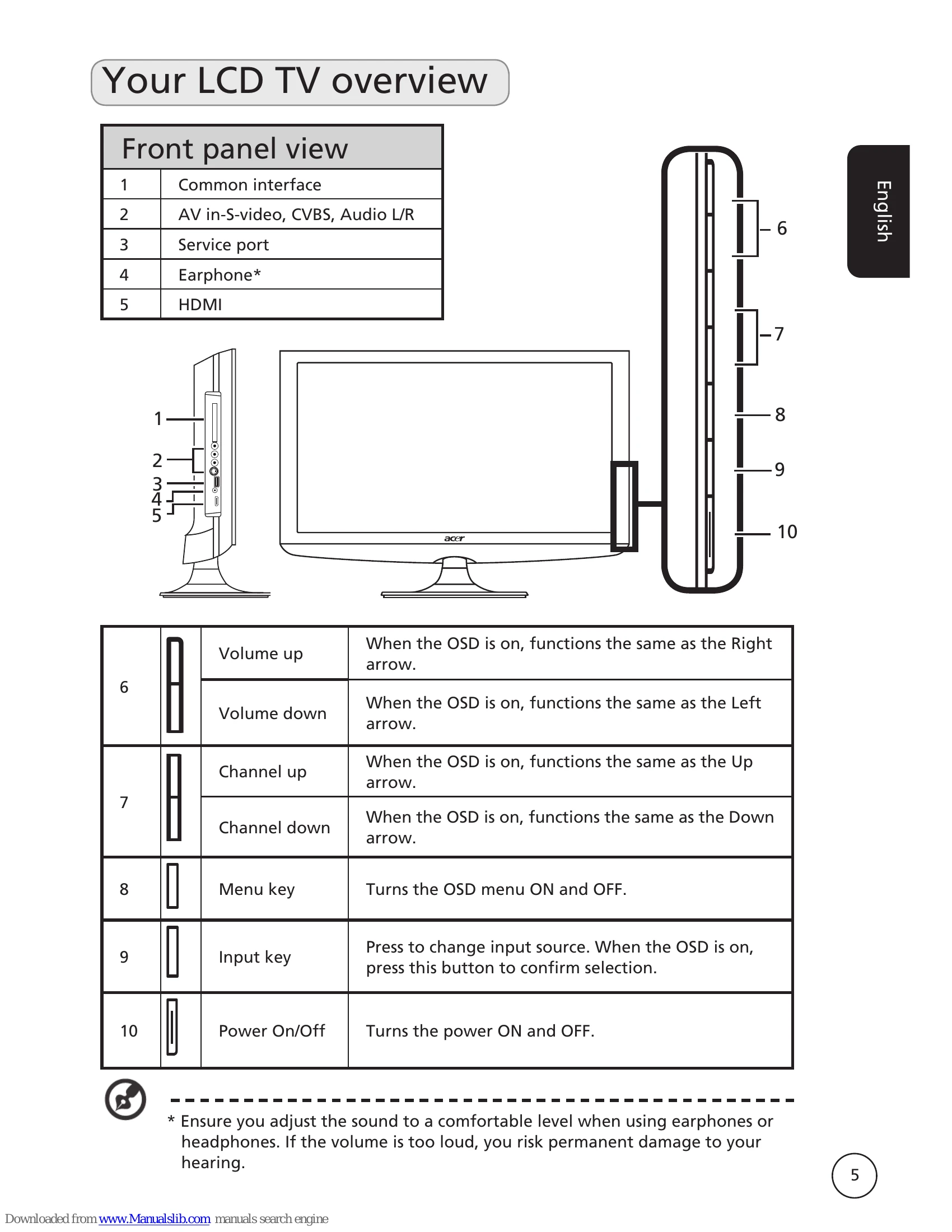
  • Power On: Turn on the power switch beneath the screen or use the power button on the remote.
  • Setup Wizard: The first time you turn on the TV, a wizard guides you through language and country selection, time zone, and channel scanning.
  • Changing Channels: Use the number keys or the channel up/down buttons on the remote.
  • Volume Control: Use the VOL +/- buttons on the remote.

Navigating Menus:

  • Press the MENU button to open the OSD.
  • Use directional keys to select menus (Picture, Sound, Channel Management, Settings, Advance) and options within them.
  • Use left/right keys to adjust settings.
  • Press MENU to exit.

Troubleshooting and error codes

Issue Possible Solutions
No Picture or Sound
  • Check power cord connection.
  • Verify correct input mode.
  • Ensure antenna is properly connected.
  • Check if the main power switch is on.
  • Make sure volume is not muted or set to minimum.
  • Ensure headphones are not connected.
Picture is not clear
  • Check antenna cable connection.
  • Verify TV signal reception.
  • Disconnect other peripherals if connected (e.g., VHS).
  • Consider antenna obstruction (for ghosting/double images); use a directional antenna if needed.
  • Turn off or remove sources of electrical interference (e.g., hair dryer, neon lights).
Picture is too dark, too light or tinted
  • Check colour adjustment.
  • Check brightness setting.
  • Check sharpness function.
  • Consider if the fluorescent lamp has reached the end of its service life.
Remote control does not work
  • Check remote control batteries.
  • Ensure the remote sensor window is not under strong fluorescent lighting.
  • Clean the remote sensor lens with a soft cloth.
  • Use the TV's buttons (hotkeys) as a temporary solution.
Privacy Policy