Brand: acer
Category: Mobile Phone
Document Type: Manual
Language: EN
Brand: acer
Category: Mobile Phone
Document Type: Manual
Language: EN
Uploaded: April 20, 2026, 7:50 p.m.
Manual Publish Date: 2010-01-01
Refer to the warranty card for full warranty details.
| Problem | Possible Cause | Solution |
|---|---|---|
| The smartphone does not turn on. | The battery is discharged. | Connect the AC adapter and charge the battery. |
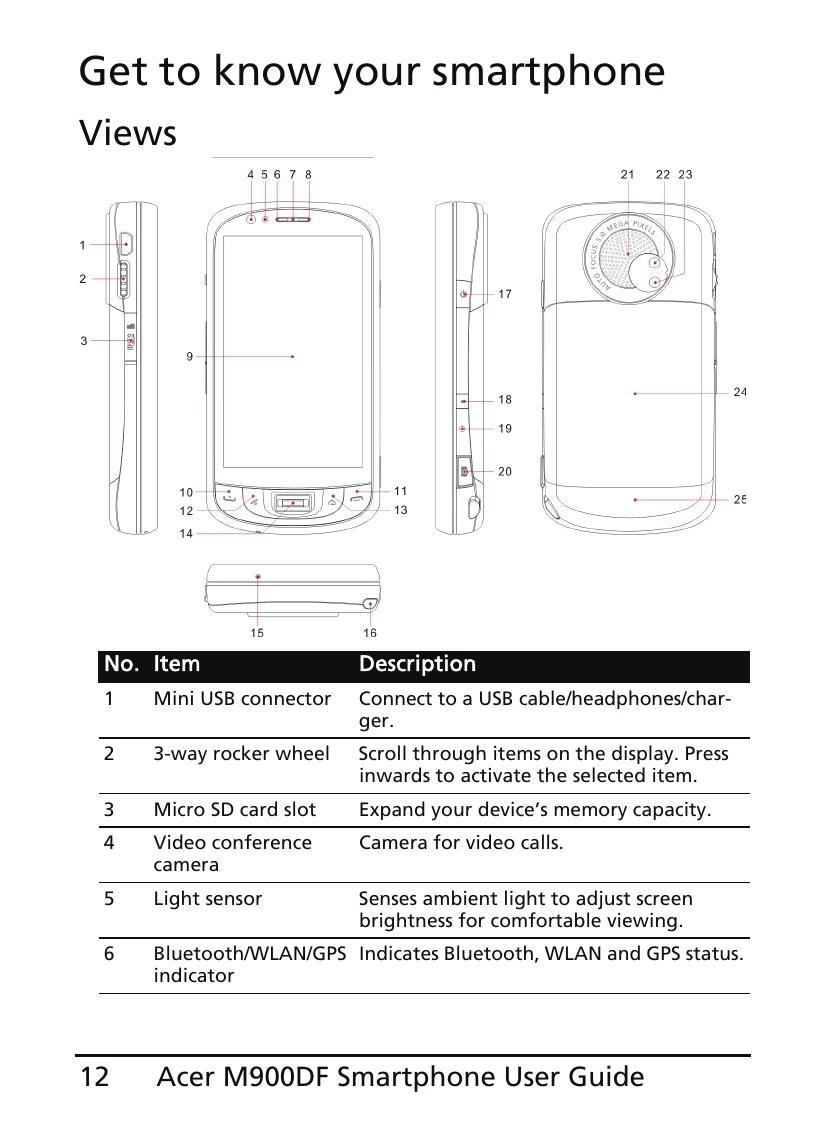
| The screen is blank or frozen. | The system has encountered an error. | Press and hold the Power button for 10 seconds to restart the device. If this does not work, insert the stylus into the reset pinhole (page 13) to reset the device. |
| Cannot make or receive calls. | The SIM card is not installed or is faulty. | Ensure the SIM card is correctly inserted. Try another SIM card. |
| No network coverage. | Move to an area with better network coverage. | |
| Cannot connect to the Internet. | The network connection is not set up correctly. | Check your network settings. Contact your network operator. |
| Application is not responding. | The application has encountered an error. | Restart the application. If the problem persists, restart the smartphone. |