Brand: AEG
Category: Appliances
Document Type: Manual
Language: EN
Brand: AEG
Category: Appliances
Document Type: Manual
Language: EN
Uploaded: April 20, 2026, 8:04 p.m.
None
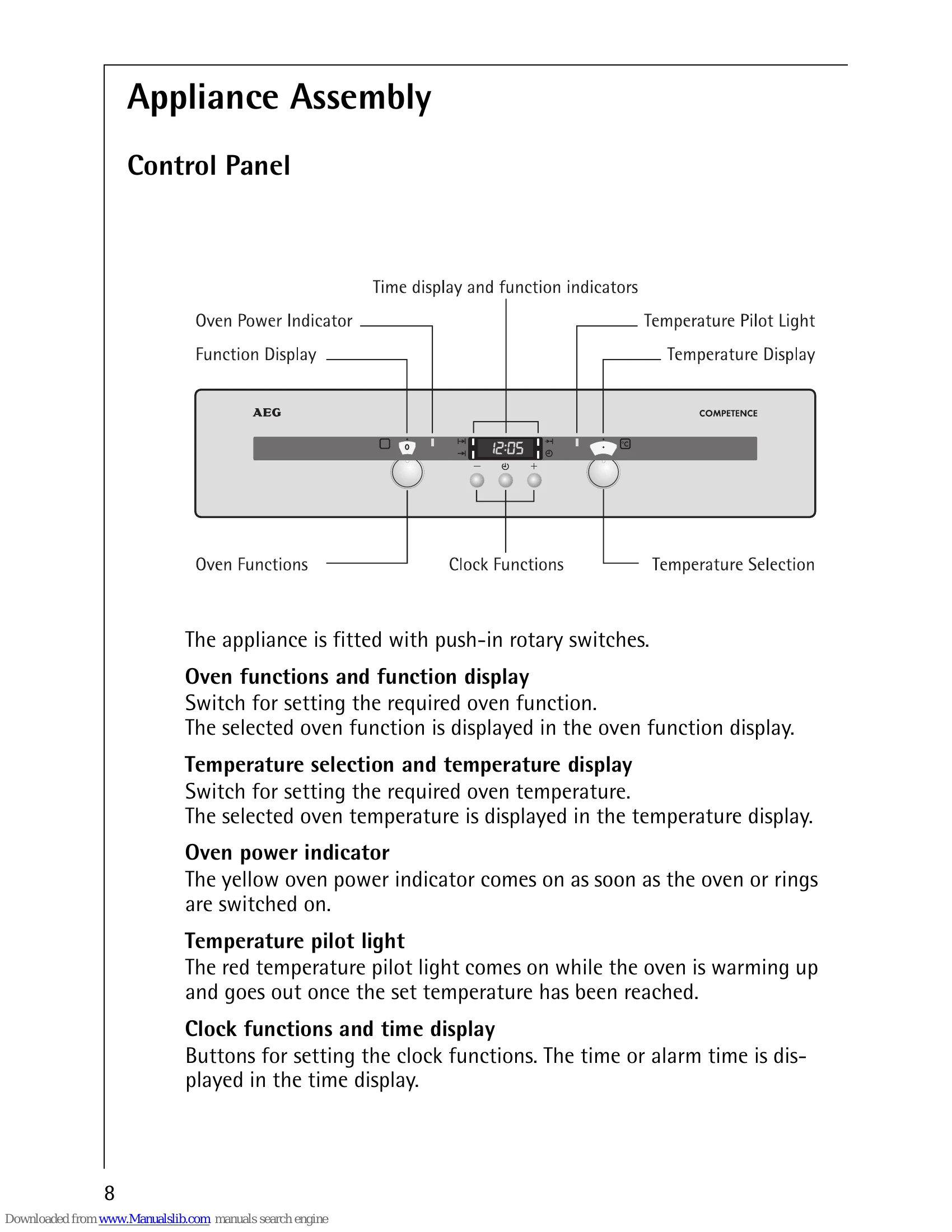
To operate the oven, push in the "oven functions" and "temperature selection" switches. Set the desired function by turning the "oven functions" switch. The selected function appears in the display. Set the desired temperature with the "temperature selection" switch; the temperature display will show your selection. The yellow oven power indicator stays on during use, and the red temperature pilot light indicates heating, turning off when the set temperature is reached.
To switch off, turn both switches to zero and push them back in to be flush with the control panel.
The oven can be set to switch on and off automatically. Use "cook time" to set the operating duration or "end time" to set when the oven should switch off. These can be combined for automatic start and stop times.
| Fault | Possible Cause | Remedy |
|---|---|---|
| The oven does not heat up | Appliance not switched on | Check if the appliance is switched on. |
| Time not set | Set the time. | |
| Incorrect settings | Check all settings. | |
| Blown fuse or tripped circuit breaker | Check the mains fuse or cooker circuit breaker. If it trips repeatedly, contact an electrician. | |
| The oven lighting goes off | Bulb failure | Replace the light bulb (see Cleaning and Care section). |