Brand: AEG
Category: Audio Equipment
Document Type: Manual
Language: EN
Brand: AEG
Category: Audio Equipment
Document Type: Manual
Language: EN
Uploaded: April 20, 2026, 8 p.m.
Manual Publish Date: 2009-10-14
This manual covers a 24-month warranty period for the DVD player.
This DVD player is designed for playing DVDs and CDs. It supports various disc formats and file types.
| Fault | Possible cause | Solution |
|---|---|---|
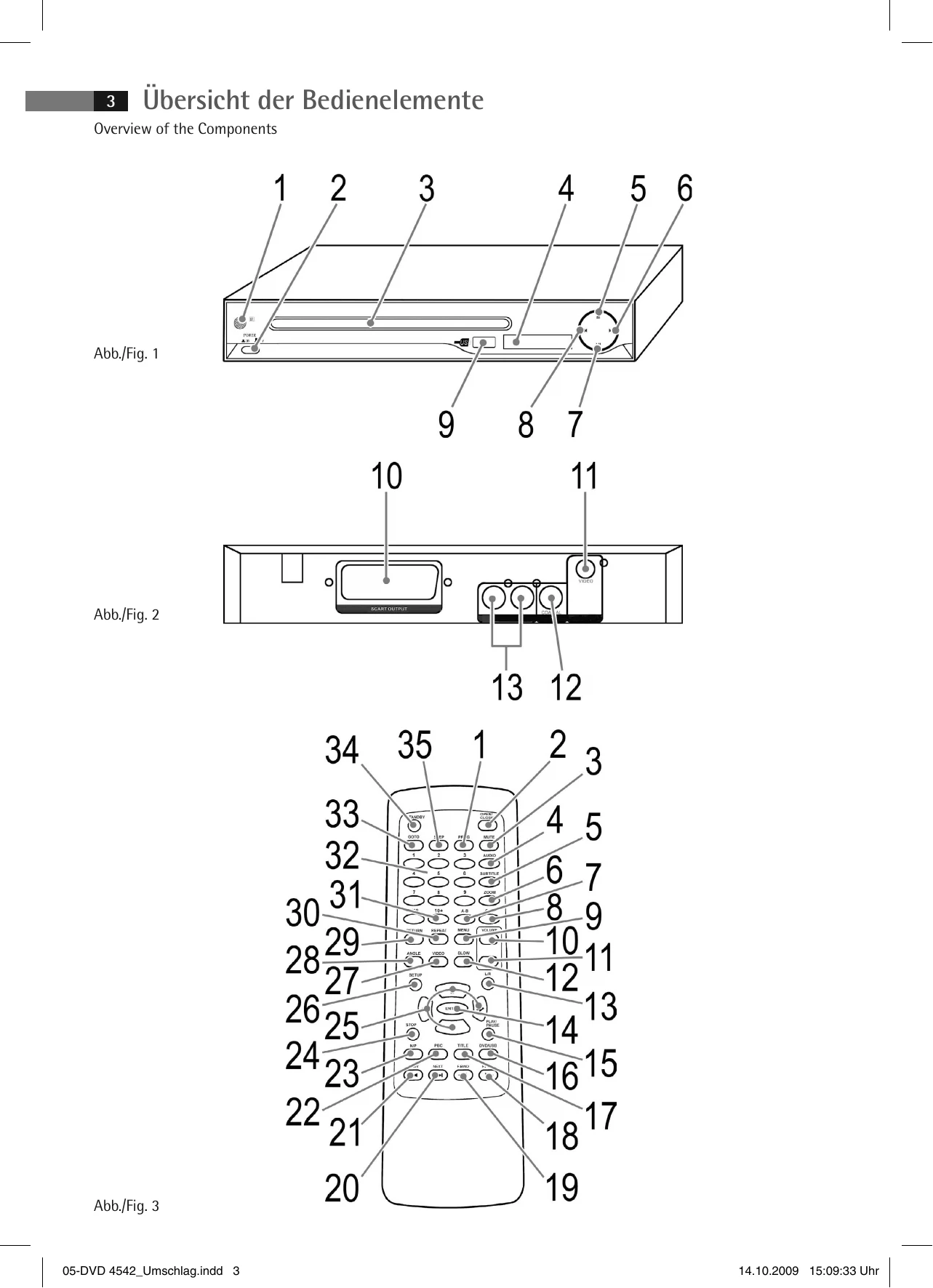
| No display | No power supply | ▲ WARNING: Before troubleshooting, switch the player off. Put the mains plug in correctly, if necessary, check the socket is working with another appliance. Switch the player on by the mains switch (Fig. 1/2). |
| No image displayed on screen | no power supply/ mains switch switched off | ▲ WARNING: Before troubleshooting, switch the player off. Check the correct fit of the Video cable "Connecting the Video cable". Make sure that the jacks are tightly in the sockets. |
| no DVD/CD inserted | Insert a CD/DVD. | |
| DVD/CD not compatible | Use only compatible media (see ⇨ "Technical data"). | |
| DVD/CD incorrectly placed in CD/DVD-tray | Turn the CD/DVD around. | |
| CD/DVD is dirty | Clean the CD/DVD around. | |
| CD/DVD is damaged | Use a different CD/DVD. | |
| Incorrect settings | Check the settings of your DVD-Player. | |
| The child lock system is activated | Deactivate the child lock. ⇨ "Parental control" | |
| The wrong TV mode has been selected. | Press the VIDEO button (Fig. 3/27) to change the TV mode. | |
| No response when pressing button | Power supply problem or static charging of appliance | Switch off the main switch and pull out the mains plug. Insert the mains plug into the socket and switch the player on again. |
| No sound | Audio cable not connected | ▲ WARNING: Before troubleshooting, switch the player off. Video plug for transmission of the Video signal, you must use and Audio cable in addition to the Video cable ⇨ "Connecting the Audio cable". |
| Amplifier switched off | If you use an amplifier for Audio output: check whether the amplifier is switched on. | |
| Incorrect settings | Check the settings of your DVD-Player. | |
| The remote control does not work | wrong direction | The remote control is not pointed towards the DVD-Player. |
| too far away | Make sure that the remote control is not further than 5 m away from the player. | |
| Batteries empty | Replace the batteries in the remote control ⇨ "Remote control battery installation". | |
| DVD cannot be played | DVD has not been finalized | Use a finalized DVD. |