Brand: AEG
Category: Home Appliances
Document Type: Manual
Language: EN
Brand: AEG
Category: Home Appliances
Document Type: Manual
Language: EN
Uploaded: April 20, 2026, 7:53 p.m.
Refer to safety chapters and contact service center for warranty information.
Control Panel: Use sensor fields to operate. Field 1: ON/OFF. Field 2: Lock/Child Safety. Field 3: STOP+GO. Field 4 & 8: Outer ring control. Field 5: Heat setting display. Field 6: Timer indicators. Field 7: Timer display. Field 9: Select cooking zone. Field 10: Time adjust. Field 11: Automatic Heat Up. Field 12: Control bar for heat setting.
Control Panel: Field 1: Display. Field 2: ON/OFF. Field 3: Oven selection (Top/Main). Field 4: Down key for menu/function. Field 5: Core temperature sensor. Field 6: Return/Clock function. Field 7: +/- for time/temperature.
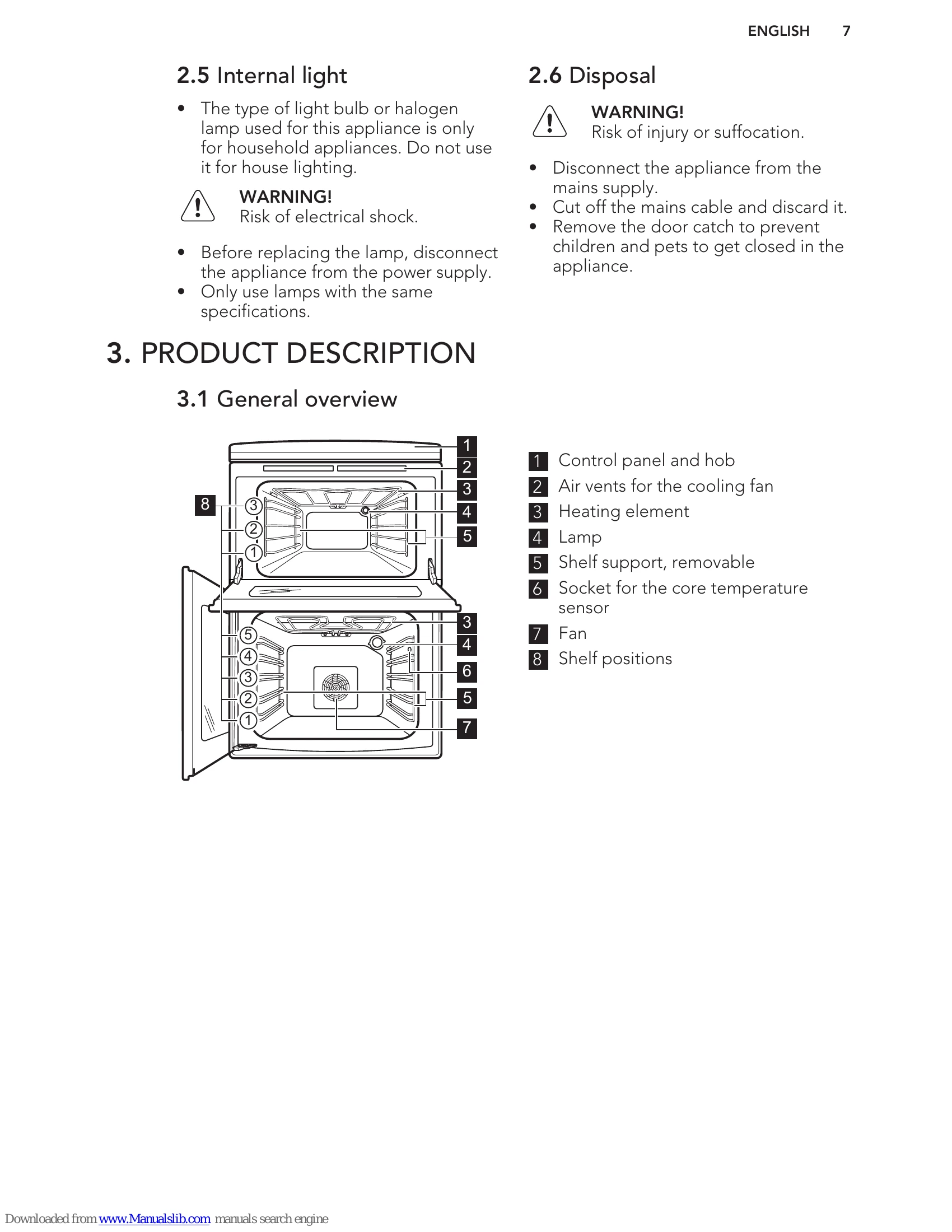
Oven Functions: Top oven includes Conventional Cooking, Browning, Bottom Heat, Dual Grill, Oven Lamp. Main oven includes Thermaflow®, Pie/Pizza, Low Temperature Cooking, Thermal Grilling, Dual Grill, Keep Warm, Drying, Defrost, Oven Lamp.
Clock Functions: Time of day, Minute Minder, Duration, End. These can be used to set cooking times and deactivation times.
| Problem | Possible cause | Remedy |
|---|---|---|
| You cannot activate the appliance. | The appliance is not connected to an electrical supply or it is connected incorrectly. | Check if the appliance is correctly connected to the electrical supply. |
| You cannot activate the appliance. | The fuse is released. | Make sure that the fuse is the cause of the malfunction. If the fuse releases again and again, contact a qualified electrician. |
| You cannot activate or operate the hob. | You touched 2 or more sensor fields at the same time. | Touch only one sensor field. |
| You cannot activate or operate the hob. | STOP+GO function operates. | Refer to "Hob - Daily use" chapter. |
| You cannot activate or operate the hob. | There is water or fat stains on the control panel. | Clean the control panel. |
| An acoustic signal sounds and the hob deactivates. | You put something on one or more sensor fields. | Remove the object from the sensor fields. |
| An acoustic signal sounds when the hob is deactivated. | You put something on the sensor field. | Remove the object from the sensor field. |
| The hob deactivates. | Automatic Switch Off operates. | Deactivate the hob and activate it again. |
| The oven does not heat up. | The oven is deactivated. | Activate the oven. |
| The oven does not heat up. | The clock is not set. | Set the clock. |
| The oven does not heat up. | The necessary settings are not set. | Make sure that the settings are correct. |
| The oven does not heat up. | The automatic switch-off is activated. | Refer to "Automatic switch-off". |
| The lamp does not operate. | The lamp is defective. | Replace the lamp. |
| The core temperature sensor does not operate. | The plug of the core temperature sensor is not correctly installed into the socket. | Put the plug of the core temperature sensor as far as possible into the socket. |
| It takes too long to cook the dishes or they cook too quickly. | The temperature is too low or too high. | Adjust the temperature if necessary. Follow the advice in the user manual. |
| Steam and condensation settle on the food and in the cavity of the oven. | You left the dish in the oven for too long. | Do not leave the dishes in the oven for longer than 15 - 20 minutes after the cooking process ends. |
| The display shows an error code that is not in this table. | There is an electrical fault. | Deactivate the appliance with the house fuse or the safety switch in the fuse box and activate it again. If the display shows the error code again, contact the Customer Care Department. |