Brand: Agfa
Category: Camera
Document Type:
Language: EN
Brand: Agfa
Category: Camera
Document Type:
Language: EN
Uploaded: Aug. 9, 2025, 11:36 p.m.
None
Getting Started:
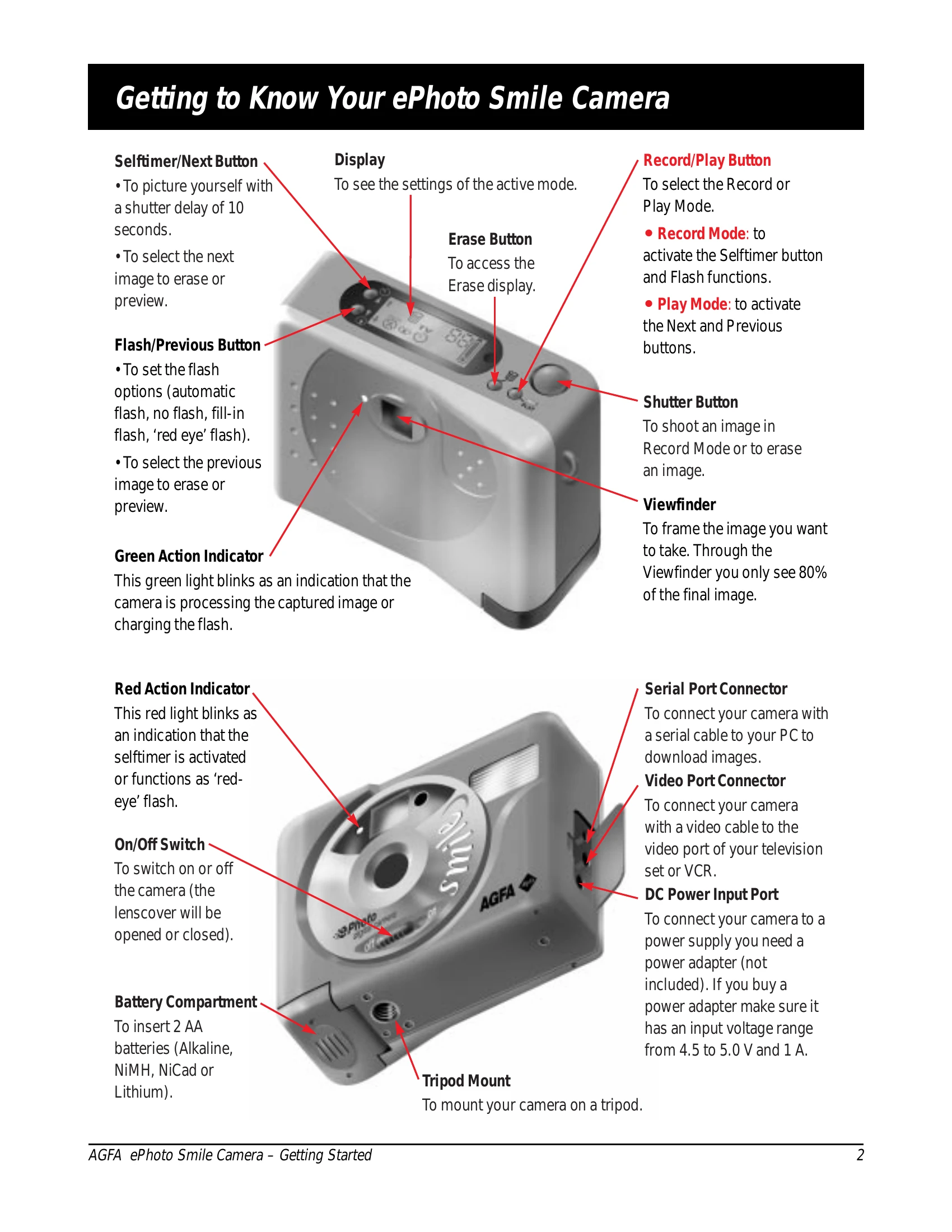
1. Turn on the camera using the On/Off switch. The lenscover will open.
2. To record an image, press the Shutter button and hold until you hear a beep. The action indicator blinks while the image is stored.
3. To change flash settings, use the Record/Play button to select Record Mode, then the Flash/Previous button to cycle through options: automatic flash, fill-in flash, red-eye flash, or no flash.
4. To use the selftimer, press the Selftimer button, then the Shutter button. A red indicator will blink for 10 seconds before the picture is taken.
5. To erase the last image, press the Erase button, then the Shutter button.
Play Mode:
1. Use the Record/Play button to select Play Mode.
2. Use the Next or Previous buttons to select images.
3. Connect to a TV using the video cable to view images.
4. To erase images in Play Mode, press the Erase button, select the image with Next/Previous, then press the Shutter button.