Manual for Realishot VLG-4K

Manual for Realishot VLG-4K

Brand: AGFA

Category: Camera

Document Type:

Language: EN
Uploaded: Aug. 9, 2025, 11:37 p.m.

Warranty Information

This product comes with a 1-year limited warranty.

\n

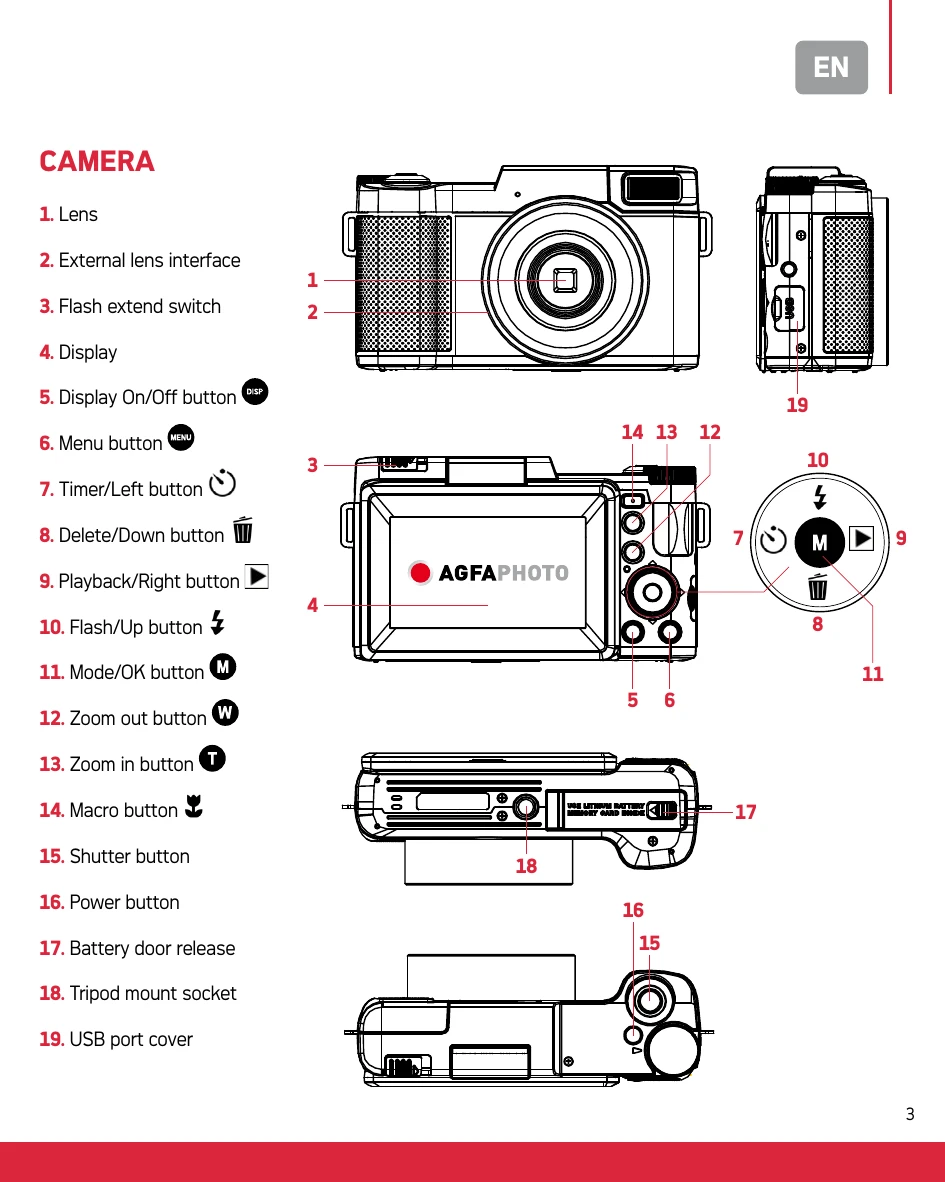
CAMERA

\n
    \n
  • Installing Battery & microSD Card: Open battery door, insert battery with contacts facing inward, and insert microSD card until it clicks. Format microSD card before first use.
  • \n
  • Powering On/Off: Press and hold the Power button for 3 seconds to turn the camera on or off.
  • \n
  • Taking Photos: In Photo Mode, use T/W buttons to zoom and press the Shutter button to capture.
  • \n
  • Recording Videos: In Photo Mode, press the Mode button to select Video Mode. Press the Shutter button to start/stop recording. Use T/W buttons to zoom during recording.
  • \n
  • Playback: Press the Playback button to enter Playback Mode. Press Shutter to play/pause videos.
  • \n
  • Deleting Files: In Playback Mode, press the Delete button, select Yes/No with Up/Down buttons, and confirm with Mode/OK.
  • \n
  • Shooting Modes: Press Mode/OK to select shooting modes like Slow Photography, Loop Recording, Time-lapse, and Auto-shoot.
  • \n
  • Menu Navigation: Press MENU to access settings, use directional buttons to navigate, and Mode/OK to confirm.
  • \n
  • Language & Date Format: Set language and date/time in the settings menu.
  • \n
  • Flash Settings: Use Up button in Photo Mode to cycle through Flash On, Flash Off, and Auto Flash. Flash does not work in video mode.
  • \n
  • Computer Connection: Connect via USB to select modes like Charging, Mass Storage, or PC Camera.
  • \n
  • External Microphone: Connect the provided microphone to the headset port and ensure it's powered on for audio recording.
  • \n
\n

TRIPOD

\n
    \n
  • Camera Installation: Align camera's screw hole with tripod's post, insert, and tighten the wheel.
  • \n
  • Angle Adjustment: Use Vertical Adjustment Button to tilt (approx. 135°) and Horizontal Adjustment Button to pan (360°).
  • \n
  • Extension Bracket: Insert bracket as shown for additional mounting options.
  • \n
  • Charging: Connect tripod to a wall charger via USB cable. Red indicator flashes while charging and stays solid when fully charged (3-4 hours).
  • \n
  • Power Output: Use tripod's USB output to charge other devices. Blue indicator shows charging status.
  • \n
  • Remote Control: Detachable remote for shooting photos/videos, zooming, and focusing within 10 meters. Replace battery (CR2032) when needed.
  • \n
\n

MICROPHONE

\n
    \n
  • Usage: Install AAA battery, mount to tripod, connect to camera via audio cable. Turn on and adjust sensitivity (0dB / +20dB).
  • \n
  • Care: Keep dry and clean. Turn off when not in use to conserve battery.
  • \n
\n

SPECIFICATIONS

\n
    \n
  • Camera: See details for various settings and functions.
  • \n
  • Tripod: Vertical/horizontal angles, battery, charging time, load-bearing, weight, remote distance.
  • \n
  • Microphone: Stereo channel, voltage, impedance, battery life, sound pressure level, frequency response, sensitivity.
  • \n
\n

SAFETY NOTES

\n
    \n
  • Do not insert foreign objects into card slot.
  • \n
  • Display may be unstable initially - normal.
  • \n
  • Color dispersion at image edges may occur - normal.
  • \n
  • microSD card and screen may get hot - normal.
  • \n
  • No autofocus; recommended distance is 2 meters.
  • \n
  • Store battery separately in a dry, dust-free environment below 30°C if not used for long periods. Ensure battery is fully discharged before storage and charge/discharge at least every 3 months.
  • \n
  • Clean lens/display with soft cloth.
  • \n
  • Protect from drops, shocks, vibrations, extreme humidity, direct sunlight, flames, or high temperatures.
  • \n
  • Do not expose to water or splashes.
  • \n
  • Do not repair yourself; only qualified personnel.
  • \n
  • For domestic use only, as described in manual.
  • \n
  • Tripod: Do not use in high temperatures or humidity. Avoid corrosive liquids, impact, extrusion, fire. Do not disassemble. Charge/discharge every 3 months if unused.
  • \n
  • Microphone: Protect from drops and strong impacts. Keep dry and clean. Turn off when not in use. Replace battery if low. Use windproof cover for best sound.
  • \n
\n

Troubleshooting and error codes

Problem Possible Cause Solution
Display unstable Camera just powered on This is normal, not a camera failure.
Color dispersion at image edge Optical performance of the lens This is normal, not a camera failure.
microSD card gets hot Extended use This is normal, not a camera failure.
Camera screen heats up Extended use This is normal, not a camera failure.
Camera won't turn on Low battery Charge the battery.
Camera shuts down automatically Low battery "Low Power" message indicates automatic shutdown to prevent data loss. Charge the battery.
PC Camera not found Driver issue or software conflict Try restarting the computer, or test with another application like Skype. Ensure correct USB connection.
Privacy Policy