Getting Started with Your Agfa Silette
Welcome to the Agfa Silette! This manual will guide you through its operation. Before loading film, familiarize yourself with the camera's functions by practicing the steps outlined below.
Loading Film
- Open the Camera Back: Push the locking lever (Fig. 4) to release and open the camera back.
- Insert Cassette: Pull out the rewinding knob, insert the new cassette, and push the knob back in until it grips the spool (Fig. 6).
- Advance Film: Insert the film's tapering end into the take-up spool and rotate the spool until the film is taut (Fig. 7).
- Close Camera Back: Ensure the film perforations engage correctly and press the back shut until it snaps (Fig. 8).
Setting the Exposure Counter
- Reset Counter: Depress the inner ring of the exposure counting device and rotate it counter-clockwise until 'A' aligns with the index mark (Fig. 9).
- Take Blank Exposures: Advance the film using the winding lever and press the release button twice to advance and cock the shutter (Fig. 10).
Taking Photos
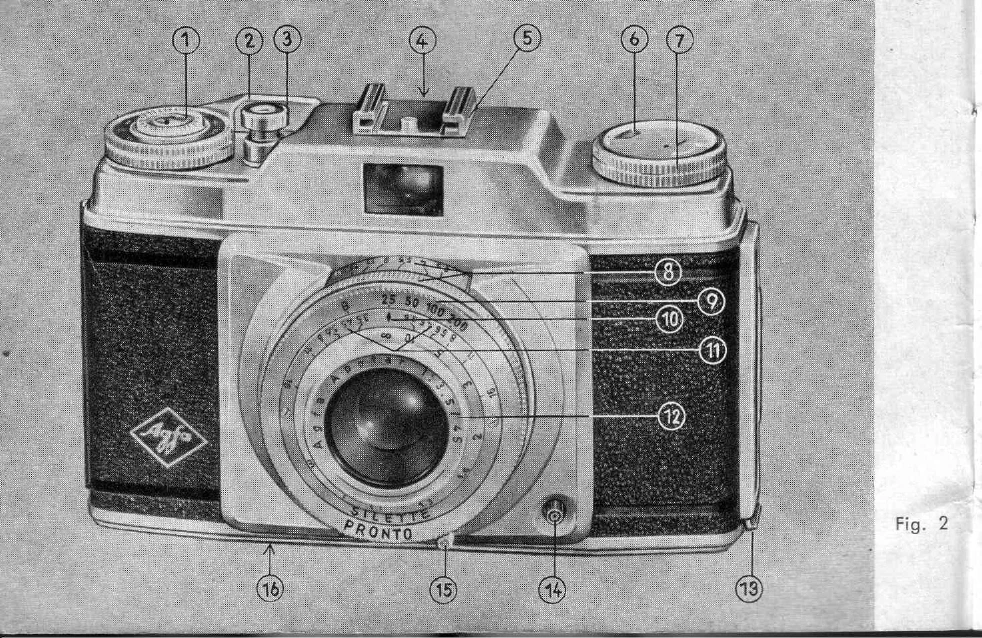
- Set Shutter Speed: Rotate the large milled ring (No. 9, Fig. 2) to set the desired exposure time against the index mark.
- Focus: Adjust the lens mount ring until the desired distance is aligned with the index mark.
- Compose and Shoot: Hold the camera steady, frame your shot using the viewfinder, and press the release button (Fig. 13).
Emptying the Camera
- Rewind Film: Depress the locking button and pull out the rewinding knob. Rotate the knob to rewind the film into the cassette (Fig. 14).
- Remove Cassette: Open the camera back and remove the exposed film.
For detailed information on flash, exposure, and depth-of-field, please refer to the relevant sections of this manual.