| My cellphone cannot switch on |
- Check battery contacts, remove and reinstall battery.
- Charge the battery for at least 20 minutes.
- Use User Data Format to reset the cellphone.
|
| My cellphone is frozen or has not responded |
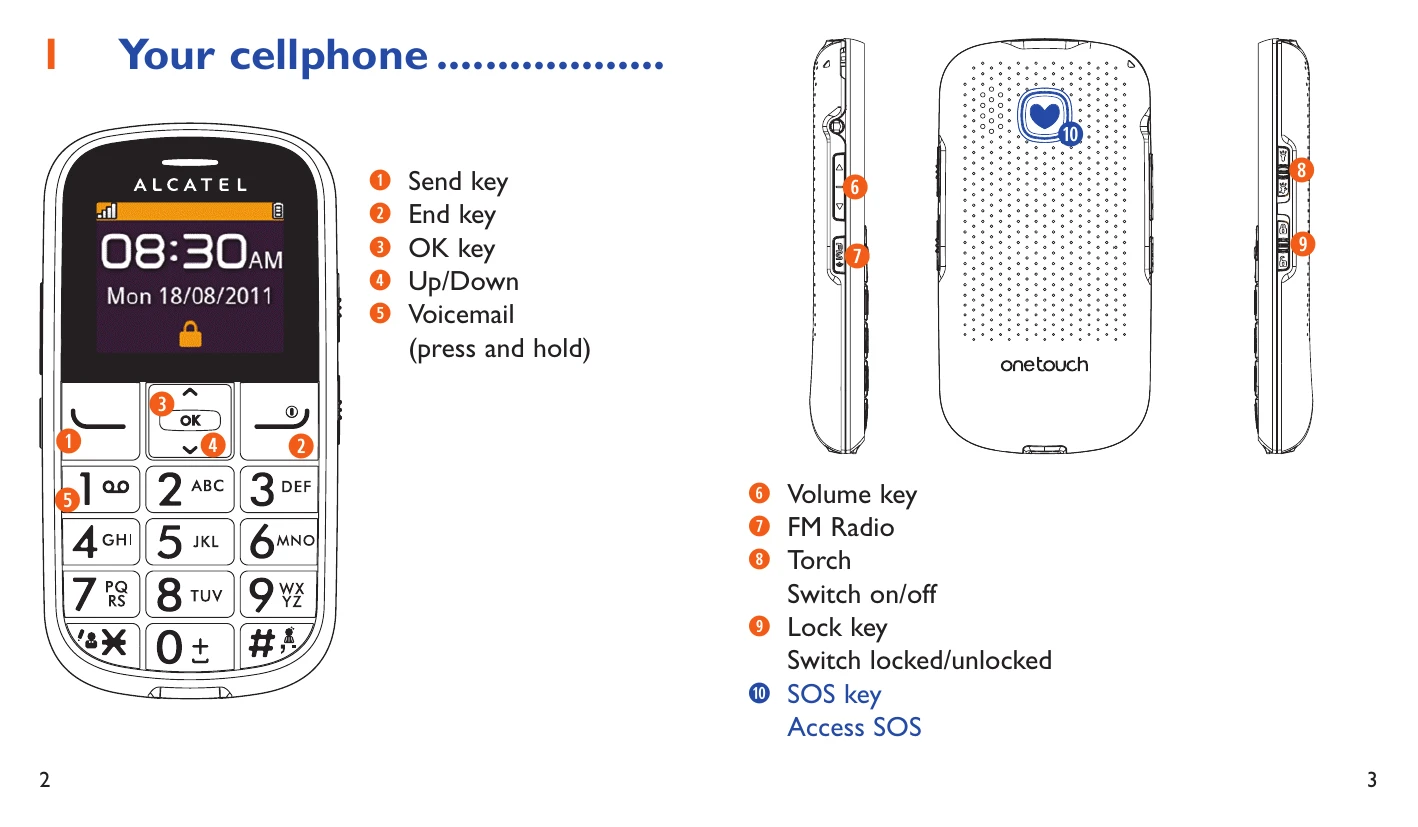
- Restart by pressing and holding the send key (1).
- Remove and re-insert the battery.
- Use User Data Format to reset the cellphone.
|
| My cellphone turns off by itself |
- Check if the keypad is locked.
- Check the battery charge level.
- Use User Data Format to reset the cellphone.
|
| My cellphone cannot charge properly |
- Use an Alcatel battery and charger.
- Ensure battery is inserted correctly and contacts are clean.
- Charge for at least 20 minutes if battery is fully discharged.
- Ensure charging conditions are normal (0°C to 40°C).
|
| My cellphone cannot connect to a network or “No service” is displayed |
- Try connecting in another location.
- Verify network coverage with your operator.
- Check SIM card validity with your operator.
- Manually select available networks.
- Try connecting later if the network is overloaded.
|
| Invalid SIM card |
- Ensure SIM card is correctly inserted.
- Check if the SIM card chip is damaged.
- Verify SIM card service availability with your operator.
|
| Unable to make outgoing calls |
- Dial a valid number and press the send key (1).
- Check country/area codes for international calls.
- Ensure the cellphone is connected to the network.
- Check subscription status with your operator.
- Ensure outgoing calls are not barred.
|
| Unable to receive incoming calls |
- Ensure cellphone is switched on and connected to the network.
- Check subscription status with your operator.
- Ensure calls are not forwarded.
- Ensure calls are not barred.
|
| The caller's name/number does not appear |
- Check subscription to this service with your operator.
- Your caller may have concealed their name or number.
|
| I cannot find my contacts |
- Check if SIM card is broken.
- Ensure SIM card is inserted properly.
- Import contacts from SIM card to cellphone.
|
| The sound quality of the calls is poor |
- Adjust volume during call using the Volume key.
- Check network strength.
- Ensure receiver/speaker is clean.
|
| I am unable to use features described in manual |
- Check with your operator to ensure subscription includes the service.
- Ensure the feature does not require specific Alcatel accessory.
|
| When I select a number from contacts, number cannot be dialed |
- Ensure the number is recorded correctly in your file.
- Enter the country prefix when calling a foreign country.
|
| I am unable to add a contact |
- Check if SIM card contacts are full; delete files or save to phone contacts.
|
| My callers are unable to leave messages on voicemail |
- Contact your network operator to check service availability.
|
| I cannot access my voicemail |
- Ensure voicemail number is correctly entered.
- Try later if the network is busy.
|
| The flickering icon is displayed on standby screen |
- Too many short messages on SIM card; delete or archive them.
- Ensure SIM card is not locked (obtain PUK code).
|
| How to make your battery last longer |
- Follow complete charge time (minimum 3 hours).
- Wait 20 minutes after partial charge for accurate indicator.
- Switch on backlight upon request.
|