Brand: ALCATEL
Category: Mobile Phone
Document Type:
Language: EN
Brand: ALCATEL
Category: Mobile Phone
Document Type:
Language: EN
Uploaded: Aug. 10, 2025, 12:02 a.m.
Your phone is warranted against defects for twelve months from the date of purchase.
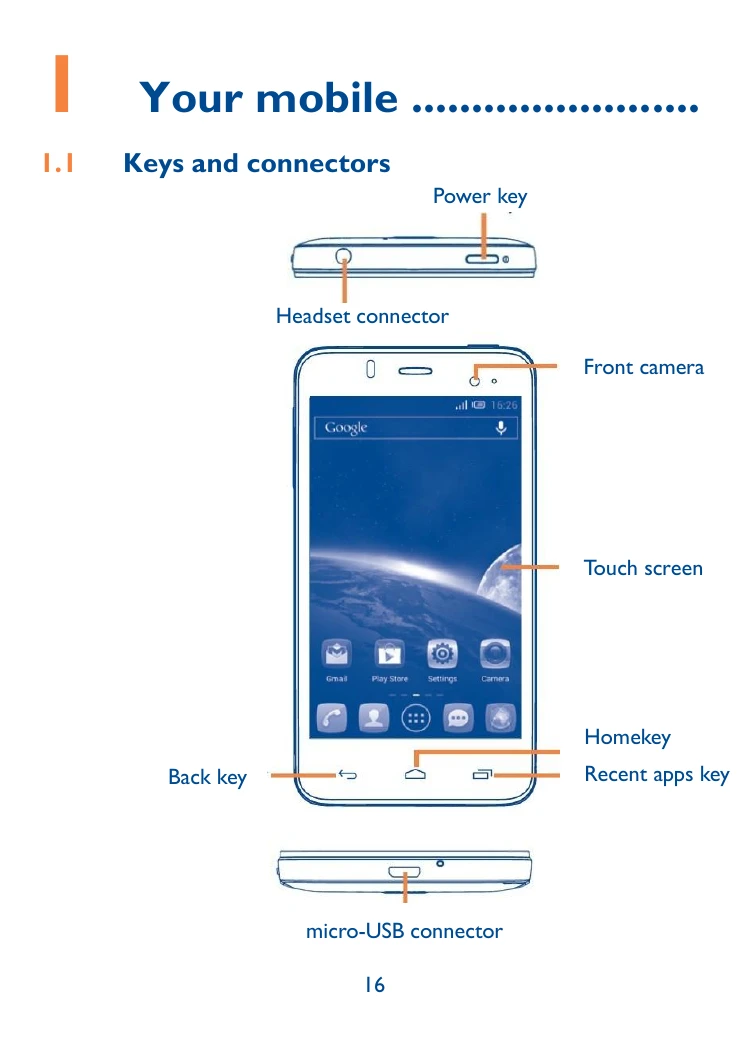
Power key: Press to lock/unlock screen. Press and hold for power menu (Ringer mode, Airplane mode, Power off, Quick start, Restart). Press and hold to power on. Press and hold with Volume down to capture screenshot. Press to end calls.
Volume keys: Adjust earpiece/headset volume during calls, media volume in Music/Video/Streaming, and ringtone volume. Mute incoming calls. Use as camera capture key.
Recent apps key: Shows recent apps. Swipe to remove. Touch and hold for Wallpaper, Manage applications, and Settings.
Home key: Returns to the Home screen.
Back key: Goes to the previous screen or closes menus/dialogs.
SIM card: Insert or remove SIM card after powering off and removing the battery. Dual SIM models may have 3G network support limitations.
microSD card: Insert into the slot with gold contacts facing down until locked. Push to unlock and remove.
Charging: Connect charger to phone and mains. Charging status bar may take time to appear if battery is fully discharged. Disconnect when fully charged. Conserve battery by switching off unused features (Wi-Fi, GPS, Bluetooth) and reducing backlight time.
Power on: Hold Power key until phone powers on. Unlock using Slide, PIN, Password, Face unlock, or Pattern. Setup wizard guides through language, keyboard, data connection, date/timezone, and Google Account setup.
Power off: Hold Power key on Home screen until options appear, then select Power off.
| Problem | Possible Solutions |
|---|---|
| My phone is frozen or cannot switch on | Check battery level, charge for at least 20 minutes. Reset phone using Power key and Volume up key. |
| My phone has not responded for several minutes | Restart phone by pressing and holding the Power key. |
| My phone turns off by itself | Check screen lock. Ensure Power key is not mis-contacted. Check battery charge level. |
| My phone cannot charge properly | Ensure battery is not fully discharged. Charge for at least 20 minutes. Charge under normal conditions (0°C to 40°C). Check voltage input abroad. |
| My phone cannot connect to a network or "No service” is displayed | Try connecting in another location. Verify network coverage. Check SIM card validity. Select network manually. Try later if the network is overloaded. |
| My phone cannot connect to the Internet | Check IMEI. Ensure SIM card has internet access. Check Internet settings. Ensure network coverage. Try later or in another location. |
| Invalid SIM card | Ensure SIM card is correctly inserted. Check for damage or scratches on the chip. Make sure SIM service is available. |
| Unable to make outgoing calls | Dial valid number. Check country/area codes for international calls. Ensure phone is connected to network. Check subscription status. Ensure outgoing calls are not barred. Ensure phone is not in flight mode. |
| Unable to receive incoming calls | Ensure phone is on and connected to network. Check subscription status. Ensure calls are not forwarded or barred. Ensure phone is not in flight mode. |
| The caller's name/number does not appear when a call is received | Check subscription with operator. Caller may have concealed their information. |
| I cannot find my contacts | Ensure SIM card is not broken. Ensure SIM card is inserted properly. Import contacts from SIM to phone. |
| The sound quality of the calls is poor | Adjust volume. Check network strength. Ensure receiver/speaker is clean. |
| I am unable to use the features described in the manual | Check subscription with operator. Ensure feature does not require specific accessory. |
| When I select a number from my contacts, the number cannot be dialed | Ensure number is correctly recorded. Select correct country prefix for foreign calls. |
| I am unable to add a contact in my contacts | Check if SIM card contacts are full; delete files or save to phone contacts. |
| My callers are unable to leave messages on my voicemail | Contact network operator for service availability. |
| I cannot access my voicemail | Ensure operator's voicemail number is correctly entered. Try later if network is busy. |
| I am unable to send and receive MMS | Check phone memory. Contact operator for service and MMS parameters. Verify server centre number/MMS profile. Server may be busy. |
| SIM card PIN locked | Contact network operator for PUK code. |
| I am unable to connect my phone to my computer | Install ALCATEL ONE TOUCH Android Manager. Check USB driver installation. Check Notification panel for Android Manager Agent activation. Check USB debugging setting. Ensure computer meets requirements. Use correct cable. |
| I am unable to download new files | Ensure sufficient phone memory. Check subscription status. |
| The phone cannot be detected by others via Bluetooth | Ensure Bluetooth is on and visible. Ensure phones are within detection range. |
| How to make your battery last longer | Follow complete charge time. Wait after charging for accurate indication. Switch on backlight on request. Extend email auto-check interval. Update news/weather manually or increase interval. Exit background apps. Deactivate unused Bluetooth, Wi-Fi, GPS. |