Manual for iPhone

Manual for iPhone

Brand: Apple

Category: Electronics

Document Type: Manual

Language: EN
Uploaded: Aug. 10, 2025, 12:11 a.m.

Warranty Information

For information about warranty service, visit www.apple.com/support/iphone/.

iPhone Basics

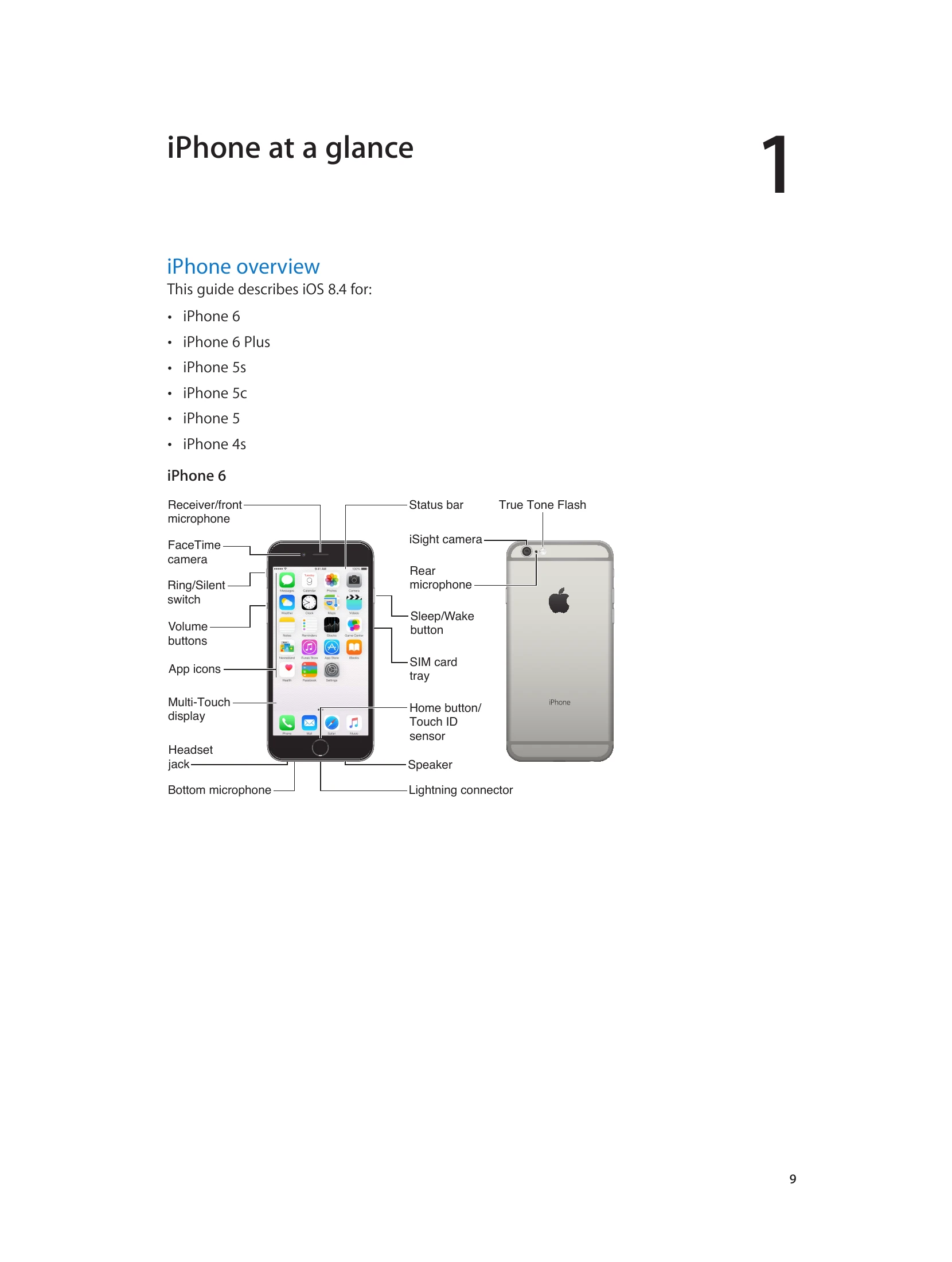
  • Power: Press the Sleep/Wake button to lock or unlock your iPhone. Press and hold to turn it on or off.
  • Home Button: Press to return to the Home screen. Double-click to see recent apps. Press and hold to activate Siri or Voice Control.
  • Volume: Use the volume buttons on the side to adjust sound levels.
  • Ring/Silent Switch: Flip to switch between ring and silent modes.
  • Connectivity: Connect to Wi-Fi via Settings. The iPhone also connects to cellular networks for internet access.
  • Setup: Follow the Setup Assistant when you first turn on your iPhone to connect to Wi-Fi, sign in with your Apple ID, and configure settings.
  • iCloud: Use iCloud to store and sync photos, videos, contacts, calendars, and more across your devices.
  • iTunes: Sync music, videos, and other content between your computer and iPhone using iTunes.
Privacy Policy