Brand: Apple
Category: Smartphone
Document Type: Manual
Language: EN
Brand: Apple
Category: Smartphone
Document Type: Manual
Language: EN
Uploaded: Aug. 10, 2025, 12:12 a.m.
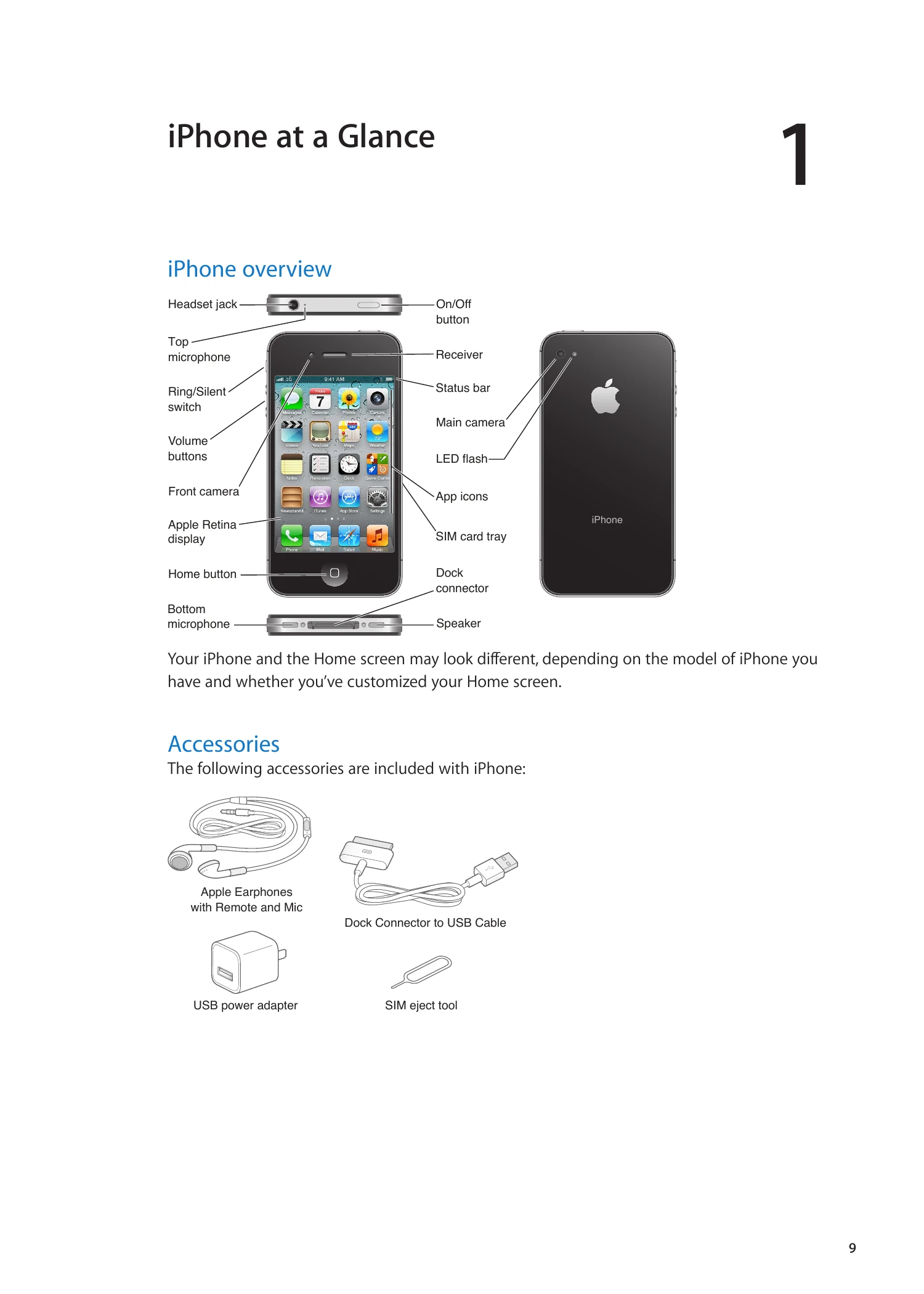
Covers the basics of using your iPhone, including overview of buttons, status icons, and included accessories.
Guide to setting up and activating your iPhone, connecting to the internet, and managing your device with iTunes and iCloud.
Explains how to use apps, customize the Home screen, type, print, search, use Voice Control, manage notifications, and utilize features like Twitter, AirPlay, and Bluetooth.
Details on making and receiving calls, using the keypad, voice dialing, managing calls, conference calls, Bluetooth for calls, and emergency calls.
Instructions on making and receiving FaceTime video calls and using visual voicemail.
Covers checking and reading email, working with multiple accounts, sending mail, using links and attachments, organizing mail, and mail account settings.
Guide to viewing webpages, using links and Reading List, Reader mode, entering text, filling forms, searching, bookmarks, history, and web clips.
Instructions on adding music and audio, playing songs, additional audio controls, podcasts, audiobooks, iTunes Match, Genius, playlists, and Home Sharing.
Details on sending and receiving messages, sending to groups, sending photos/videos, editing conversations, and searching messages.
Information on viewing calendars, adding events, responding to invitations, searching calendars, subscribing to calendars, and calendar accounts/settings.
Covers viewing photos and videos, slideshows, organizing albums, sharing, and printing photos.
Instructions on taking photos and videos, HDR photos, editing, trimming, uploading, and using Photo Stream.
Guide to browsing and searching for videos, playing videos, watching on TV, keeping track of liked videos, sharing, commenting, and rating.
Information on viewing stock quotes, adding/deleting stocks, and getting more information.
Details on finding locations, getting directions, sharing location info, and showing traffic conditions, satellite and street view.
How to get weather information, add/delete cities, and switch temperature display.
Instructions on typing, reading, editing, searching, and printing/emailing notes.
Using the clock for world clocks, setting alarms, using the stopwatch, and setting timers.
About reminders, setting reminders (date, location), managing lists, and searching reminders.
Discovering games, signing in, purchasing/downloading, playing, playing with friends, and Game Center settings.
About the iTunes Store, finding music/videos, purchasing, downloading podcasts, checking status, and account information.
Organizing magazines and newspapers, reading latest issues, and managing downloads.
Finding and downloading apps, deleting apps, and store settings.
About contacts, syncing, searching, adding/editing contacts, unified contacts, and account settings.
Playing videos, watching on TV, searching videos, and managing downloaded videos.
Using the calculator and scientific calculator.
About the compass, calibrating, finding direction, and using with Maps.
Recording, listening, managing, and sharing voice memos.
About Nike + iPod, activating, linking sensors, working out, calibrating, and sending data to Nikeplus.com.
About iBooks, using the iBookstore, syncing books/PDFs, reading books, and changing book appearance.
Details on Universal Access features like VoiceOver, Zoom, Large Text, White on Black, Speak Selection, Speak Auto-text, Mono Audio, Hearing Aid Mode, Custom Vibrations, LED Flash, AssistiveTouch, and TTY support.
Configuring iPhone settings like Airplane mode, Wi-Fi, Notifications, Location Services, VPN, Personal Hotspot, Carrier, Sounds, Brightness, Wallpaper, General, Auto-Lock, Passcode Lock, Restrictions, Date & Time, Keyboard, International, Accessibility, Profiles, and Reset options.
Adding/removing keyboards, switching, typing in Chinese, Japanese, and Vietnamese.
Includes iPhone support site, restarting/resetting, backing up, updating/restoring software, file sharing, safety, service, disposal, recycling, and operating temperature.