Brand: Apricot
Category: Computer
Document Type: Manual
Language: EN
Brand: Apricot
Category: Computer
Document Type: Manual
Language: EN
Uploaded: Nov. 21, 2025, 8:09 p.m.
Consult the supplier for warranty information, as it may not be supportable in another country.
This chapter provides a quick tour of your new Apricot LS Personal Computer. After unpacking and assembling the components, you should progress to the 'Getting Started' chapter.
This section provides important information for using your Apricot PC safely and efficiently.
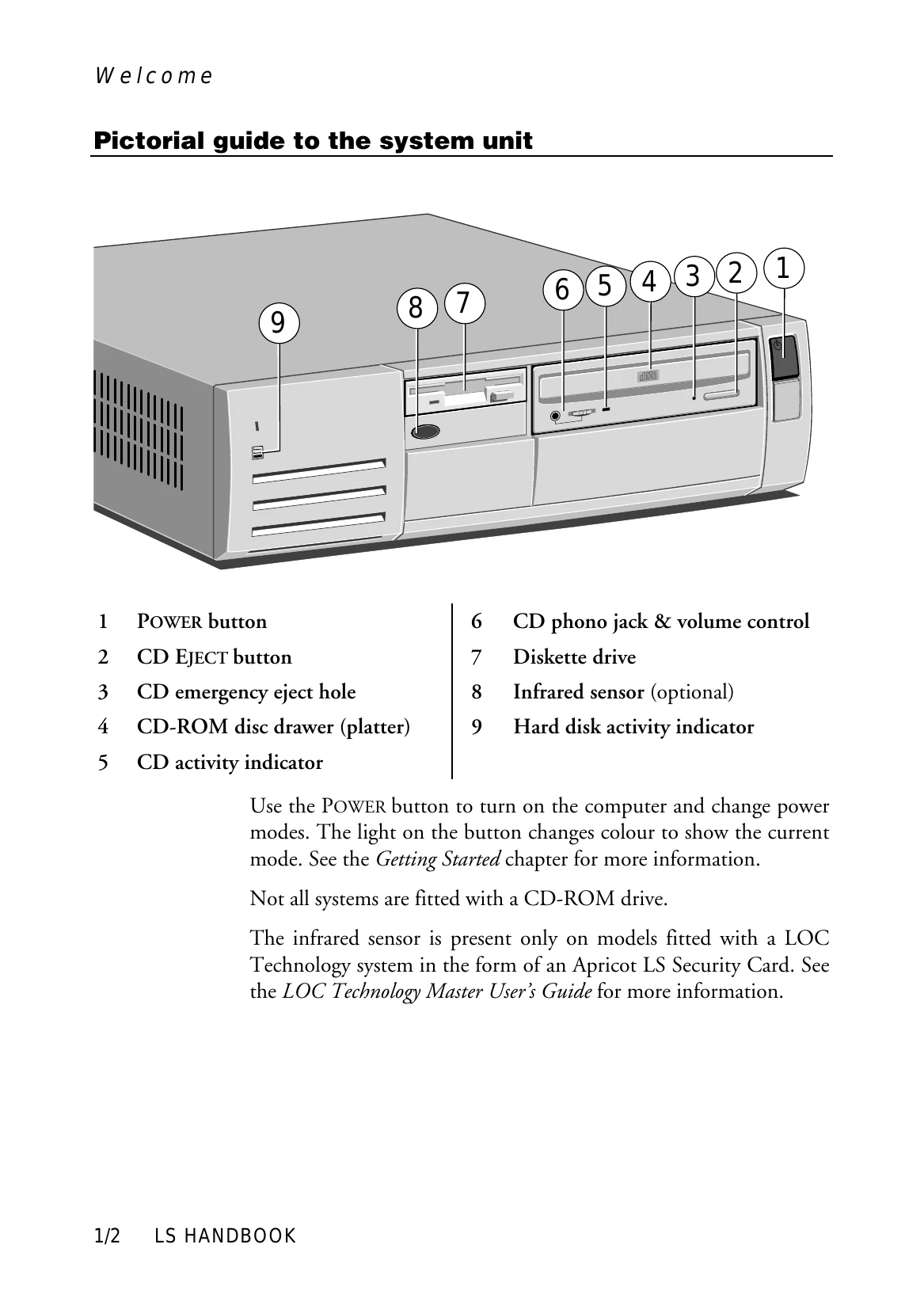
Press the POWER button to turn on the computer. The indicator light on the POWER button will turn from red to green. The monitor has its own power button or switch.
When the computer is turned on, it performs a POST to test hardware components and compare the configuration with its permanent memory. BIOS and POST messages may be displayed.
If POST is successful, the computer attempts to boot an operating system (typically Windows 95, Windows NT, or MS-DOS/Windows for Workgroups) from the hard disk.
The POWER button can be used to turn the computer on and change power modes: Off [red], Suspend [yellow], and On [green]. Suspend mode conserves electricity.
To shut down safely, wait for activity indicators to show 'not busy', turn off peripherals (except the monitor), and then use the operating system's shutdown option.
When using Windows 95 or NT for the first time, you will need to enter your name and agree to the license terms. The system will then configure itself.
| Code | Beeps | Test which failed |
|---|---|---|
| 16 | 1-2-2-3 | BIOS ROM checksum |
| 20 | 1-3-1-1 | DRAM refresh. |
| 22 | 1-3-1-3 | 8742 keyboard controller |
| 2C xxxx | 1-3-4-1 | RAM failure on address line xxxx. |
| 2E xxxx | 1-3-4-3 | RAM failure on data bits xxxx of low byte of memory bus. |
| 30 xxxx | 1-4-1-1 | RAM failure on data bits xxxx of high byte of memory bus. |
| 46 | 2-1-2-3 | Check ROM copyright notice |
| 58 | 2-2-3-1 | Test for unexpected interrupts |
| 98 | 1-2 | Video configuration failure, or option ROM checksum failure. (One long, two short beeps.) |