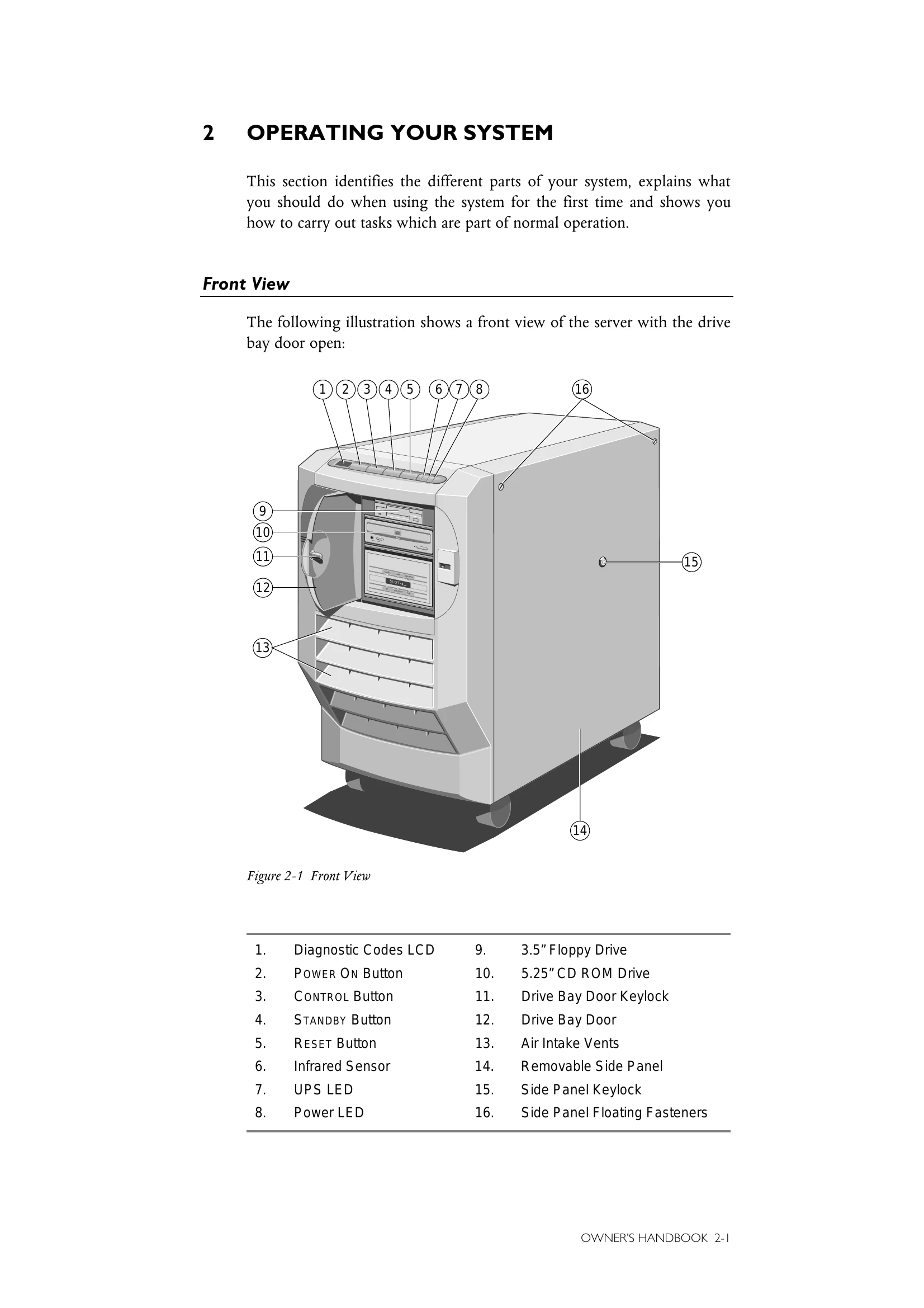
System Overview: The Apricot Shogun is a high-performance, reliable, and upgradeable network server designed for large and complex networks. It supports up to four 100-MHz Pentium processors, 768 MB of ECC memory, and 20 multi-gigabyte hard disk drives. It features a multi-processor bus, RAID technology for fault resilience, and a Systems Management Controller (SMC) for remote diagnostics.
Basic Operation:
- Powering On: Press the POWER ON button to switch from Standby to On mode. The Power LED will illuminate, and the system will boot. Diagnostic codes will appear on the LCD.
- Standby Mode: Hold the STANDBY button to initiate a shutdown sequence to Standby mode. The system is powered off, but the UPS battery pack remains charged.
- Front Panel Controls: The front panel includes buttons for power, standby, reset, and control, along with diagnostic LEDs and an LCD display.
- Rear Panel: The rear panel houses various ports for keyboard, mouse, serial, parallel, video, and network connections, as well as power input.