Quick Start Guide for zero6

Quick Start Guide for zero6

Brand: AQUOS

Category: Mobile Phone

Document Type: Quick Start Guide

Language: EN
Uploaded: Nov. 21, 2025, 6:27 p.m.

Manual Publish Date: 2021-10-01

Warranty Information

None

  • Turning the Power On: Hold down the Power key (⑨) for at least 3 seconds while the product is turned off.
  • Transferring Data: Connect your old smartphone to the product using the included Quick Switch Adapter (sample) to easily transfer data during initial setup.
  • Using the Product: Read the "Safety Precautions" for proper use. Check the "かんたん診断 (Quick check)" app if you suspect a malfunction.
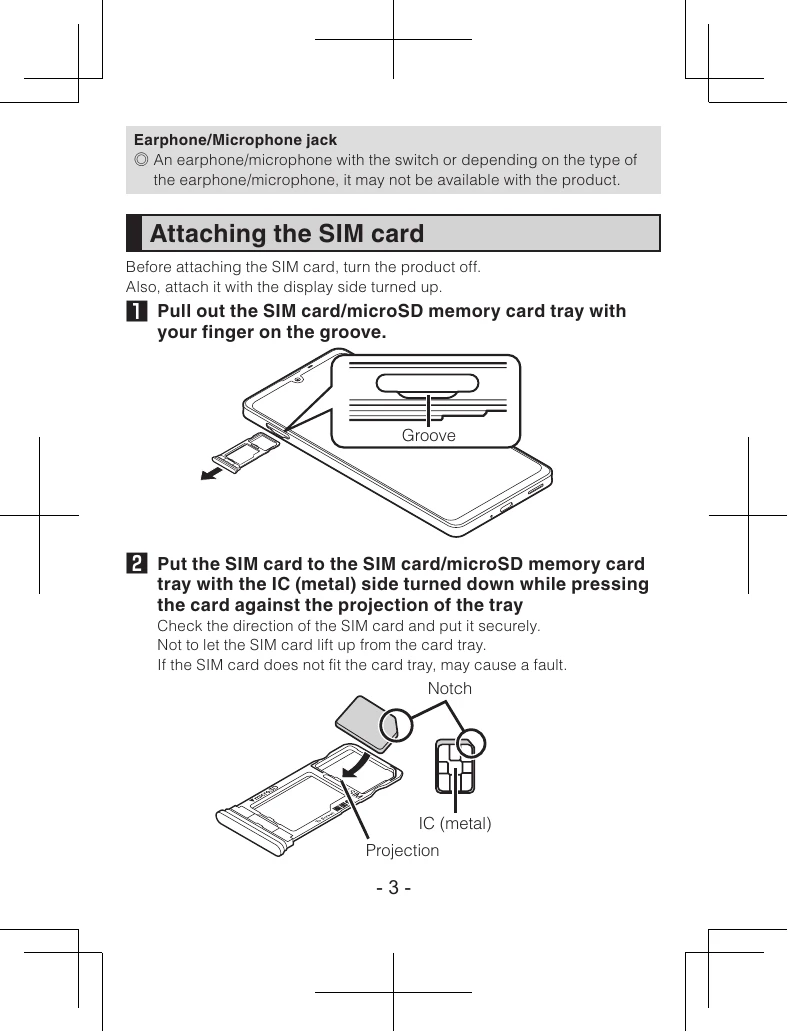
  • SIM Card Insertion: Turn the product off, pull out the SIM card tray, place the SIM card with the IC side down, and insert the tray back into the product.
  • Draining Water: If the product gets wet, wipe off excess water, shake the product to drain water from openings, and then leave it to air dry at room temperature for 2-3 hours.

Troubleshooting and error codes

Problem Possible Cause Solution

The product does not turn on.

  • The battery is depleted.
  • The product is frozen.
  • Charge the product.
  • Hold down the Power key (⑨) for at least 8 seconds to force a shutdown, then turn it on again.

The screen does not respond.

  • The product is frozen.
  • Hold down the Power key (⑨) for at least 8 seconds to force a shutdown, then turn it on again.

Cannot make or receive calls.

  • No network service.
  • Airplane mode is on.
  • SIM card is not inserted correctly.
  • Check network coverage.
  • Turn off Airplane mode.
  • Reinsert the SIM card correctly.

Cannot connect to Wi-Fi.

  • Wi-Fi is turned off.
  • Incorrect Wi-Fi password.
  • Router issue.
  • Turn on Wi-Fi.
  • Enter the correct password.
  • Restart the router.
Privacy Policy