Brand: ARCTIS
Category: Refrigeration Appliance
Document Type: Manual
Language: EN
Available Languages: EN , ES
Brand: ARCTIS
Category: Refrigeration Appliance
Document Type: Manual
Language: EN
Available Languages: EN , ES
Uploaded: April 20, 2026, 7:38 p.m.
Refer to the Service Centre for any faults, and provide appliance details. Unjustified service calls may incur charges.
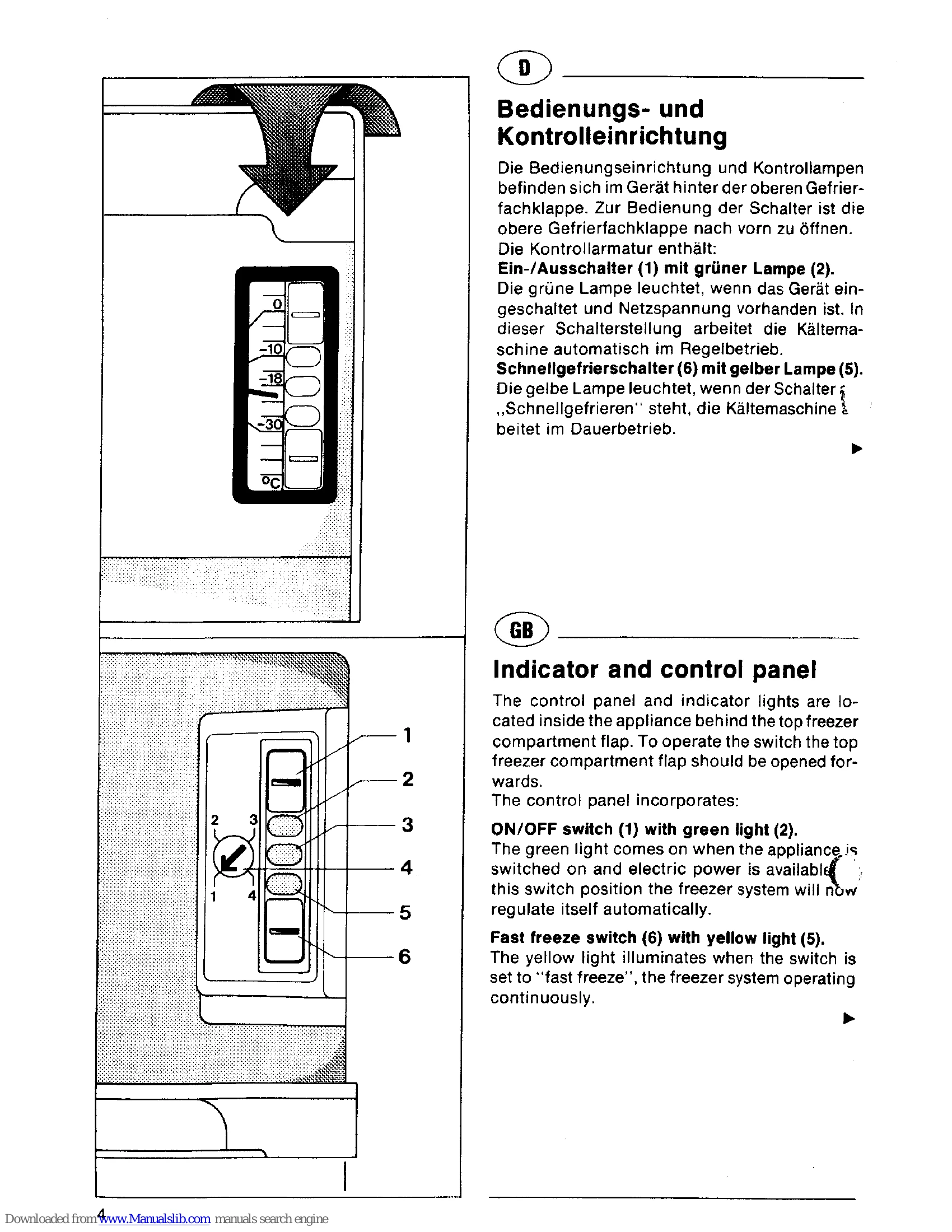
Start-up: Switch on the main switch (1); the green light (2) indicates power. For rapid freezing, activate the fast freeze switch (6) and yellow light (5) will illuminate. The freezer operates continuously. Only cancel fast freeze once the red light (3) is off and the temperature alarm is silenced.
Temperature Control: Use the temperature control (4) to set the desired storage temperature, ideally -18°C or colder. Position '1' is the warmest setting, and '4' is the coldest.
Freezing & Storage: Do not freeze excessive quantities at once. Ensure food is frozen quickly to the core. Do not exceed the appliance's stated freezing capacity. For best results, use the fast freeze function 24 hours before freezing. Place packaged food in the pre-freeze compartment (1) or freezer drawers (2). Drawer (3) is for storage.
Maintenance: Regularly remove frost using a plastic scraper. Do not use knives. Avoid storing hot food or handling frozen items with wet hands.
Troubleshooting: Check indicator lights and ensure the freezer system is operating correctly. Consult the manual for specific fault indications.
| Fault/Indicator | Possible Cause | Remedy |
| Green light (2) not on | No power supply | Check mains supply. |
| Green light (2) off, but freezer operating | Fast freeze switch not activated | Switch on fast freeze switch (6). |
| Yellow light (5) on | Green light (2) defective | Notify Service Centre. |
| Red light (3) on and/or audible alarm | Storage temperature not reached; excessive food added; door left open too long; freezer system fault. | Wait for temperature to stabilize; check door seal; if system fault, notify Service Centre. Fast freeze switch can cancel alarm temporarily. |
| No lights on | No power supply | Check mains supply. |