Brand: argus
Category: Digital Camera
Document Type:
Language: EN
Brand: argus
Category: Digital Camera
Document Type:
Language: EN
Uploaded: Aug. 9, 2025, 11:34 p.m.
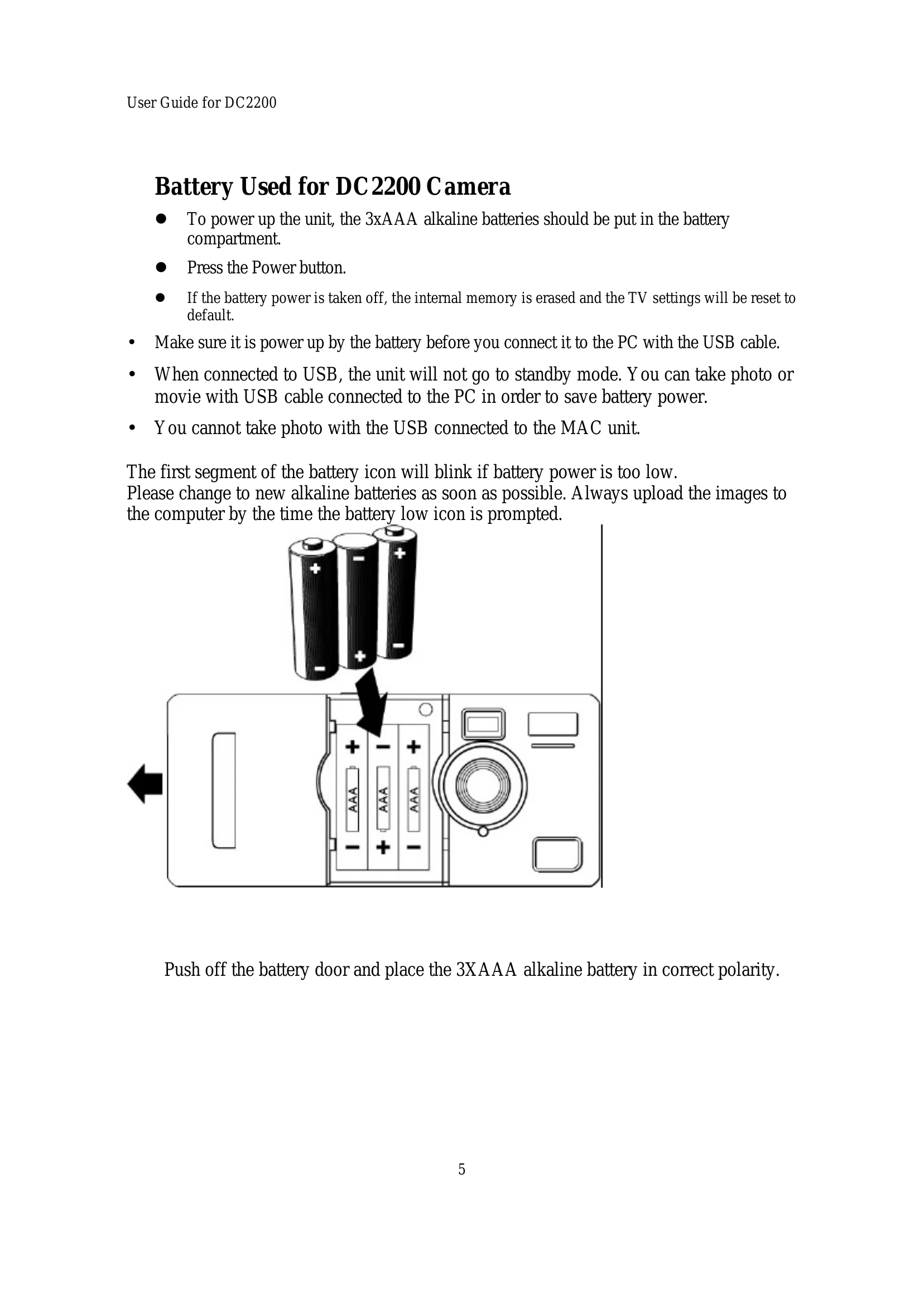
Powering On: Insert 3xAAA batteries and press the Power button.
Taking Photos: Press the Shutter button. The LCD will indicate the number of photos taken.
Changing Settings: Use the Mode button to cycle through options (like Picture Quality, TV System) and the Select/Timer button to confirm or change values.
Connecting to PC: Use the USB cable. Ensure the camera is powered on. Access files through 'My Computer' or 'My Camera' explorer.
Recording Movies: Select Movie mode, then press the Shutter button to start and stop recording.
| Problem | Solution |
|---|---|
| Battery power is too low | Change to new alkaline batteries. Upload images promptly. |
| LCD display is damaged | Do not touch the display. |
| Internal memory loss upon battery removal | Upload photos to PC before removing batteries. |
| Harmful interference to radio/TV reception | Re-orient/relocate antenna, increase separation, use different circuit, or consult dealer/technician. |