Brand: Argus
Category: Digital Camera
Document Type:
Language: EN
Brand: Argus
Category: Digital Camera
Document Type:
Language: EN
Uploaded: Aug. 9, 2025, 11:34 p.m.
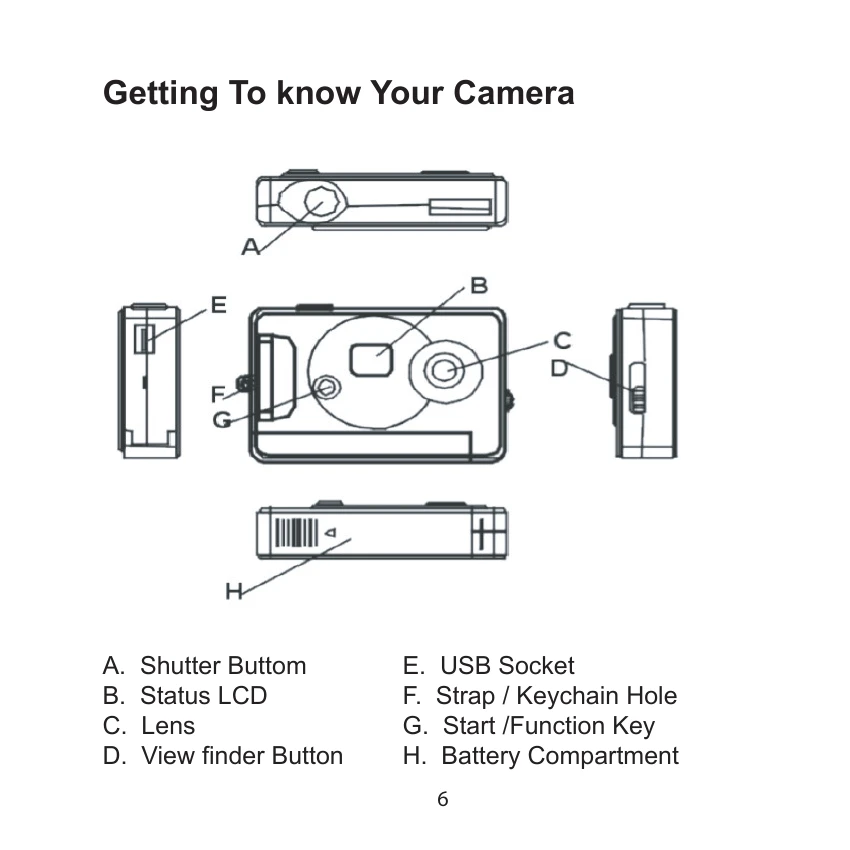
Taking Photos: Press the shutter button to take a photo. The number on the LCD screen decreases by one. If lighting is poor, the camera will beep twice.
Sleep Mode: The camera automatically enters sleep mode after 30 seconds of inactivity. You can manually activate sleep mode by pressing the MODE button until "oF" appears on the LCD, then press the shutter button.
Timer Mode: Press MODE until "St" is displayed. Press the shutter button to start a 10-second countdown with beeps before taking a photo.
AVI Mode: Press MODE until "d8" is displayed. Press and hold the shutter button to capture continuously at approximately 6 frames per second.
Deleting Images: Press MODE until "CA" is displayed, then press the shutter button to confirm deletion of all photos. Press MODE until "CL" is displayed, then press the shutter button to delete the last photo taken.
Changing Resolution: Toggle between "High Resolution Mode" and "Low Resolution Mode" by pressing MODE until "Lo" or "Hi" is shown, then press the shutter button to confirm.
Changing Frequency: Adjust anti-flicker frequency for fluorescent lighting by pressing MODE until "50" (50Hz) or "60" (60Hz) is displayed, then press the shutter button to confirm.
Changing Compression Mode: Switch between "Hd" and "Ld" compression by pressing MODE until the desired mode is displayed, then press the button to confirm.
| Problem | Solution |
| My camera does not turn on. | The battery is not properly installed. Remove and reinstall the batteries. Insufficient battery voltage. Do not use old batteries or batteries with mixed battery life. |
| Why would I get fuzzy, unclear photos? | There might be some movements of your body or hands when taking photos. Hold the camera steady with both hands. Use the first finger of your right hand to press the shutter. Stand on solid ground. Do not move or run when pressing the shutter. Even tiny movements will result in fuzzy photos. |
| The computer does not recognize camera. | The camera driver has to be installed before picture download. Ensure that camera is connected the rear USB port of the computer. Check in Device Manager, under Imaging Devices and see if the computer is recognizing the camera. |
| Why would I get horizontal, black stripes in photos taken abroad? | The camera is set to your country's AC mains frequency (e.g. 60Hz for US). If you take photos under an electric light source in another country with a different frequency (e.g. European's 50Hz), you will get horizontal, black stripes in those photos, due to incorrect mains frequency. There will be no problems when taking photos under sunlight. |