Brand: ASUS
Category: Mobile Phone
Document Type:
Language: EN
Brand: ASUS
Category: Mobile Phone
Document Type:
Language: EN
Uploaded: Aug. 10, 2025, 12:13 a.m.
This mobile phone meets EU requirements for exposure to radio waves and follows safety standards.
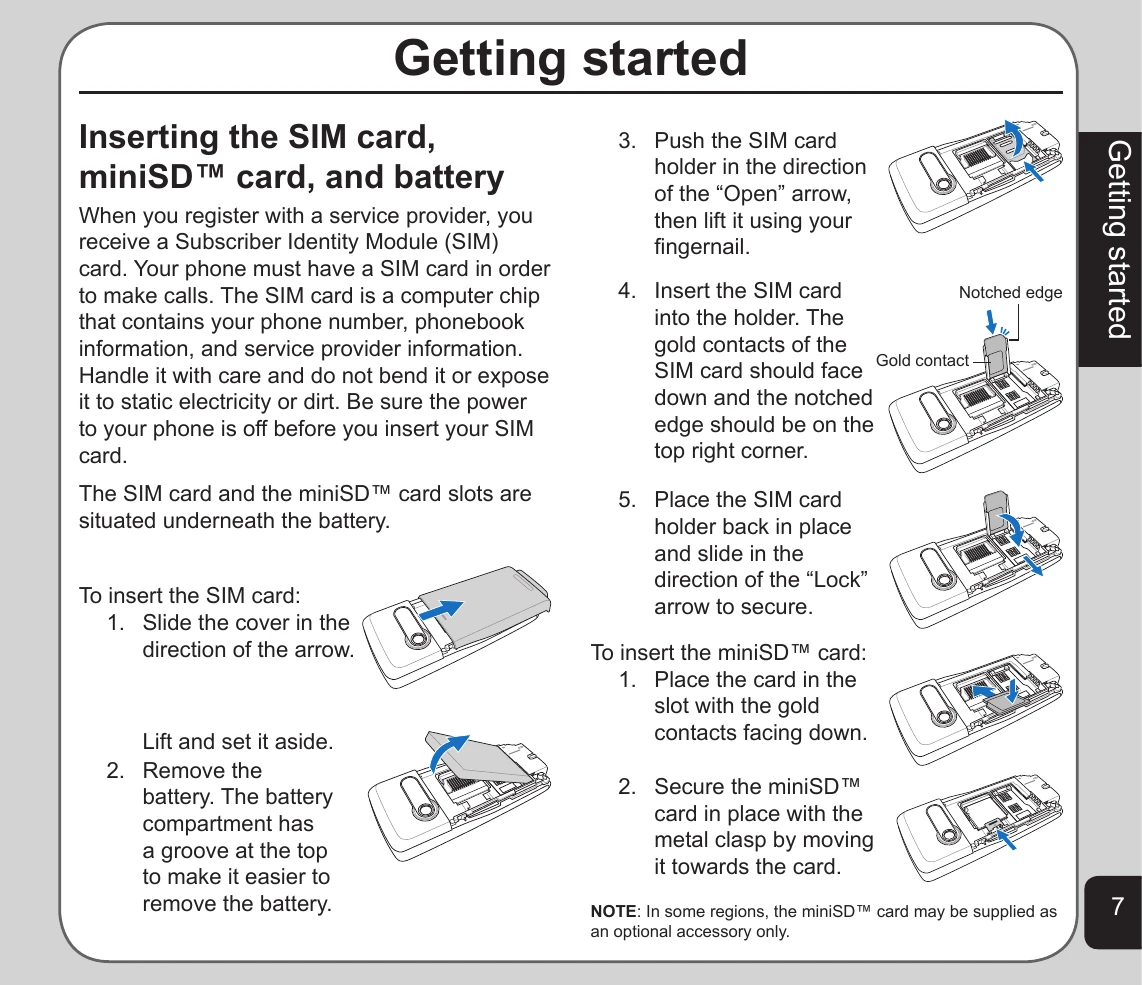
Inserting SIM Card, miniSD™ Card, and Battery: Ensure the phone is off before inserting cards. Follow the diagrams to insert the SIM and miniSD™ cards correctly, then replace the battery and back cover.
Charging the Battery: Connect the charger to a power outlet and then to the phone's charging socket.
Turning the Phone On/Off: Press and hold the Power/End key to turn the phone on or off.
Familiarize yourself with the keys: Power/End, Call, Left/Right Soft Keys, and Joystick keys for navigation and selection.
Understand the layout of the phone's buttons and ports.
Prevent accidental presses by locking the keypad using the Right Soft Key and # key. Unlock similarly.
Learn to interpret the icons displayed in standby mode, which indicate signal strength, battery status, alerts, and more.
Navigate menus using the joystick and Enter key. Options can be selected by highlighting and pressing Enter, or by using number shortcuts.
Learn different text entry methods: ABC input (one letter at a time), Smart ABC (predictive text), Numeric input, and Symbols input.
Use the supplied USB cable to connect your phone to a computer. Install Handset Manager software for enhanced functionality.