1.1 Welcome!
Thank you for purchasing the ASUS® Portable USB Monitor!
The latest ASUS Portable USB Monitor provides great portability and simplicity to
your daily life, enhancing both of your viewing experience and style.
1.2 Package contents
Check your package for the following items:
- Portable USB monitor
- Quick start guide
- Warranty card
- USB Type-C to Type-C cable
- USB Type-C to Type-A cable
- Leather case
If any of the above items is damaged or missing, contact your retailer
immediately.
1.3 Monitor introduction
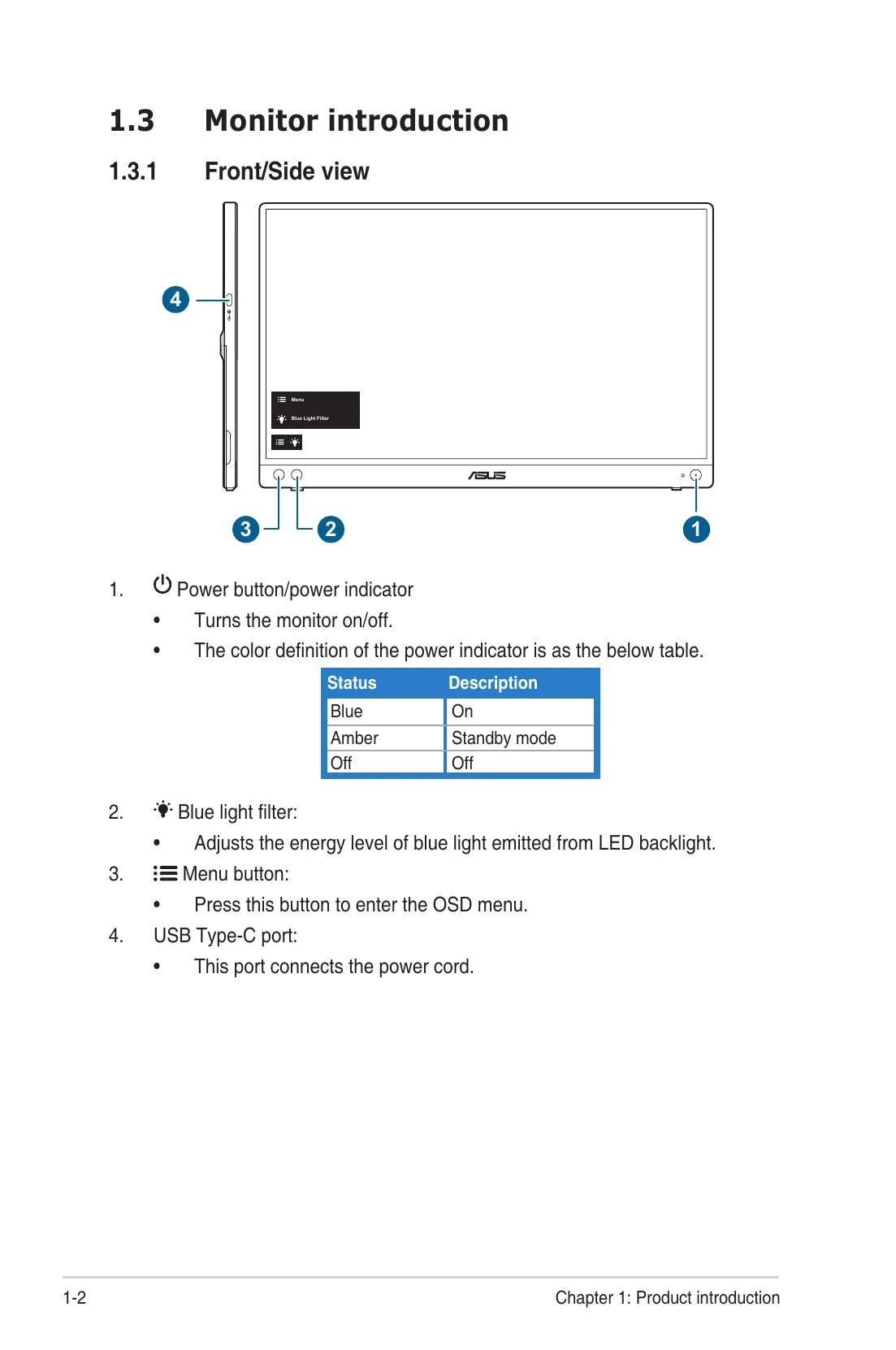
1.3.1 Front/Side view
- Power button/power indicator
Turns the monitor on/off.
The color definition of the power indicator is as the below table.
| Status | Description |
| Blue | On |
| Amber | Standby mode |
| Off | Off |
- Blue light filter:
Adjusts the energy level of blue light emitted from LED backlight.
- Menu button:
Press this button to enter the OSD menu.
- USB Type-C port:
This port connects the power cord.
2.1 Monitor standing positions
You can stand up the monitor in the following positions.
2.2 Adjusting the monitor
- For optimal viewing, we recommend that you look at the full face of the
monitor, then adjust the monitor to the angle that is most comfortable for you.
- Hold the stand to prevent the monitor from falling when you change its angle.
- You can adjust the monitor's angle at 0° ~ 70°.
(Tilt)
2.3 Connect the USB monitor with system
2.4 Turning on the monitor
Press the power button . See page 1-2 for the location of the power button. The
power indicator lights up in blue to show that the monitor is ON.
2.5 Announcements
As this product includes magnet in the structure, there could be potential risk to
cause the damage of computer hard disc and objects that are sensitive to magnet.
Please ensure not to stack the product with the computer when computer is in use
(power on or standby mode) otherwise the hard drive could possibly be influenced
by the result of permanent data missing or the computer display could be switched
off due to computer auto protection mechanism. When placing this product
together with the computer in a bag, you must have the computer power off to
avoid possible hard drive damage.