Manual for P1 Portable LED Projector

Manual for P1 Portable LED Projector

Brand: ASUS

Category: Other

Document Type: Manual

Language: EN
Uploaded: Nov. 21, 2025, 8:18 p.m.

Manual Publish Date: 2011-10-01

Warranty Information

Product warranty or service will not be extended if the product is repaired, modified or altered without authorization, or if the serial number is defaced or missing.

Powering on the projector:

  1. Connect the power using the power adapter and peripheral signal cable(s) connections.
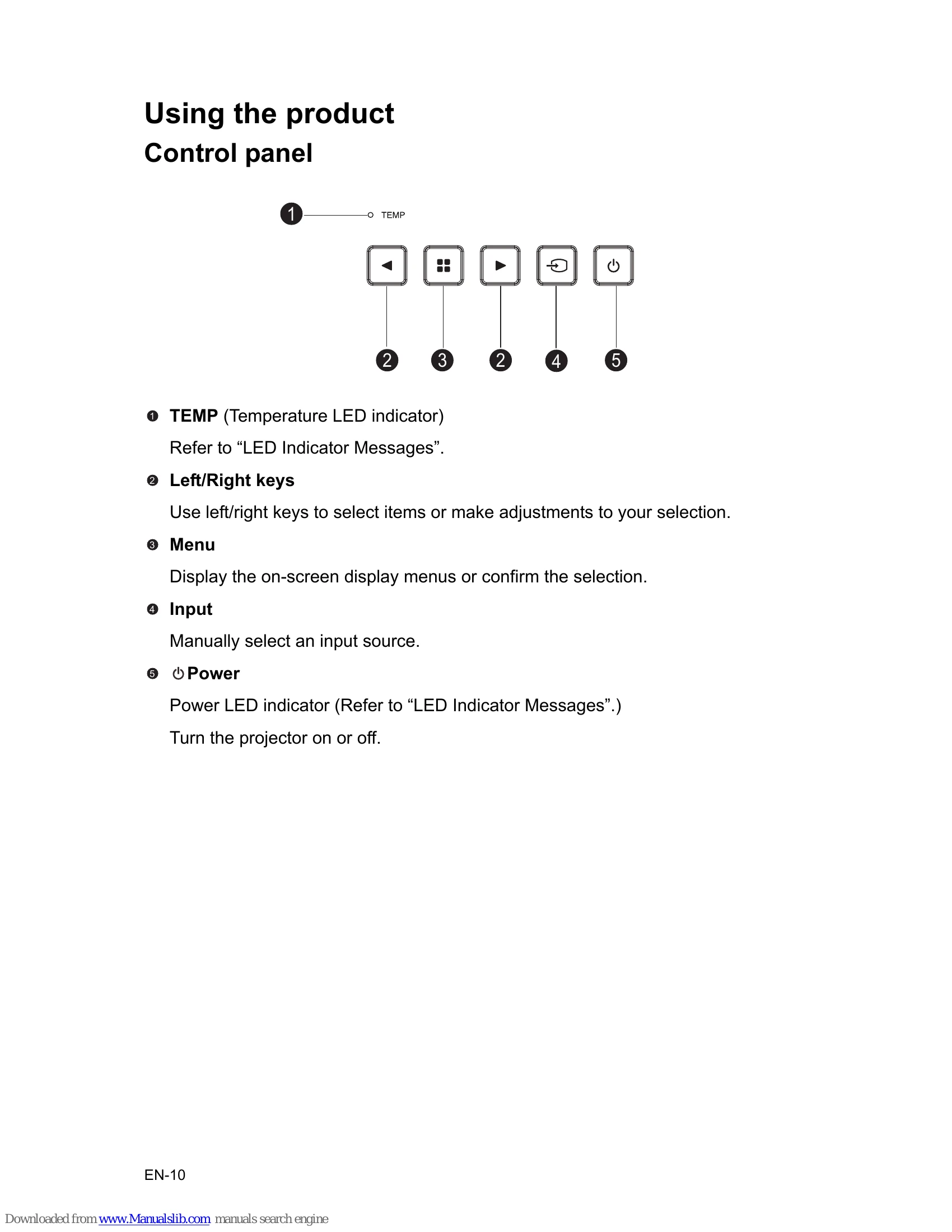
  2. Press the power button to turn on the projector. Allow several seconds to warm up.
  3. Turn on your source (computer, notebook, DVD, etc.). The projector automatically detects your source. If multiple sources are connected, press Input to select the desired signal.
  4. If activated for the first time, select OSD language.

Powering off the projector:

  1. Press the power button to turn off the projector.
  2. Disconnect the power cord from the wall socket if the projector will not be used for an extended period.

Troubleshooting and error codes

Status/Problem LED indicators
Power LED (White) Temp LED (Red)
Standby Solid Off
Normal Solid Off
Temperature error Solid Solid
Fan error Solid Flashing
Privacy Policy