Manual for ZenBeam Latte

Manual for ZenBeam Latte

Brand: ASUS

Category: Other

Document Type: Manual

Language: EN
Uploaded: April 20, 2026, 8:05 p.m.

Manual Publish Date: 2021-03-01

Warranty Information

This manual contains copyright and warranty information.

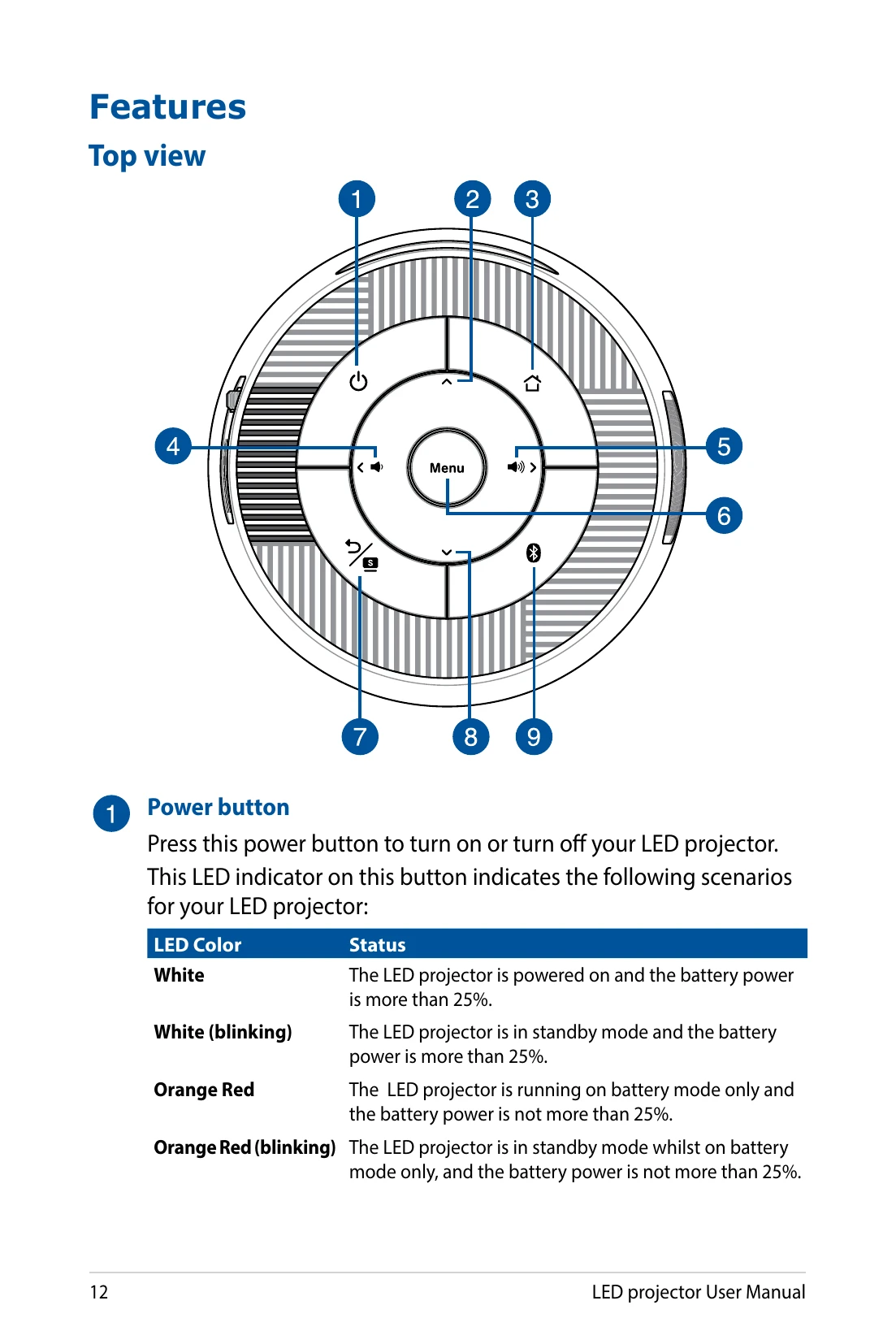
  • Power Button (1): Turns the LED projector on/off. The LED indicator shows power status and battery levels.
  • Navigation Buttons (2, 4, 5, 8): Used to navigate menus and adjust volume.
  • Home Button (3): Returns to the home page or switches to projector mode.
  • Menu/OK Button (6): Opens the main menu or confirms selections.
  • Back/Splendid Button (7): Returns to the previous screen or toggles Splendid mode.
  • Bluetooth Button (9): Toggles between Bluetooth speaker and projector modes.
  • Lens (Front View 1): Projects images. Do not touch with hands or sharp objects.
  • Focus Dial (Right View 1): Adjusts the projector lens focus.
  • Air Vents (Left View 1): Expel hot air; ensure they are not obstructed.
  • Remote Sensor (Rear View 1): Detects remote control signals.
  • Manual Reset Hole (Rear View 2): Resets the projector if unresponsive.
  • Audio Output Jack (Rear View 3): Connects to external speakers or headphones.
  • HDMI Port (Rear View 4): For HDMI connectors, HDCP compliant.
  • USB 2.0 Port (Rear View 5): Compatible with USB devices.
  • Power Input Port (Rear View 6): Connects the power adapter.
  • Battery Charge Indicator (Rear View 7): Shows battery charging status.
  • Built-in Stand (Bottom View 1): Adjusts projector height.
  • Tripod Socket (Bottom View 2): For connecting to a tripod.
Privacy Policy