Brand: ASUS
Category: Smartphone
Document Type: Quick Start Guide
Language: EN
Brand: ASUS
Category: Smartphone
Document Type: Quick Start Guide
Language: EN
Uploaded: Aug. 10, 2025, 12:13 a.m.
Refer to the MyPal A730W handbook for detailed warranty information.
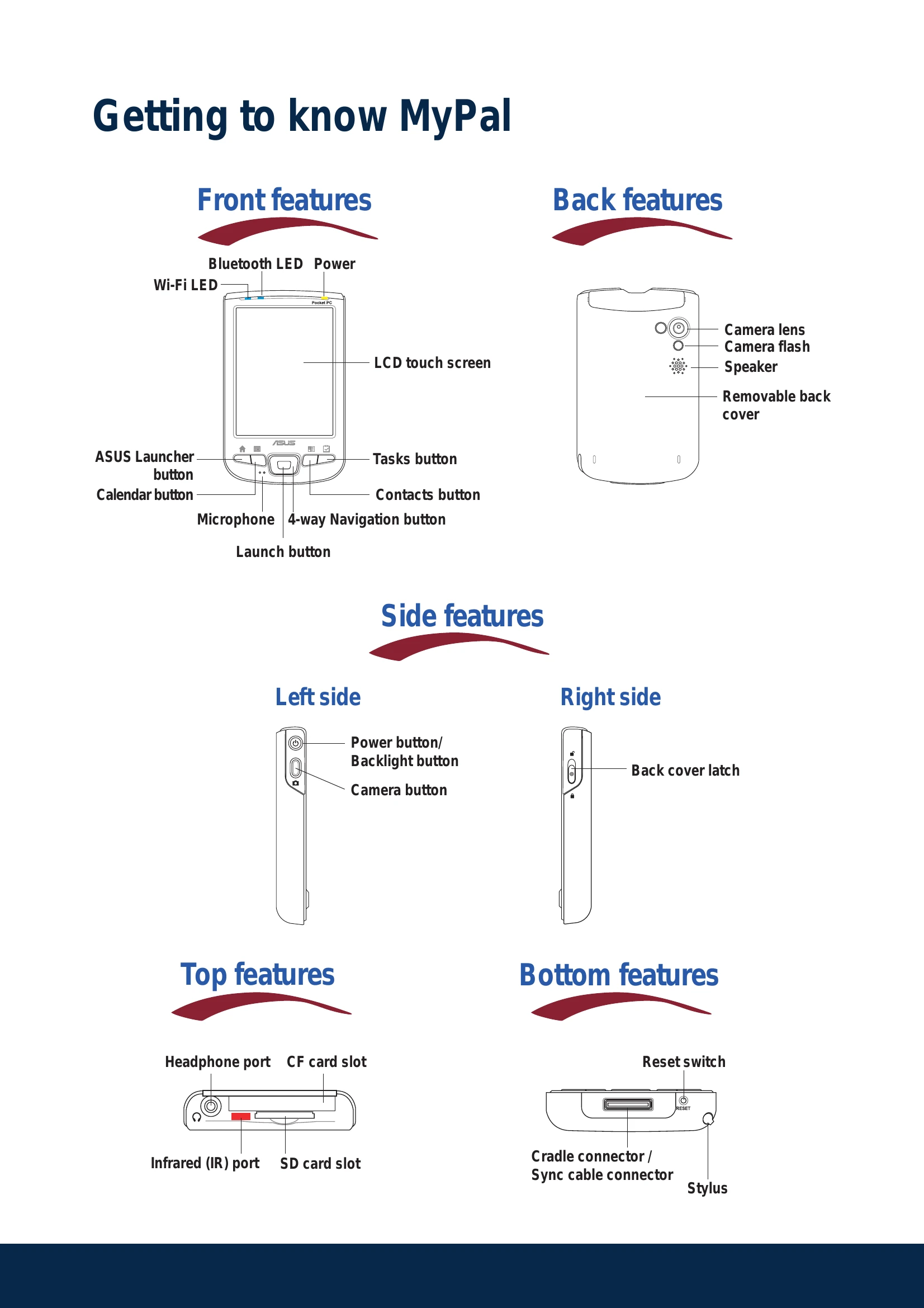
Familiarize yourself with the front, back, side, top, and bottom features of your MyPal Pocket PC. This includes the LCD touch screen, buttons like ASUS Launcher, Calendar, Tasks, and Contacts, as well as ports for headphones, memory cards, and syncing.
Connect the power cable and sync cable adapter to power up your device. You can set it up with or without the cradle. The charging status LED indicates the charging progress.
Use the provided Companion CD to install Microsoft ActiveSync on your desktop computer. Connect your MyPal device to your computer using the USB sync cable, either directly or via the cradle, to automatically synchronize your data. You can also check synchronization status on both the device and your computer.
Explore the bundled Pocket PC 2003 Second Edition software, including Pocket Outlook, Pocket Word, Pocket Excel, MSN Messenger, Windows Media Player, and Internet Explorer. Learn to navigate the Today screen for daily summaries and access programs, settings, and help from the Start menu.
Enter information using typing, writing, drawing, or recording methods. Access these functions through the on-screen keyboard or specific buttons.
Refer to the MyPal A730W handbook and on-device help for more detailed operation and troubleshooting. Visit the ASUS website for support, software downloads, and product information.
| Header 1 | Header 2 | Header 3 | Header 4 |
|---|---|---|---|
| Data 1-1 | Data 1-2 | Data 1-3 | Data 1-4 |
| Data 2-1 | Data 2-2 | Data 2-3 | Data 2-4 |
| Data 3-1 | Data 3-2 | Data 3-3 | Data 3-4 |