Manual for P526

Manual for P526

Brand: ASUS

Category: Smartphone

Document Type: Manual

Language: EN
Uploaded: Aug. 10, 2025, 12:13 a.m.

Manual Publish Date: 2007-05-01

Warranty Information

Product warranty or service will not be extended if repaired, modified or altered without authorization, or if the serial number is defaced or missing.

  • Getting Started:
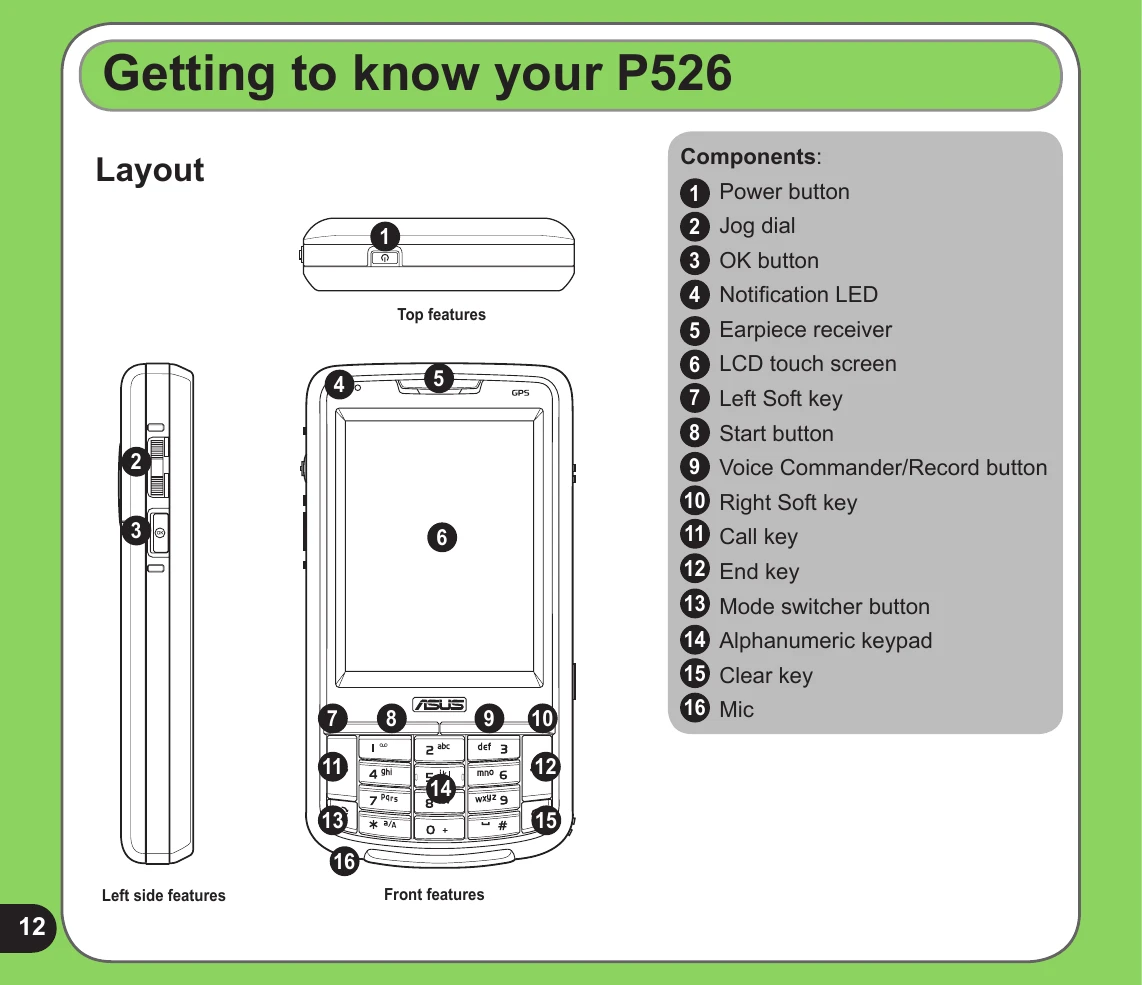
  • Familiarize yourself with the device layout and components.
  • Install the SIM card and battery.
  • Charge the battery fully before first use.
  • Power on the device and follow on-screen instructions for initial setup (screen alignment, time zone).
  • Learn to use the stylus for navigation and interaction.
  • Calibrate the screen for accurate touch input.
  • Understand how to lock and unlock the device keys and buttons.
  • Navigate the Today screen, which displays key information and status indicators.

  • Entering Data:
  • Utilize various input methods like the Block Recognizer, On-screen keyboard, Letter Recognizer, T9 input, and Transcriber.
  • Write and draw directly on the screen.
  • Record voice memos.

  • Phone Features:
  • Make and receive calls using the phone pad or alphanumeric keypad.
  • Adjust volume and use speed dial or voice commands.

  • Wireless Features:
  • Manage wireless connections using the Wireless Manager.
  • Explore Bluetooth® features and activate Bluetooth.
  • Set up and manage GPRS connections.

  • Multimedia Features:
  • Use the camera to take photos and record videos.
  • View pictures and videos.

  • Other Features:
  • Utilize ASUS Launcher, CallFilter, and Remote Presenter.
  • Manage Windows Live™ and Meeting Time Planner.
  • Configure settings like ring tones, wake-up alarms, and more.
  • Understand device component status icons.
  • Restore default factory settings if needed.
Privacy Policy