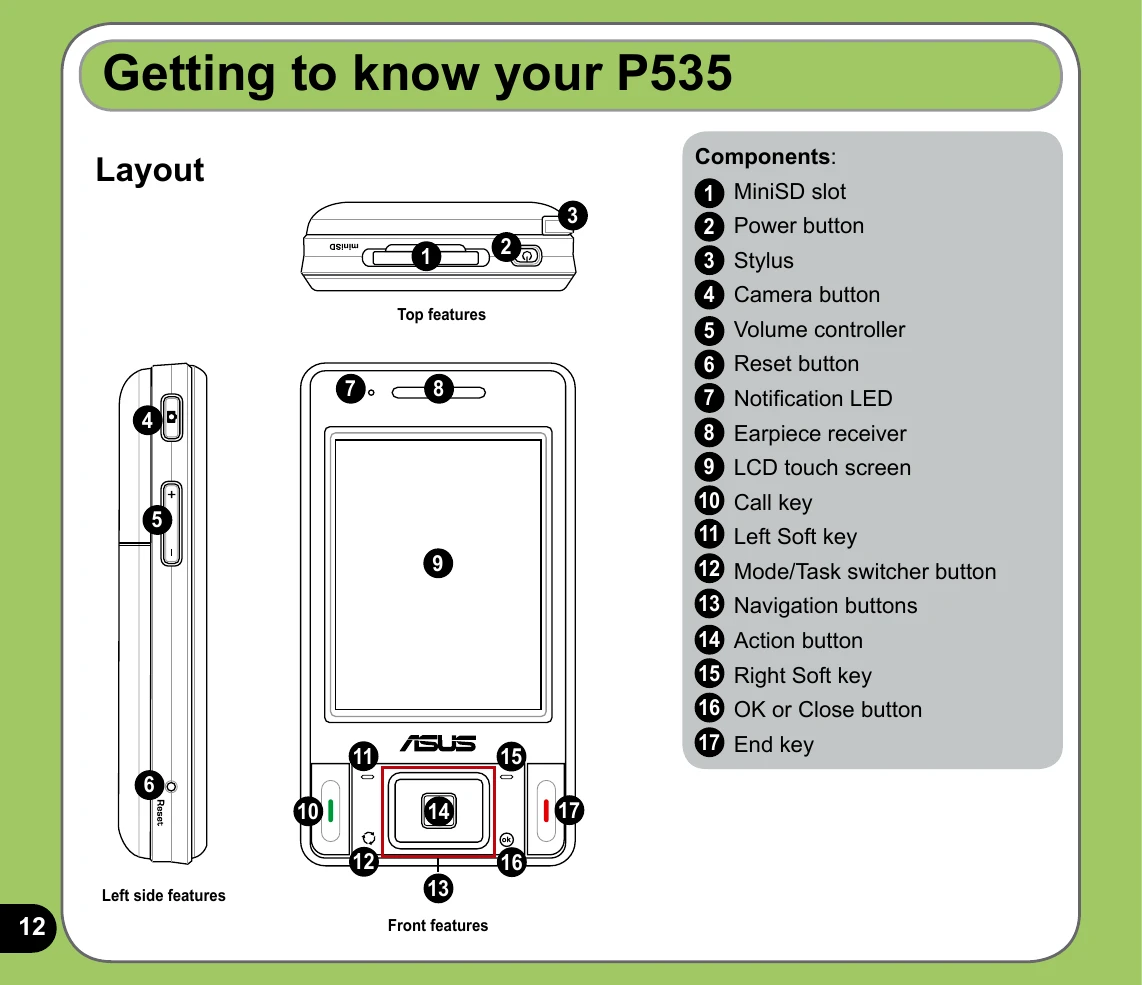
Getting to know your ASUS P535 involves familiarizing yourself with its layout and components. The device features top, side, and bottom components including a MiniSD slot, power button, stylus, camera button, volume controller, reset button, notification LED, earpiece receiver, LCD touch screen, call key, soft keys, navigation buttons, action button, OK/Close button, and end key. The rear and side views highlight the camera flash, camera lens, GPS antenna connector, speaker, battery compartment, voice recorder button, hold button, earphone slot, mini-USB connector, and microphone. The device can be powered on by pressing and holding the power button. Users can interact with the device using the stylus for writing, drawing, selecting, or dragging items on the touch screen. Calibrating the screen ensures accurate touch input. The Hold button can be used to lock/unlock keys and buttons. The Today screen provides at-a-glance information and can be customized to display important details like battery status, signal strength, and connectivity. Status indicators help users understand network and device conditions.