Manual for P735

Manual for P735

Brand: ASUS

Category: Smartphone

Document Type:

Language: EN
Uploaded: Aug. 10, 2025, 12:13 a.m.

Manual Publish Date: 2007-04-01

Warranty Information

Product warranty or service will not be extended if the product is repaired, modified, or altered without ASUS authorization.

Getting Started with your ASUS P735

Device Overview

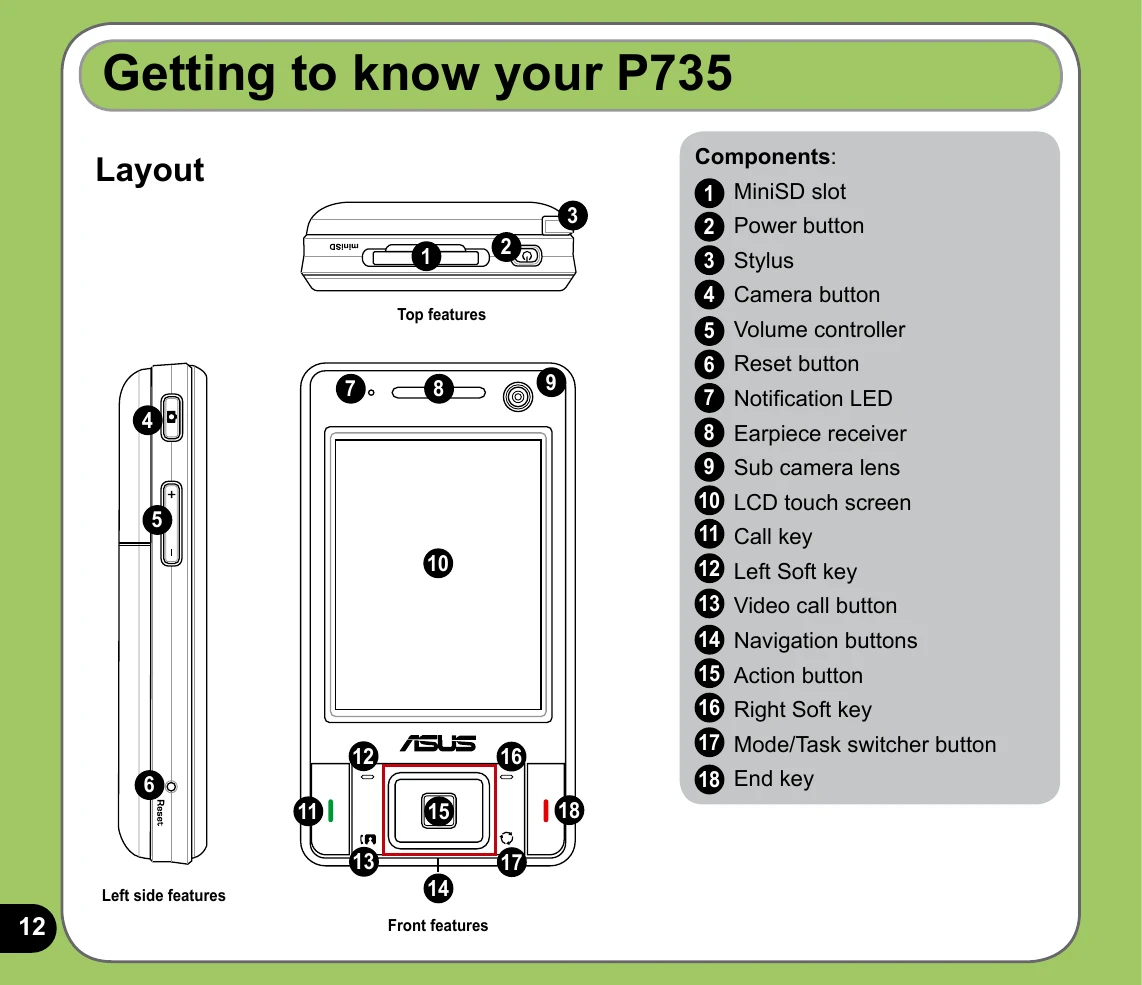
Familiarize yourself with the layout of your P735, including buttons for power, camera, volume, and navigation. Understand the functions of the LCD touch screen, earpiece, and microphone.

Initial Setup

Ensure your device is fully charged. Install the SIM card and battery as per instructions. Calibrate the touch screen for accurate input. Power on the device and follow on-screen prompts to set the date, time, and time zone.

Basic Operations

Navigate menus using the stylus or navigation buttons. Learn to lock/unlock keys and buttons. Explore the Today screen for quick access to information and functions like the Start menu, settings, and connectivity status.

Key Features

Discover how to enter data using the on-screen keyboard or other input methods. Learn to make and receive calls, use the camera, and manage wireless connections like Bluetooth and WLAN. Explore additional features such as My Secrets and the Meeting Time Planner. Always refer to safety guidelines for proper usage and care.

Troubleshooting and error codes

Icon Description
G Icon General Packet Radio Services (GPRS) available.
G Connecting Icon Connecting via GPRS.
G Connected Icon Connected via GPRS.
ActiveSync Connecting Icon Connecting with ActiveSync
ActiveSync Not Active Icon ActiveSync connection not active.
ActiveSync Progress Icon ActiveSync synchronization in progress.
Sync Error Icon Synchronization error.
Call Forwarded Icon Call forwarded.
Call In Progress Icon Call in progress.
Call On Hold Icon Call on hold.
Missed Call Icon Missed call.
New Message Icon New message.
Privacy Policy