Manual for ZE520KL

Manual for ZE520KL

Brand: ASUS

Category: Smartphone

Document Type: Manual

Language: EN
Uploaded: April 20, 2026, 8:05 p.m.

Manual Publish Date: 2016-08-01

Warranty Information

Refer to the user manual or ASUS Support Site for detailed warranty information.

Getting Started

  • Powering On/Off: Press and hold the power button to turn the device on or off.
  • Initial Setup: Follow the on-screen Setup Wizard to configure language, input methods, network, accounts, and location services.
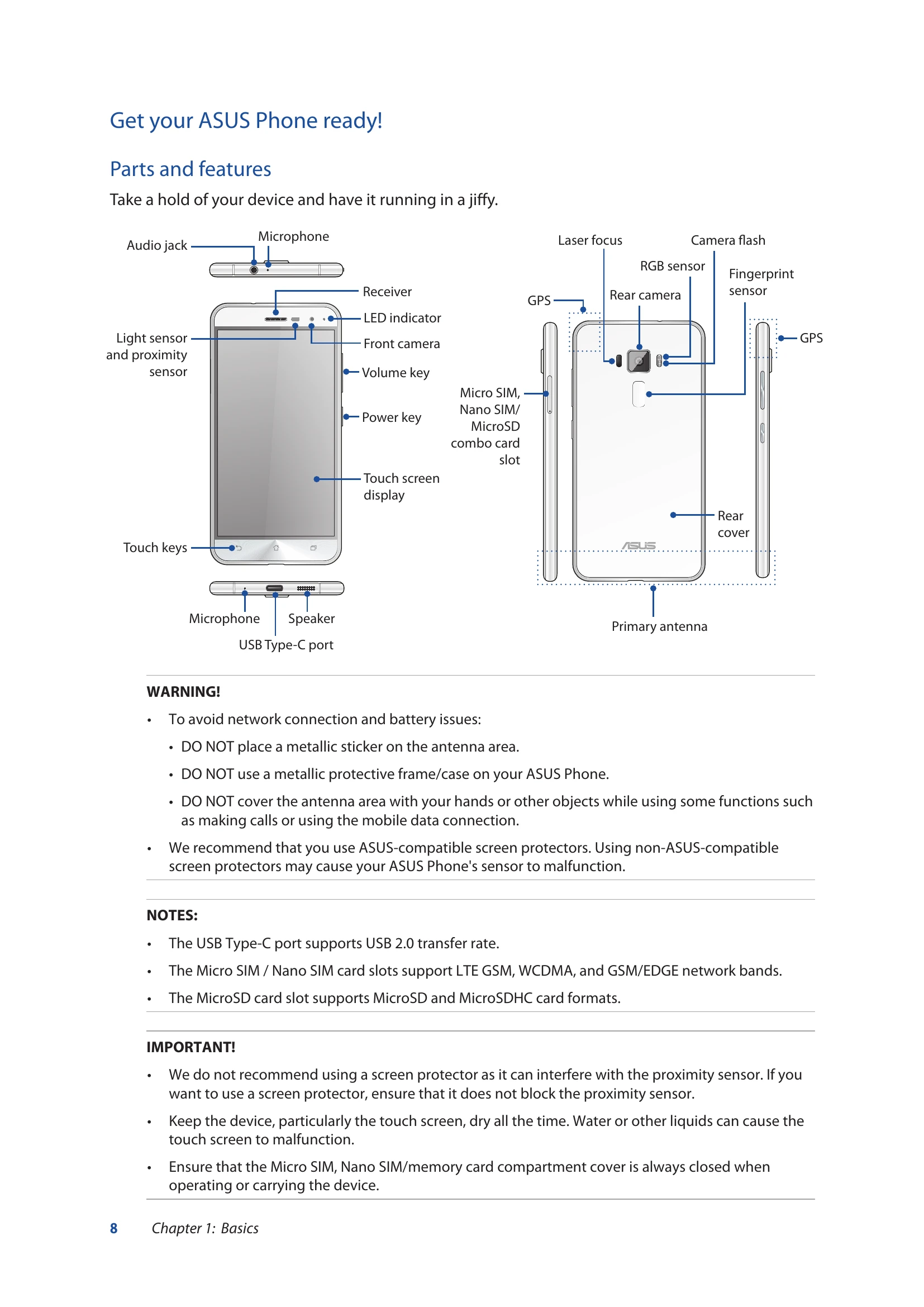
  • SIM Card Installation: Turn off the device, use a pin to eject the tray, insert Micro SIM/Nano SIM or MicroSD card, then close the tray.
  • Charging: Use the bundled AC power adapter and USB Type-C cable. Charge fully before first use.

Basic Operations

  • Touchscreen: Tap to launch apps/select items, tap and hold to move/delete, swipe to navigate screens, pinch to zoom.
  • Home Screen: Access notifications, quick settings, apps, and search. Swipe left/right for extended screens.
  • Notification Icons: Understand icons for mobile network, Wi-Fi, battery, messages, etc.

Key Features

  • Camera: Capture moments with PixelMaster technology.
  • ZenUI Apps: Utilize apps like Camera, Do It Later, ZenFone Care, and Share Link.
  • Connectivity: Manage Wi-Fi, Bluetooth, and mobile networks.
  • Customization: Adjust screen display, wallpapers, and ringtones.

Troubleshooting and error codes

ProblemPossible CauseSolution
Device does not power on Battery is depleted Charge the device fully.
Screen is unresponsive Device is frozen Restart the device by pressing and holding the power button.
Cannot connect to Wi-Fi Wi-Fi is turned off Enable Wi-Fi in settings.
Incorrect Wi-Fi password Re-enter the Wi-Fi password.
Cannot make or receive calls Airplane mode is on Turn off Airplane mode.
No mobile network signal Move to an area with better signal or check SIM card.
Privacy Policy