Brand: AT&T
Category: Mobile Phone
Document Type:
Language: EN
Brand: AT&T
Category: Mobile Phone
Document Type:
Language: EN
Uploaded: Aug. 10, 2025, 12:03 a.m.
The product is guaranteed against material, design, and manufacturing defects for 24 months for the phone.
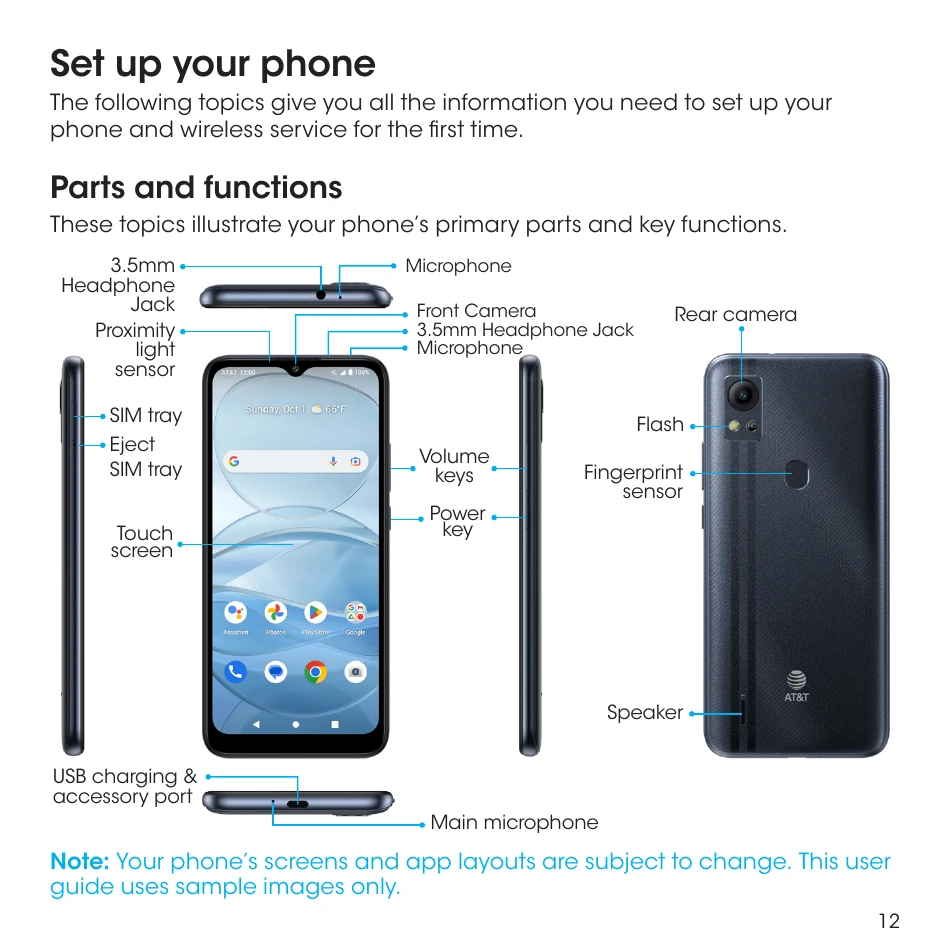
| Part | Description |
|---|---|
| Fingerprint sensor | Unlock your phone with a touch of your finger. |
| Eject SIM tray | Insert the SIM Card Tray Pin into the card tray slot and remove the SIM card tray. |
| SIM tray | Insert your Nano SIM card and microSD for service and additional storage. |
| Flash |
|
| Front camera | Take pictures and record videos while facing the screen with a 5MP lens. |
| Rear camera | Take pictures and record videos with an 8MP lens. |
| Headset port | Plug in a headset (sold separately) to listen to music or for convenient, hands-free conversations. |
| Microphone | Transmit your voice electronically for a call, voice recording, or Google Assistant™. |
| Proximity and light sensor | A sensor will automatically dim or brighten the screen according to the environment. |
| Power key |
|
| Receiver | Hear the caller and automated prompts. |
| Speaker | Listen to calls, automated prompts, and music. |
| Touch screen |
|
| USB charging & accessory port | Connect the USB cable (included) for charging, or connect other accessories. |
| Volume keys | Adjust the volume for ringtones, media, notifications, and system sounds. |