Brand: beko
Category: Vacuum Cleaner
Document Type: Manual
Language: EN
Brand: beko
Category: Vacuum Cleaner
Document Type: Manual
Language: EN
Uploaded: April 20, 2026, 7:51 p.m.
| PROBLEM | POSSIBLE CAUSE | SOLUTION |
|---|---|---|
| Not operating | Battery is discharged. | Charge it. |
| Battery may be unseated. | Remove the battery and install it again. | |
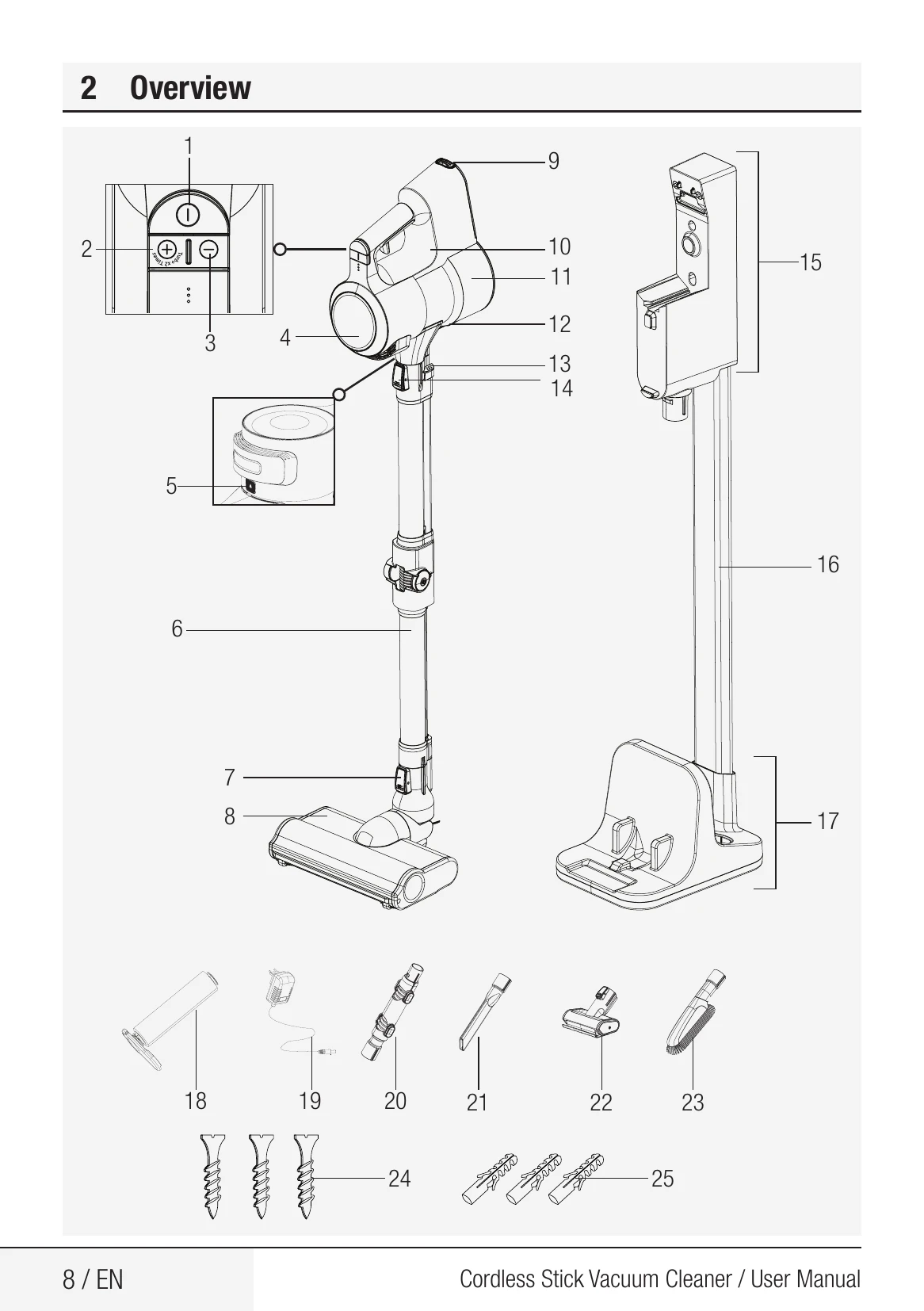
| Vacuum connection is blocked. | Separate the appliance as body (10), brush (8) and wand (6). Inspect and clean the connection points. | |
| Suction power is getting reduced. | Dust reservoir (11) is full. | Clean the dust reservoir (11) and the filter. |
| You may have reached the cleaning period of the filters. | Clean the filters. | |
| Filters may be deformed as a result of operation and their replacement period may have come. | Please contact the customer services to buy a new filter. | |
| Motor inlet foam is not cleaned. | Clean the filters and recharge the appliance. | |
| There is disturbing noise from the motor. | Hair and similar materials may have tangled on the rotating roll on the turbo brush (8). | Clean the turbo brush roll. |
| Vacuum connection is blocked. | Separate the appliance as body (10), brush (8) and wand (6). Inspect and clean the connection points. | |
| Cannot charge the vacuum cleaner. | The vacuum cleaner is not installed to the charging dock (15). | Install the vacuum cleaner to the charging dock (15). Make sure that it is seated properly. Check the connection. |
| Operates for a very short time after charging. | It is not charged for the adequate period. | Charge for 4-5 hours as per the instructions. |
| Motor inlet foam is not cleaned. | Clean the filters and recharge the appliance. | |
| The colour indicator on the screen is illuminated in red. | Your appliance is about to discharged. | Charge it. |
| The animation indicating that the brush is blocked is displayed on the screen and the appliance has stopped operating. | Hair and similar materials may have tangled on the rotating roll on the turbo brush (8). | Clean the turbo brush roll. |
| The animation indicating that the vacuum is blocked is displayed on the screen and the appliance has stopped operating. | A blockage has occurred on the vacuum duct. | Remove the blockages. |
| The animation indicating that the filter is blocked is displayed on the screen and the appliance has stopped operating. | Filters are filled with excessively dust. | Clean the motor inlet foam and the metal filter. |
| The appliance has stopped operating while being operated. | Battery is faulty. | Contact the customer services. |
| Battery may be overheated. | Wait for appliance to cool down and try to operate it again. | |
| When the appliance is connected to charge, the charging screen is displayed on the screen. But, the battery percentage does not change. | You may have inadvertently plugged the adaptor of another appliance, and thus the charge current is excessive. | Use the proper adaptor. |
| The appliance stopped operating without any warning animation being displayed on the screen. | Battery be overheated than expected. | Contact the customer services. |
| While charging, 1 LED light on the appliance flashes rapidly in red and the battery percentage on the screen does not change. | The Body (10) is not installed properly to the charging dock (15). Or the battery is not installed properly to the body of the appliance. | Remove the adaptor (19) from the charging dock (15) and remove the body (10) from the charging dock. Ensure that the battery is installed properly on the body. Install the body (10) to the charging dock again and plug the adaptor to the charging dock again. |
| While charging, 1 LED light on the appliance is illuminated solidly in red and the battery percentage on the screen does not increase. | Battery be overheated than expected. | Contact the customer services. |
| While charging, 1 LED light on the appliance flashes both in red and white alternately and the battery percentage on the screen does not is shown as 00%. | The Body (10) is not installed properly to the charging dock (15). Or the battery is not installed properly to the body of the appliance. | Remove the adaptor (19) from the charging dock (15) and remove the body (10) from the charging dock. Ensure that the battery is installed properly on the body. Install the body (10) to the charging dock again and plug the adaptor to the charging dock again. |
| A bad smell (light humidity, dust, plastic material odour) occurs on the air outlet. | Have you purchased the appliance within the last 3 months? | It is normal that a bad smell (light odour of plastic) occurs within 3 months after the purchase date. |
| The dust reservoir (11) and the filters are not cleaned properly. | Clean the dust reservoir (11) and the filters. | |
| Filters may be installed while wet after they are washed. | Remove the filters and ensure that they are dry before installing them to the appliance. | |
| Filters may be deformed as a result of the frequency of operation and their replacement period may have come. | Please contact the customer services to buy a new filter. |