Manual for MZ32PCSSI

Manual for MZ32PCSSI

Brand: BLACK & DECKER

Category: Microwave Oven

Document Type: Manual

Language: EN
Uploaded: April 20, 2026, 7:56 p.m.

Warranty Information

Black & Decker provides a 2 Year Warranty against defects due to materials or workmanship.

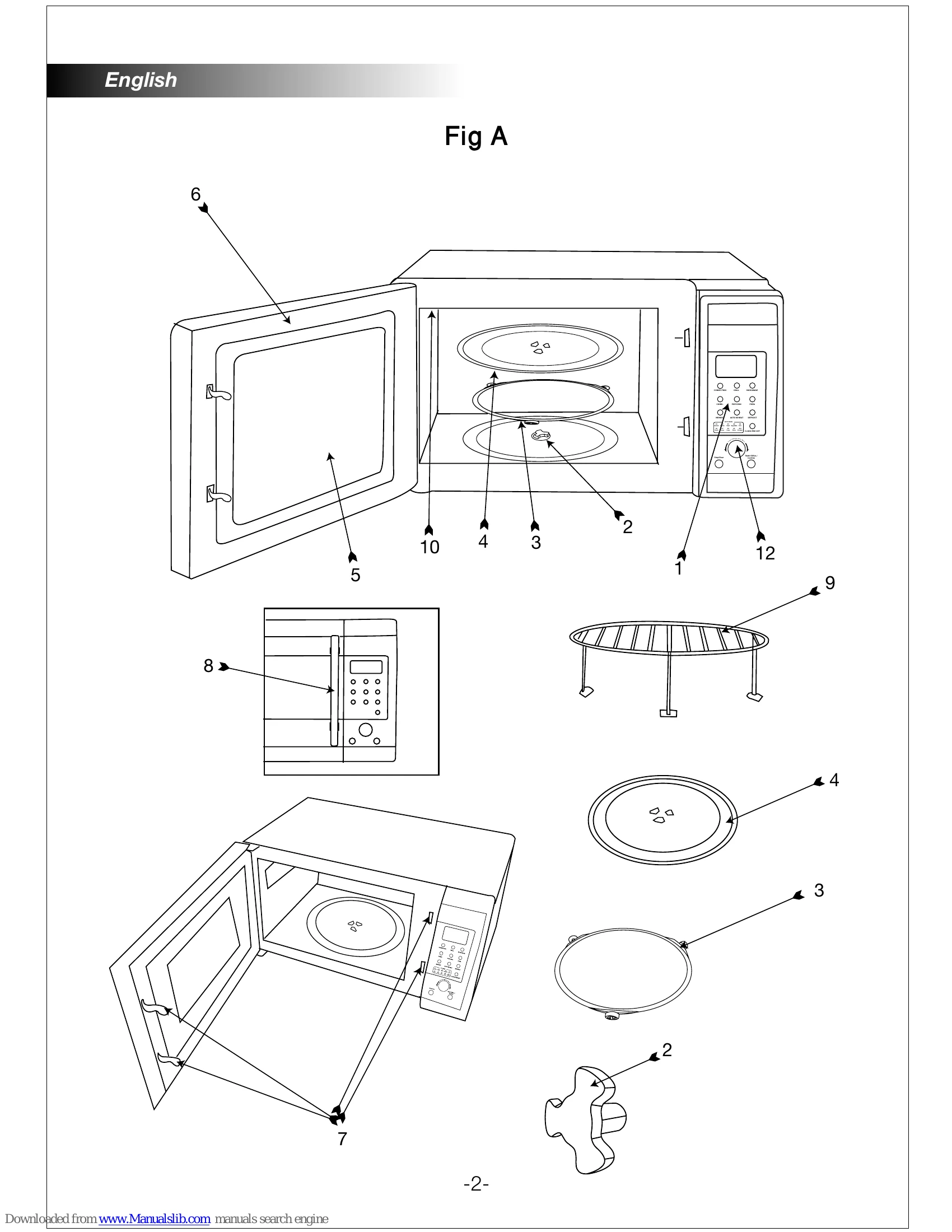
  • Assembly: Place appliance on a flat surface, insert turntable shaft, roller support, and tray. Connect to electrical supply.
  • Setting Clock: Connect to power, display shows '0:00'. Use 'Clock / Pre-set' to select 12/24hr format, rotate dial for hour and minute, press 'Clock / Pre-set' to confirm.
  • Using Microwave: Open door, place food on tray, close door. Press 'Microwave', display shows 'P100'. Rotate dial to select power, press 'Start / +30Sec./Confirm' to start.
  • Using Grill: Press 'Grill', display shows 'G-1'. Rotate dial to select time, press 'Start / +30Sec./Confirm' to start.
  • Combi. Cooking: Press 'Combi', select combination (C-1 to C-4) by pressing button or rotating dial. Confirm combination with 'Start/+30Sec./Confirm', set time, and start.
  • Convection Cooking: Press 'Convection'. For pre-heat, select temperature (150-240°C), confirm, then start pre-heating. Once preheated, open door to set cooking time and start. Without pre-heat, select temperature, confirm, set time, and start.
  • Multi-Stage Cooking: Set up to 3 stages. Defrost must be first. Audible signal at end of each stage.
  • Delayed Cooking: Set clock first. Input program (max 3 stages, no defrost). Set start time using 'Clock/Pre-set' and dial, then confirm with 'Start/+30Sec./Confirm'.
  • Auto Menu: Rotate dial to select menu, confirm with 'Start/+30Sec./Confirm', rotate dial to select weight, and start cooking.
  • Defrost by Weight: Press 'Defrost', select weight using dial, press 'Start/+30Sec./Confirm' to start.
  • Defrost by Time: Press 'Defrost' twice, set time using dial, press 'Start/+30Sec./Confirm' to start.
  • Quick Start: Press 'Start/+30Sec./Confirm' to start at 100% power. Each press adds 30 seconds.
  • Auto Reheat: Press 'Auto Reheat', select weight by pressing button or rotating dial, press 'Start/+30Sec./Confirm' to start.
  • Memory Function: Press 'Memory' to select/save programs. Example: To set program 2 for 80% power for 3:20, press 'Memory' twice, 'Microwave' twice, confirm power, set time, save with 'Memory'.
  • Popcorn: Press 'Popcorn' for weight, press 'Start/+30Sec./Confirm' to start.
  • Pizza: Press 'Pizza' for weight, press 'Start/+30Sec./Confirm' to start.
  • Child Lock: Press & hold 'Stop/Clear' for 3 sec to lock/unlock.
  • Operating times and preparations: Follow food packaging. Switching on/off: Press 'Start/+30Sec./Confirm' to start. Press 'Stop/Clear' to stop. Re-press 'Start/+30Sec./Confirm' if door opened. Audible signal when finished.
Privacy Policy