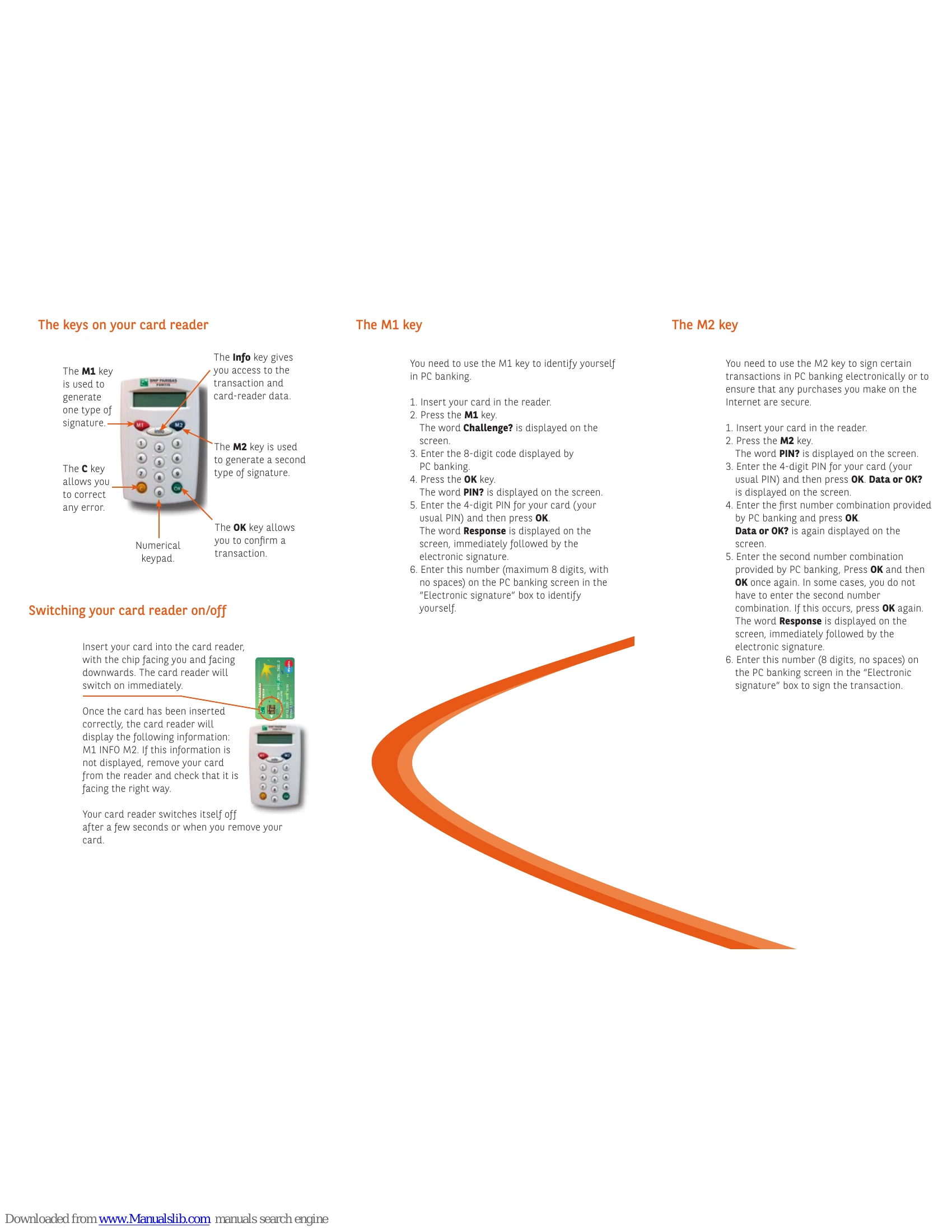
The Info key
Pressing the Info key displays the following information successively:
- Proton (Belgium only): Check Proton balance and last 5 transactions. Cannot reload Proton chip via card reader.
- EPCI Number: Certification number from an independent body for reader security compliance.
- Battery level: Displays battery percentage. A message appears at 5%, requiring reader exchange within two weeks.
- Reader version: Displays the reader's program version.
Switching your card reader on/off
Insert your card (chip facing up and towards you) to turn the reader on. It displays "M1 INFO M2". If not, reinsert the card correctly. The reader turns off automatically after a few seconds or when the card is removed.
The M1 key
Used to identify yourself in PC banking.
- Insert card.
- Press M1.
- Enter 8-digit code from PC banking.
- Press OK.
- Enter 4-digit PIN, press OK.
- Enter the "Electronic signature" (max 8 digits, no spaces) on the PC banking screen.
The M2 key
Used to sign PC banking transactions electronically or for secure Internet purchases.
- Insert card.
- Press M2.
- Enter 4-digit PIN, press OK.
- Enter the first number combination from PC banking, press OK.
- Enter the second number combination (if prompted), press OK twice. If not prompted, press OK again.
- Enter the "Electronic signature" (8 digits, no spaces) on the PC banking screen to sign.