Manual for SCOUTING CAM BLACK 1300 Wifi

Manual for SCOUTING CAM BLACK 1300 Wifi

Brand: Braun

Category: Trail Camera

Document Type:

Language: EN
Uploaded: Aug. 9, 2025, 11:46 p.m.

Warranty Information

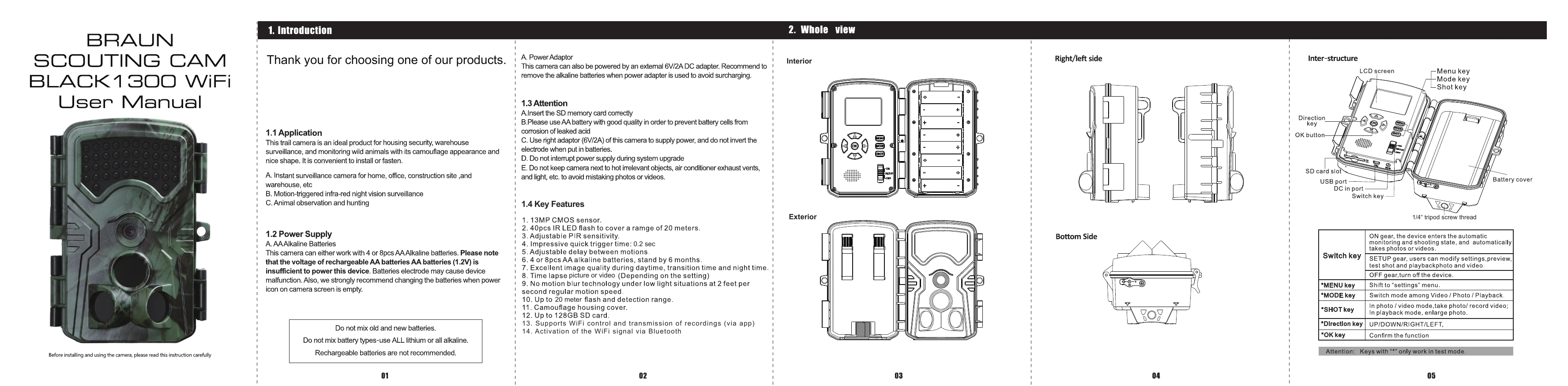
The manual provides setup, operation, and troubleshooting for the BRAUN SCOUTING CAM BLACK1300 WiFi trail camera.

  • **Installation:** Insert SD card, 4 or 8 AA batteries.
  • **Setup:** Use the SWITCH key to enter SETUP mode to modify settings like mode, resolution, video length, sensitivity, etc.
  • **Operation:** Use the SWITCH key to select ON for automatic monitoring and shooting, or OFF to turn off the device.
  • **Playback:** Use MODE key to enter playback mode, UP/DOWN to browse, and OK to play/stop videos. MENU allows deleting, slide shows, and write protection.
  • **WiFi:** Download 'Wildlife Cam Pro' app. Connect to the camera's WiFi signal (Trail Camera XXXXXX) via Bluetooth, then connect to the camera's WiFi (BRAUN-XXXXXX) using password '12345678' to control settings, view live feed, and download recordings.

Troubleshooting and error codes

Problem Solution
Camera cannot be switched on Check battery polarity, reload batteries and reboot without SD card, format or replace SD card.
Abnormal picture color Turn off camera, reload batteries, and reboot.
Camera cannot take picture Check if SD card is in NON-WRITABLE mode.
PIR not work Ensure SD card is installed, check if SD card is full, and verify camera is not in time lapse or delay mode.
Privacy Policy