Search
Manual for AUTO ZOOM 814 ELECTRONIC
Brand:
CANON
Category:
Camera
Document Type:
Manual
Language:
EN
Uploaded:
Aug. 10, 2025, 12:26 a.m.
Download Manual
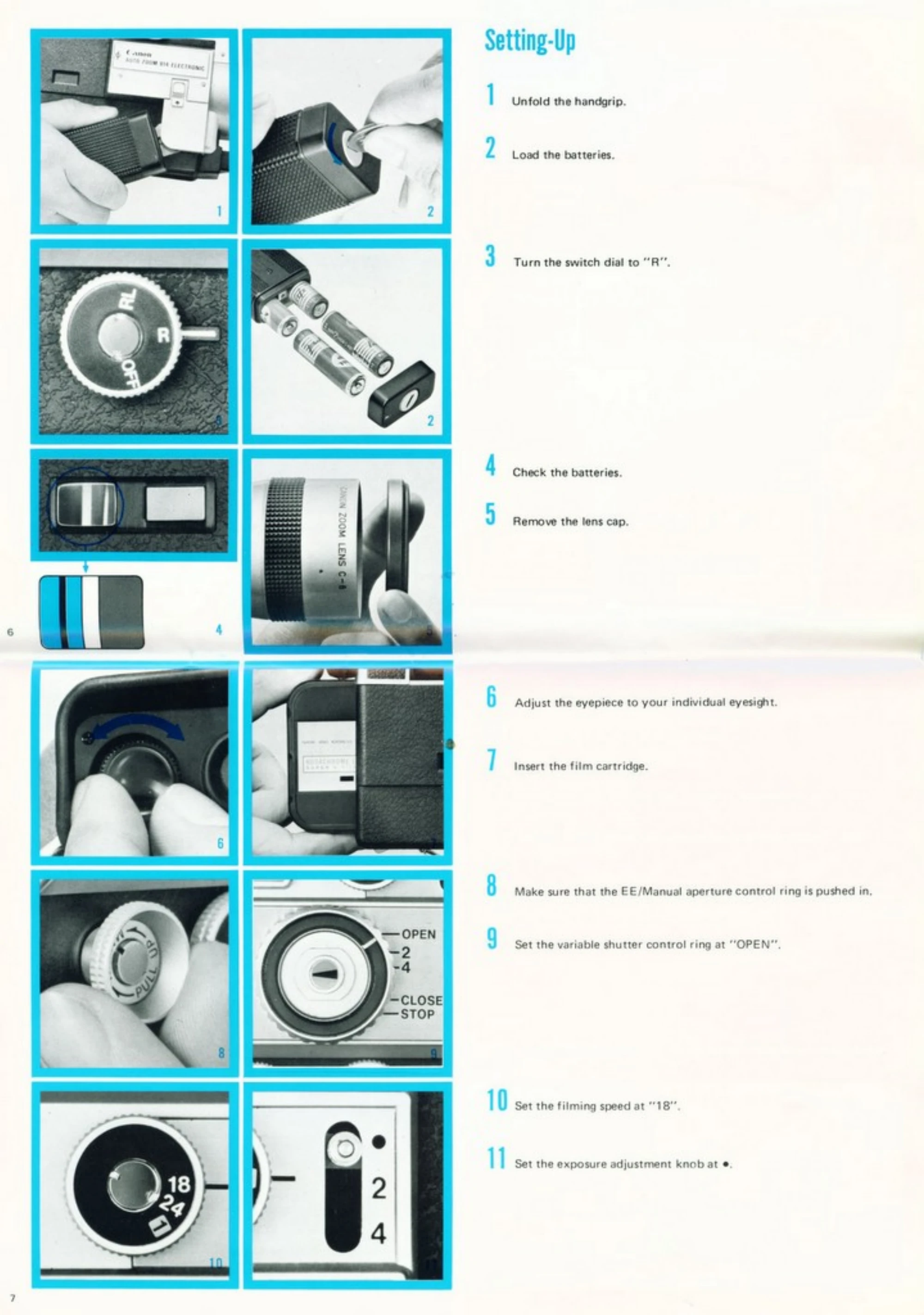
Setting-Up
Unfold the handgrip.
Load the batteries.
Turn the switch dial to "R".
Check the batteries.
Remove the lens cap.
Adjust the eyepiece to your individual eyesight.
Insert the film cartridge.
Make sure that the EE/Manual aperture control ring is pushed in.
Set the variable shutter control ring at "OPEN".
Set the filming speed at "18".
Set the exposure adjustment knob at ..
Operation
Hold the camera and look through the viewfinder.
Focus at the subject at the maximum magnification (60mm).
Decide the composition of the picture by turning the zooming ring.
Pull the trigger slightly to confirm the exposure needle is stable.
Pull the trigger deeper to start filming.
During shooting, zoom in and zoom out according to your needs.
The film-end caution lamp lights up 2.5 feet before the film-end. Continue to run the film to the end (50 ft), and pull out the cartridge.
Privacy Policy