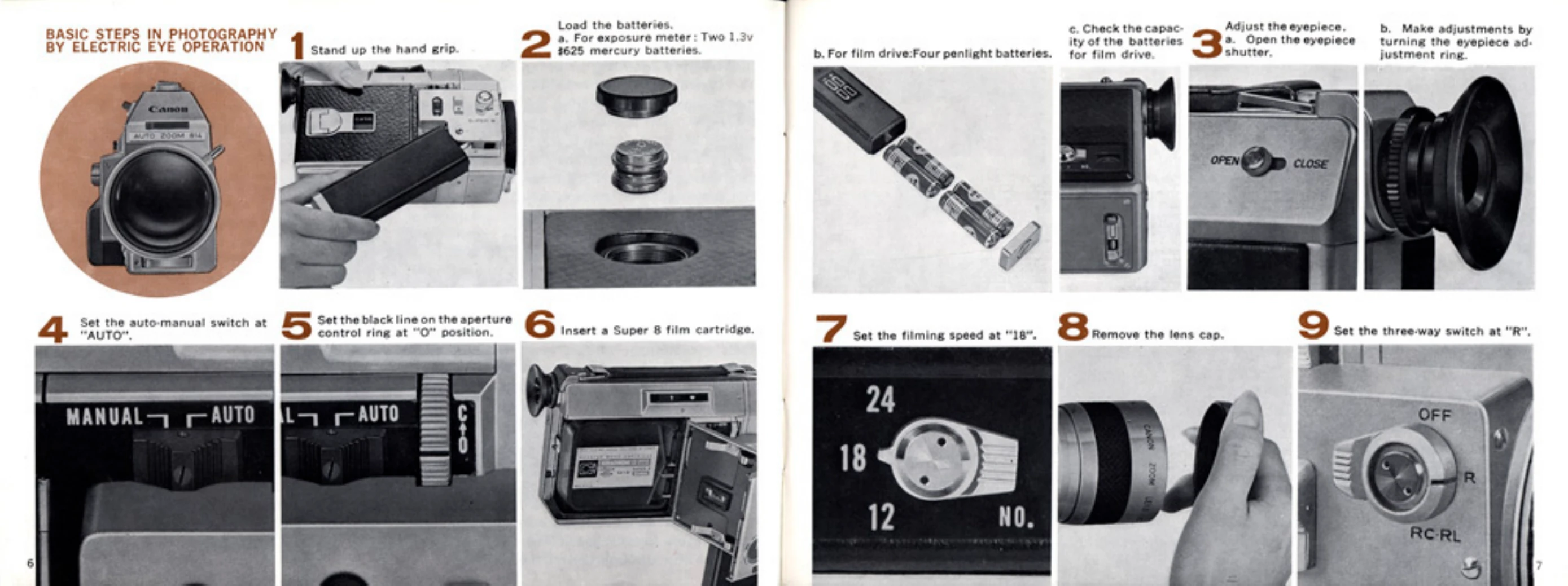
BASIC STEPS IN PHOTOGRAPHY BY ELECTRIC EYE OPERATION
Stand up the hand grip.
Load the batteries: a. For exposure meter: Two 1.3v $625 mercury batteries. b. For film drive: Four penlight batteries. c. Check the capacity of the batteries for film drive.
Adjust the eyepiece: a. Open the eyepiece shutter. b. Make adjustments by turning the eyepiece adjustment ring.
Set the auto-manual switch at "AUTO".
Set the black line on the aperture control ring at "O" position.
Insert a Super 8 film cartridge.
Set the filming speed at "18".
Remove the lens cap.
Set the three-way switch at "R".
Hold the camera and look through the viewfinder.
Set the focus at maximum magnification (telephoto).
Decide the composition of the picture by turning the zoom lens.
Check the position of the exposure meter needle.
Press the shutter lever.
During shooting, zoom in and zoom out according to your needs.
Take out the cartridge after the entire film has been exposed.