Brand: CANON
Category: Camera
Document Type: Manual
Language: EN
Brand: CANON
Category: Camera
Document Type: Manual
Language: EN
Uploaded: Aug. 10, 2025, 12:30 a.m.
Manual Publish Date: 2013-08-01
Introduction
This manual is for the EOS-1D C, a digital SLR camera with enhanced movie shooting functions, based on the EOS-1D X. It offers advanced movie shooting features like a full-frame CMOS sensor, 4K movie recording, Full HD at 60p/50p, Super 35mm Crop, Canon Log gamma, and uncompressed movie output via HDMI. It also includes a wide range of shooting functions optimized for professionals, a compact and lightweight body, high reliability, and an expandable system.
Shooting and Playing Movies
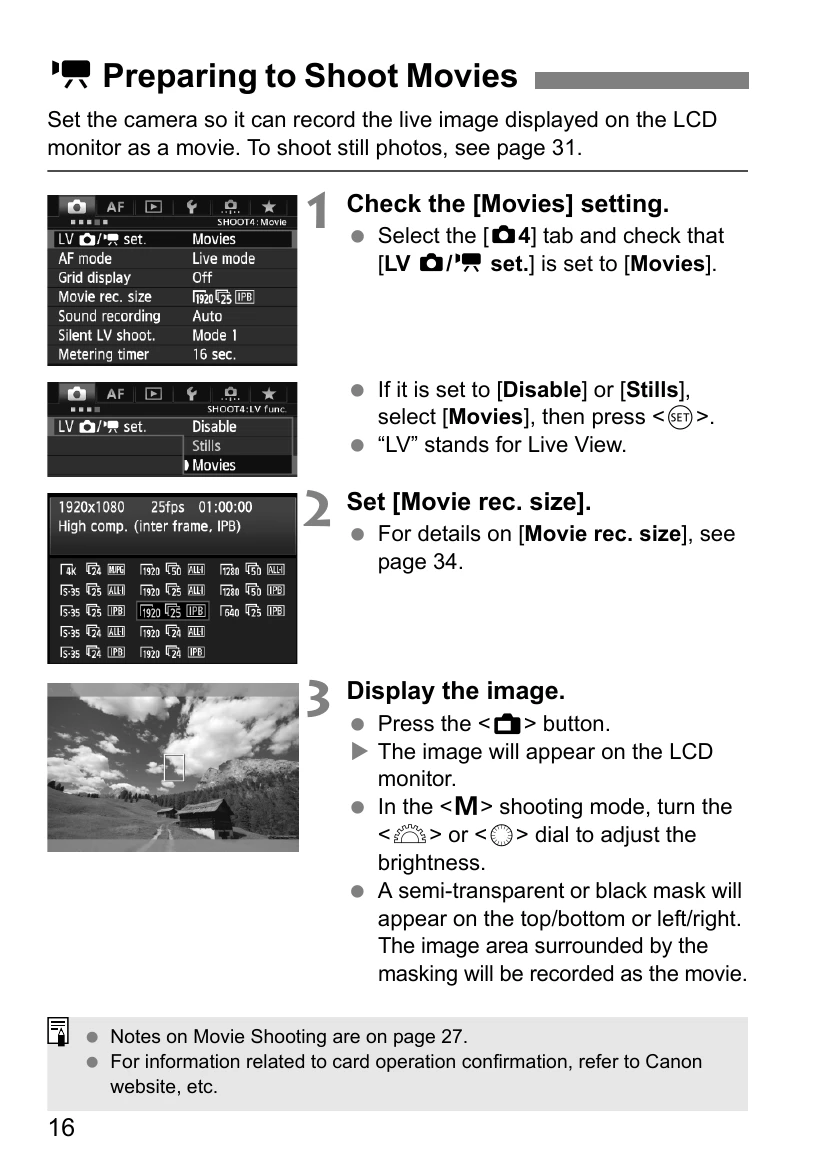
This section details how to set up the camera for movie recording, including checking the [Movies] setting, setting the movie recording size, and displaying the image. It covers autoexposure shooting, shutter-priority AE, aperture-priority AE, and manual exposure shooting, explaining how to adjust shutter speed, aperture, and ISO speed. It also touches on shooting still photos during movie shooting and the various settings available, such as AF mode, grid display, sound recording, silent control, and Canon Log gamma.
Reference
This section highlights differences with the EOS-1D X Instruction Manual, system accessories, and provides a troubleshooting guide.
Software Start Guide
This chapter provides an overview of the software on the EOS Solution Disk and explains how to install it on a personal computer. It also covers viewing PDF files on the EOS Camera Instruction Manuals Disk.
| Troubleshooting | Solution |
|---|---|
| A white icon or red icon is displayed. | The camera's internal temperature is high. If the white icon is displayed, still photo image quality may deteriorate. If the red icon is displayed, movie shooting will soon stop automatically. |
| Movie shooting stops by itself. | The card's writing speed may be too slow. Refer to page 17 for Required Card Performance. Shoot test movies to confirm accurate recording. |
| The ISO speed cannot be set. | In P/Tv/Av/BULB modes, ISO is automatic. In M mode, you can set ISO freely. |
| ISO 32000/40000/51200 cannot be set. | Expandable if [Maximum] in [2: ISO speed settings] is set to [51200/H] or higher. Noise may be substantial at these expanded ISO speeds. |
| The manually set ISO speed changes when switching to movie shooting. | ISO speeds may automatically adjust (e.g., to 25600 or 100) for movie shooting and may not revert to original settings. |
| The movie image periphery looks dark. | Use “S-35” setting with EF Cinema zoom lenses. Other settings may result in dark periphery. |
| The exposure changes during movie shooting. | Changes in shutter speed, aperture, or zooming may be recorded. |
| The subject looks distorted. | High-speed panning or shooting moving subjects may cause distortion. |
| The screen flickers or horizontal stripes appear. | Caused by fluorescent light, LED bulbs, etc. In M mode, a slow shutter speed might help. |
| When I shoot still photos during movie shooting, the movie shooting stops. | Use a card with higher performance than specified or set a smaller image size for still photos with fewer continuous shots. |
| I cannot shoot still photos during movie shooting. | Check [5: Movie shoot. btn] setting. Cannot shoot if Canon Log gamma, 4K, S-35, or 1920 settings are active. EF Cinema zoom lenses may also cause this. |
| Lens aberration correction is not applied. | Use EOS Utility to register correction data. Ensure [Lens aberration correction] is set to [Correction data available]. Correction is applied only during movie shooting for EF Cinema lenses. |
| The time code cannot be appended during HDMI output. | Frame rate settings may be incompatible with NTSC/PAL frame rates. |
| The HDMI output image has a temporary frame stop. | HDMI output pauses when shooting ends and resumes after card writing is complete. |
| Movie shooting stops if I connect or disconnect the HDMI cable. | Use the provided Cable protector and clamp to prevent accidental disconnection. |
| The movie cannot be played back. | Computer-edited movies or movies shot with Canon Log gamma/4K may not play back on the camera or other EOS cameras. |
| When the movie is played back, camera operation noise can be heard. | Camera operation noise may be recorded. Using an external microphone is recommended. |
| The movie has still moments. | In autoexposure modes, drastic exposure changes may cause temporary pauses. Shoot in M mode. |
| No image appears on the TV screen. | Use correct cables, ensure plugs are fully inserted, set matching video system (NTSC/PAL), and check HDMI output settings. |
| There are multiple movie files for a single movie shoot. | Files exceeding 4 GB for a single clip are automatically created as new files. |