Manual for EOS-1DX

Manual for EOS-1DX

Brand: CANON

Category: Camera

Document Type: Manual

Language: EN
Uploaded: Aug. 10, 2025, 12:28 a.m.

Manual Publish Date: null

Warranty Information

null

\n
  • Attaching the Strap: Pass the end of the strap through the camera's strap mount eyelet from the bottom. Then pass it through the strap's buckle as shown in the illustration. Pull the strap to take up any slack and make sure the strap will not loosen from the buckle.
  • Charging the Battery: Connect the charger to a power outlet, remove protective covers, and slide the battery into the charger. The battery will start recharging, and the green status lamp will blink. When the battery is fully charged, all three charge level indicators will light up (50%/80%/100%).
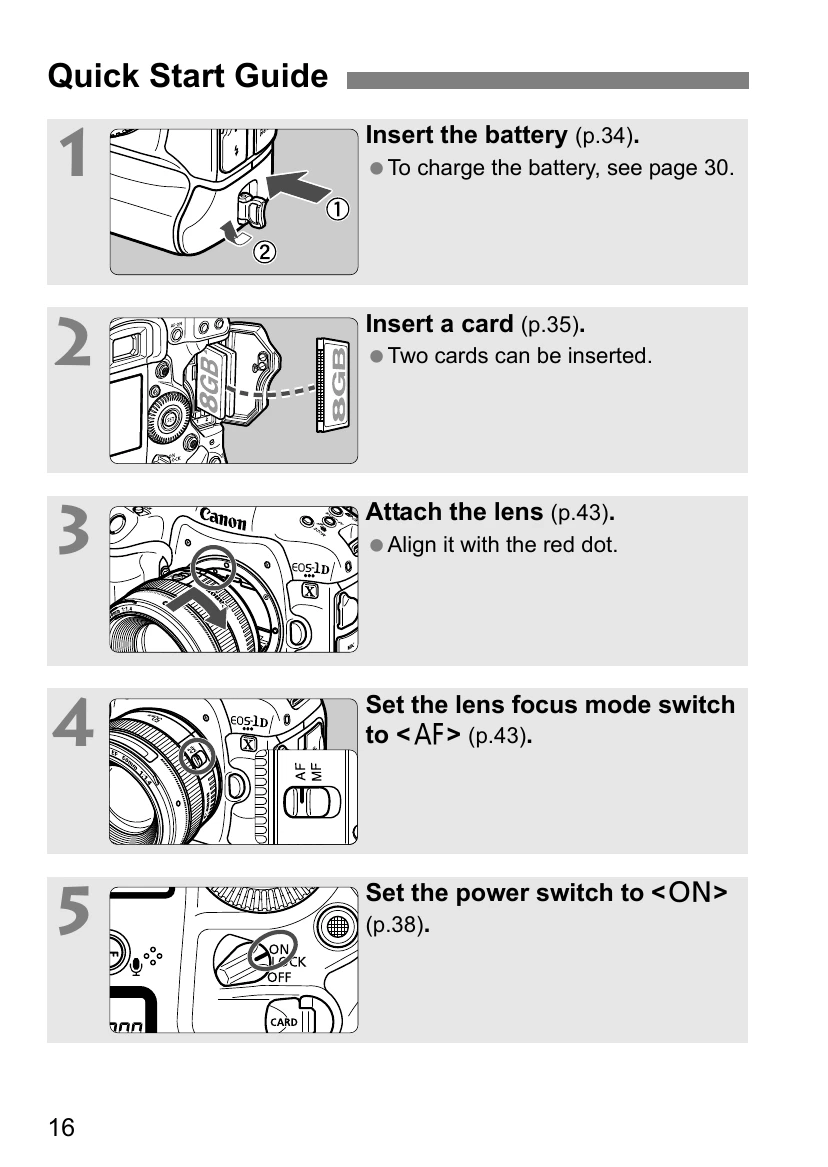
  • Installing the Battery: Remove the battery compartment cap and insert the battery firmly all the way, turning the release handle as shown by the arrow.
  • Installing and Removing the Card: Open the cover, flip out and turn the cover release handle, and open the cover. Insert the card, ensuring the label side is facing you and the end with the small holes is inserted into the camera. Close the cover until it snaps shut. To remove, push the eject button to eject the card, pull the card straight out, and close the cover.
  • Turning on the Power: Set the power switch to . If the Date/Time/Zone setting screen appears, set the Date/Time/Zone.
  • Basic Operation: Adjusting the viewfinder clarity by removing and making adjustments to the eyecup. Holding the camera correctly for horizontal and vertical shooting to minimize camera shake. Understanding the shutter button has two steps: pressing halfway and pressing completely.
  • Main Dial and Quick Control Dial: After pressing a button, turn the dials to adjust settings. Some operations are possible even when the power switch is set to .
  • Multi-controller: Consists of an eight-direction key and a button at the center for selecting AF points, correcting white balance, etc.
  • Vertical Shooting: Setting the vertical grip ON/OFF switch to to use the vertical grip's buttons and dial.
  • LOCK: Multi function lock: Prevents current settings from changing due to accidental movement of the Main Dial, Quick Control Dial, or Multi-controller.
  • LCD Panel Illumination: Press the button to turn the top and rear LCD panel illumination on or off.
  • Displaying Shooting Settings: Press the button to display shooting settings. Pressing enables Quick Control.
  • Quick Control for Shooting Functions: Directly select and set shooting functions displayed on the LCD monitor.
  • Menu Operations: Set various settings using the menus, such as beeper, date/time, etc., by looking at the LCD monitor and using the buttons and dials.
  • Before You Start: Formatting the card, setting power-off time/auto power off, setting image review time, reverting the camera to default settings, and displaying the grid and electronic level.
  • Feature Guide: Display explanations of menu options by holding down the button.
  • Setting the AF and Drive Modes: Select AF mode and drive mode to match shooting conditions and subject.
  • AF: Selecting the AF Mode: Select AF mode to suit shooting conditions or subject (One-Shot AF, AI Servo AF).
  • Selecting the AF Area: Select AF point(s) suiting the scene or subject. Six AF area selection modes are available.
  • Selecting the AF Point Manually: Manually select the AF point or zone.
  • AI Servo AF Characteristics (For a Subject): Fine-tune AI Servo AF to suit a particular subject or scene by selecting a case from 1 to 6.
  • Customizing AF Functions: Set AF operation characteristics and shutter-release timing for the first shot and subsequent shots during continuous shooting with AI Servo AF.
  • Other AF Settings: AF-assist beam firing, One-Shot AF release priority, Auto AF point selection (EOS iTR AF), Lens drive when AF impossible, Selectable AF point, Select AF area selection mode, AF area selection method, Orientation linked AF point, Initial AF point, AI Servo AF.
  • Image Settings: Selecting the card for recording and playback, setting image recording quality, ISO speed, Picture Style, white balance, Auto Lighting Optimizer, lens peripheral illumination/chromatic aberration correction.
  • Exposure Control: Program AE, Shutter-Priority AE, Aperture-Priority AE, Manual Exposure, selecting Metering Mode, Setting Exposure Compensation, Auto Exposure Bracketing (AEB), AE Lock, Bulb Exposures, Multiple Exposures, Mirror Lockup.
  • Flash Photography: Shooting with EOS-dedicated, EX-series Speedlites or non-Canon flash units. Setting Flash Firing, E-TTL II metering, Flash sync speed in Av mode, Flash function settings, Flash exposure compensation, Flash exposure bracketing, Flash Custom Function Settings.
  • Shooting with the LCD Monitor (Live View Shooting): Shooting while viewing the image on the LCD monitor. Preparing for Live View Shooting, shooting with the LCD monitor, shooting function settings, menu function settings, AF to focus (Live Mode, Face Detection Live Mode, Quick Mode), Focusing Manually.
  • Shooting Movies: Preparing to shoot movies, shooting movies (Autoexposure shooting, Shutter-priority AE, Aperture-priority AE, Manual Exposure Shooting), ISO speed, setting movie recording size, sound recording, silent LV shooting, metering timer, time code, silent control, movie shooting button, shooting still photos during movie shooting.
  • Image Playback: Playing back images (single-image display, index display, jump display), magnified view, rotating the image, setting ratings, quick control during playback, enjoying movies, playing movies, editing movies' first and last scenes, slide show (auto playback), viewing images on TV.
  • Post-Processing Images: Processing RAW images with the camera, resizing JPEG images.
  • Sensor Cleaning: Automatic sensor cleaning, manual sensor cleaning, appending dust delete data.
  • Printing Images and Transferring Images to a Computer: Preparing to print, connecting the camera to a printer, PictBridge, Digital Print Order Format (DPOF), Direct Printing with DPOF, Trimming the image, handling printer errors, transferring images to a personal computer.
  • Customizing the Camera: Custom Functions, Custom Controls, Registering My Menu, Saving and Loading Camera Settings, Registering Custom Shooting Modes.
  • Reference: Function Availability Table According to Shooting Mode, System Map, INFO. Button Functions, Camera Settings, Troubleshooting Guide, Error Codes, Specifications.

Troubleshooting and error codes

01 Communications between the camera and lens is faulty. Clean the lens contacts. $\\Rightarrow$ Clean the electrical contacts on the camera and lens or use a Canon lens (p.15, 18).
02 Card * cannot be accessed. Reinsert/change card * or format card * with camera. $\\Rightarrow$ Remove and insert the card again, replace the card, or format the card (p.35, 55).
04 Cannot save images because card * is full. Replace card *. $\\Rightarrow$ Replace the card, erase unnecessary images, or format the card (p.35, 55, 286).
06 Sensor cleaning is not possible. Turn the camera off and on again. $\\Rightarrow$ Operate the power switch (p.38).
10, 20, 30, 40, 50, 60, 70, 80, 99 Shooting is not possible due to an error. Turn the camera off and on again or re-install the battery. $\\Rightarrow$ Operate the power switch, remove and install the battery pack again, or use a Canon lens (p.34, 38).
If the error still persists, write down the error number and contact your nearest Canon Service Center.
Privacy Policy