Brand: Canon
Category: Camera
Document Type: Manual
Language: EN
Brand: Canon
Category: Camera
Document Type: Manual
Language: EN
Uploaded: April 20, 2026, 8:04 p.m.
The EOS 5D Mark III is a high-performance, digital single-lens reflex camera featuring a fine-detail, full-frame (approx. 36 x 24 mm) CMOS sensor with approx. 22.3 effective megapixels, DIGIC 5+, approx. 100% viewfinder coverage, high-precision and high-speed 61-point AF, approx. 6 fps continuous shooting, Live View shooting, and Full High Definition (Full HD) movie shooting.
The camera is highly responsive to any shooting situation at any time, provides many features for demanding shots, and expands shooting possibilities with system accessories.
With a digital camera, you can immediately view the image you have captured. While reading this manual, take a few test shots and see how they come out. You can then better understand the camera.
To avoid botched pictures and accidents, first read the "Safety Warnings" (p.389, 390) and "Handling Precautions" (p.14, 15).
After shooting, play images back and check whether they have been properly recorded. If the camera or memory card is faulty and the images cannot be recorded or downloaded to a computer, Canon cannot be held liable for any loss or inconvenience caused.
Copyright laws in your country may prohibit the use of your recorded images of people and certain subjects for anything but private enjoyment. Also be aware that certain public performances, exhibitions, etc., may prohibit photography even for private enjoyment.
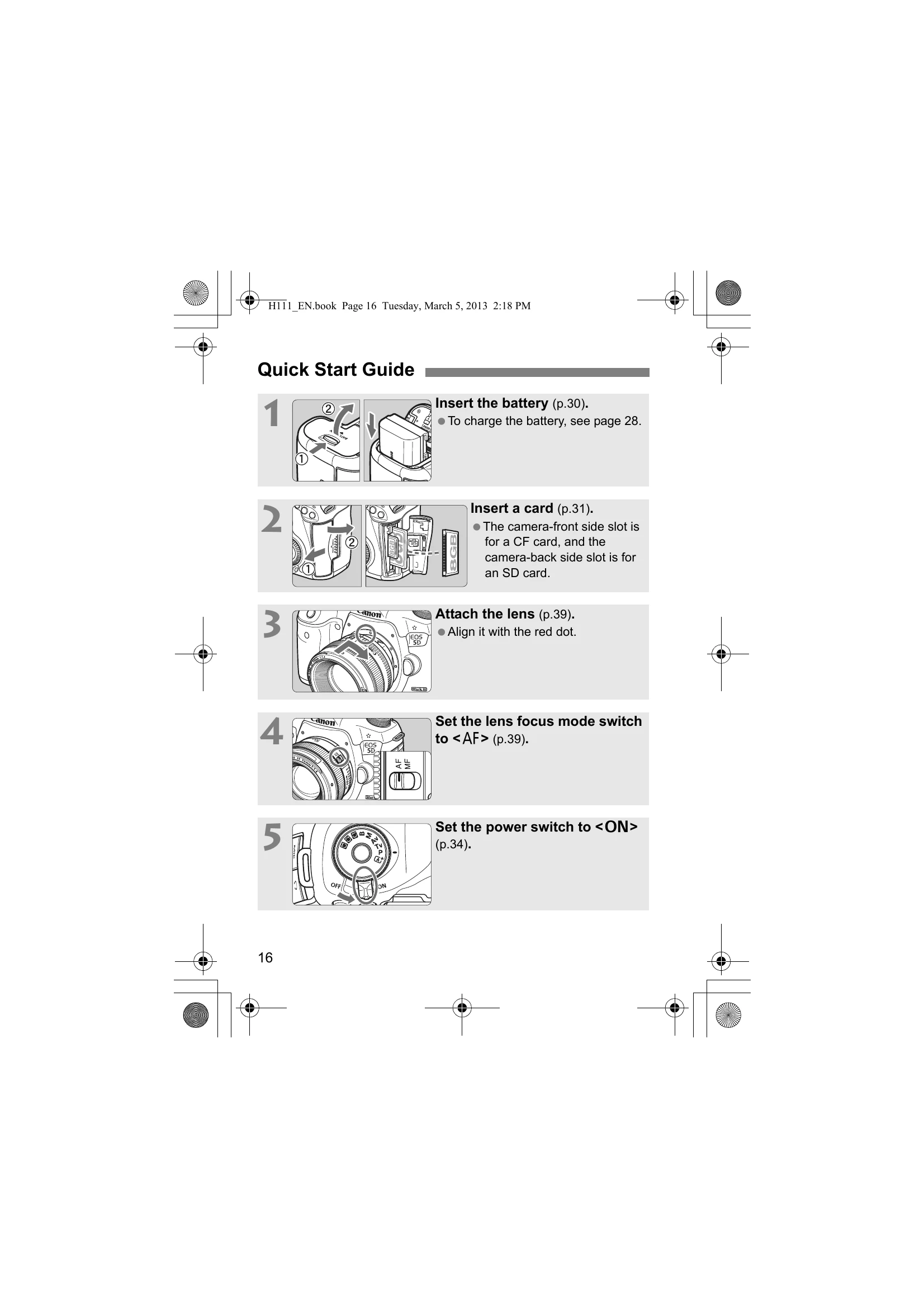
In this manual, "CF card" refers to CompactFlash cards and "SD card" refers to SD/SDHC/SDXC cards. "Card" refers to all memory cards used to record images or movies. The camera does not come with a card for recording images/movies. Please purchase it separately.
| No. | Error Message & Solution |
|---|---|
| 01 | Communications between the camera and lens is faulty. Clean the lens contacts. Clean the electrical contacts on the camera and lens or use a Canon lens (p.15, 18). |
| 02 | Card * cannot be accessed. Reinsert/change card * or format card * with camera. Remove and insert the card again, replace the card, or format the card (p.31, 53). |
| 04 | Cannot save images because card * is full. Replace card *. Replace the card, erase unnecessary images, or format the card (p.31, 53, 283). |
| 06 | Sensor cleaning is not possible. Turn the camera off and on again. Operate the power switch (p.34). |
| 10, 20, 30, 40, 50, 60, 70, 80, 99 | Shooting is not possible due to an error. Turn the camera off and on again or re-install the battery. Operate the power switch, remove and install the battery pack again, or use a Canon lens (p.30, 34). |