Manual for EOS 90D

Manual for EOS 90D

Brand: CANON

Category: Camera

Document Type: Manual

Language: EN
Uploaded: Nov. 21, 2025, 8:50 p.m.

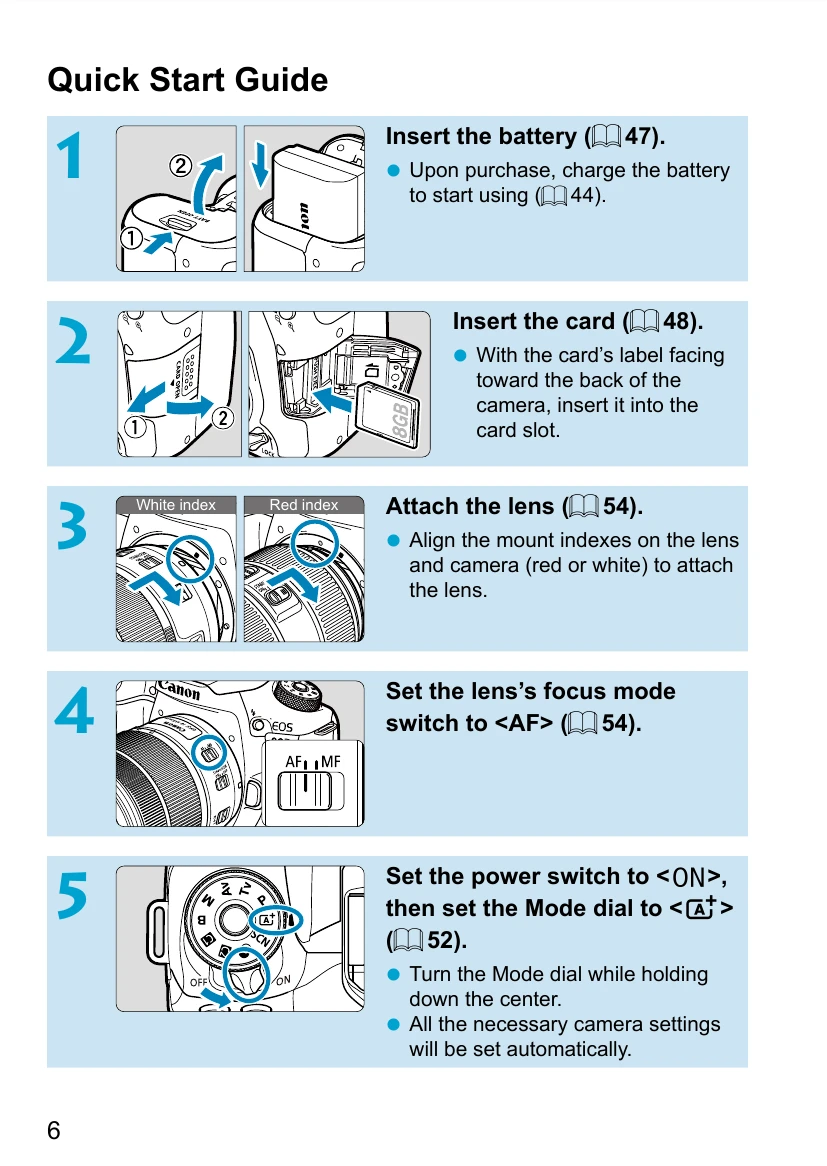
Quick Start Guide:

  1. Insert the battery and charge it.
  2. Insert the memory card.
  3. Attach the lens by aligning the mount indexes.
  4. Set the lens focus mode to <AF>.
  5. Turn the power switch to <ON> and set the Mode dial to <A>.
  6. Flip out the screen.
  7. Focus on the subject by looking through the viewfinder and pressing the shutter button halfway.
  8. Take the picture by pressing the shutter button completely.
  9. Review the picture on the screen.

Important Notes:

  • Always read the "Safety Instructions" and "Handling Precautions" before shooting.
  • Format new or previously used memory cards in the camera.
  • Ensure genuine Canon accessories are used for optimal performance.

Troubleshooting and error codes

Error Possible Cause Solution
Camera does not turn on Battery is not charged or is exhausted. Charge the battery or replace it.
Cannot release shutter Memory card is not inserted or is full. Insert a memory card or delete images.
Images are blurred Camera shake or incorrect focus. Use a tripod, increase shutter speed, or ensure correct focus.
Privacy Policy