Brand: CANON
Category: Camera
Document Type: Manual
Language: EN
Brand: CANON
Category: Camera
Document Type: Manual
Language: EN
Uploaded: Aug. 10, 2025, 12:25 a.m.
Manual Publish Date: 2010-03
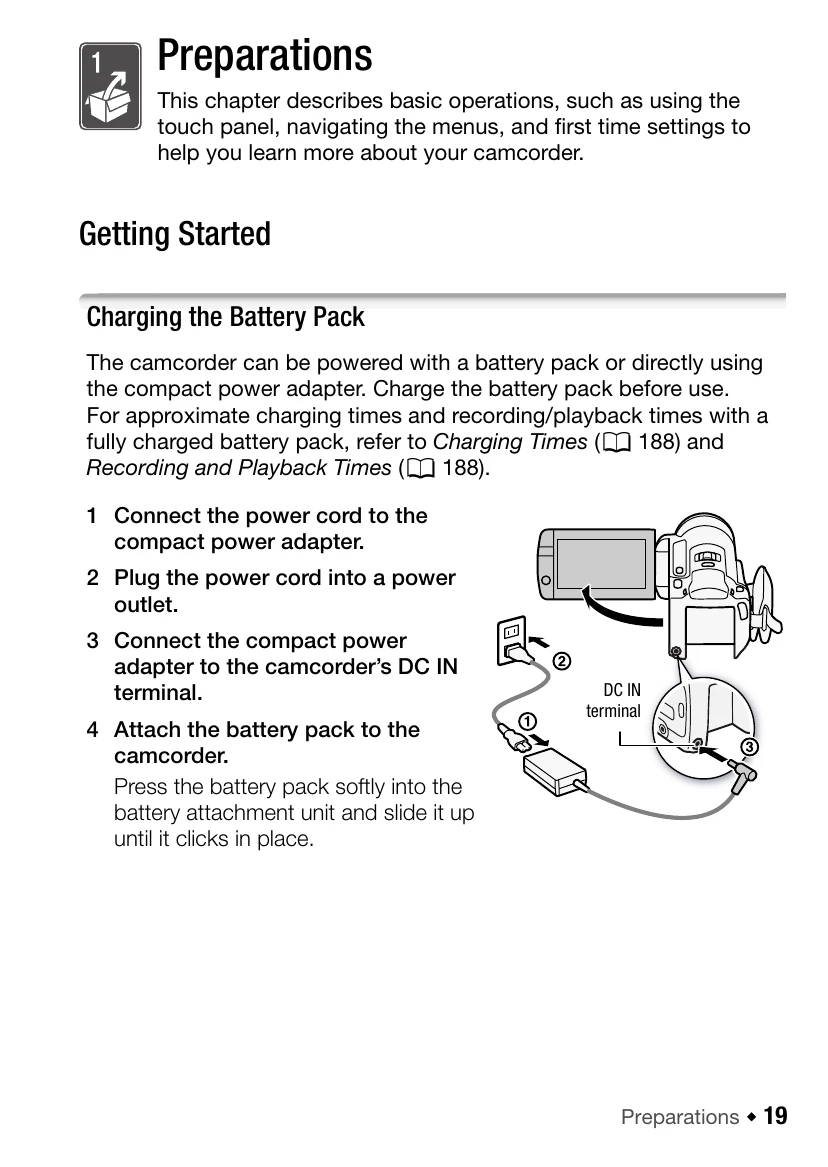
Charging the Battery Pack: Connect the power cord to the compact power adapter, plug the power cord into a power outlet, connect the adapter to the camcorder's DC IN terminal, and attach the battery pack by sliding it up until it clicks.
Using the Wireless Controller: Insert the CR2025 lithium button battery into the controller. Point the controller at the camcorder's remote sensor to operate it. The LCD panel can be rotated 180 degrees to use the controller from the front.
Using the Touch Screen: Navigate menus and select functions by touching the LCD screen.
Operating Modes: Switch between different recording modes to suit your needs.
First Time Settings: Set the date and time, language, and time zone for accurate recording and playback.
Insert a compatible memory card to expand storage. You can select the memory for recordings and utilize relay recording for uninterrupted shooting.