Quick Start Guide for LEGIA HF G25

Quick Start Guide for LEGIA HF G25

Brand: CANON

Category: Camera

Document Type: Quick Start Guide

Language: EN
Uploaded: Aug. 10, 2025, 12:29 a.m.

Manual Publish Date: 2013-01-01

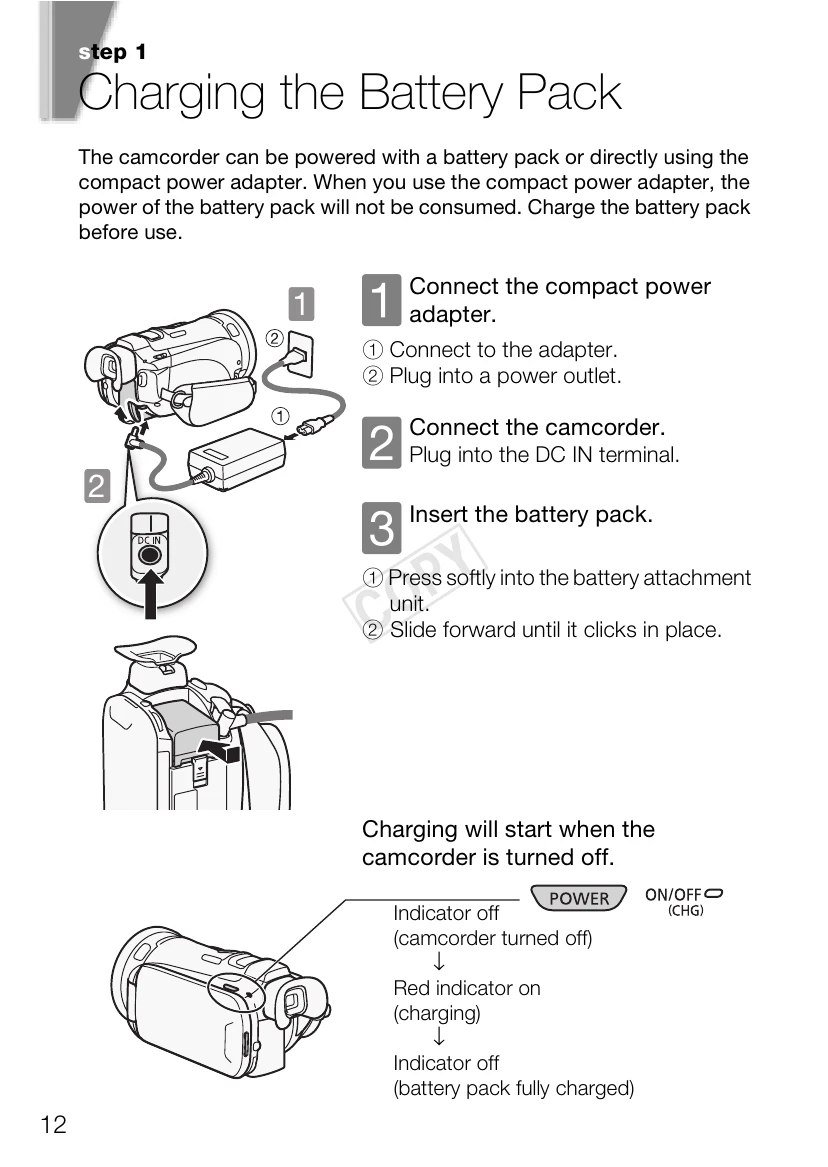
Charging the Battery Pack:

  1. Connect the compact power adapter to the camcorder and a power outlet.
  2. Insert the battery pack into the camcorder. Charging starts when the camcorder is off.

Basic Preparations:

  1. Attach the lens hood by aligning it with the lens and turning until it clicks.
  2. Fasten the grip belt for comfortable handling and access to controls.
  3. Rotate the LCD panel to the desired angle for shooting.
  4. Use the touch screen to navigate menus and select options, pressing firmly.
  5. Switch between AUTO, Manual (M), and CINEMA modes depending on your recording needs.

Setting Date/Time and Language:

  1. Press POWER to turn on the camcorder.
  2. Set the date and time using the touch screen.
  3. Select your preferred date/time format and language.

Using a Memory Card:

  1. Turn off the camcorder and open the memory card slot cover.
  2. Insert the memory card into the slot.
  3. Close the slot cover.

Shooting Video and Taking Photos:

  1. Set the camcorder to AUTO mode.
  2. Open the lens barrier.
  3. Press to start recording movies or touch [PHOTO] to take photos.
Privacy Policy