Manual for LEGRI A HF R56 / LEGRI A HF R57

Manual for LEGRI A HF R56 / LEGRI A HF R57

Brand: CANON

Category: Camera

Document Type: Manual

Language: EN
Uploaded: Aug. 10, 2025, 12:29 a.m.

Manual Publish Date: 2013-12-01

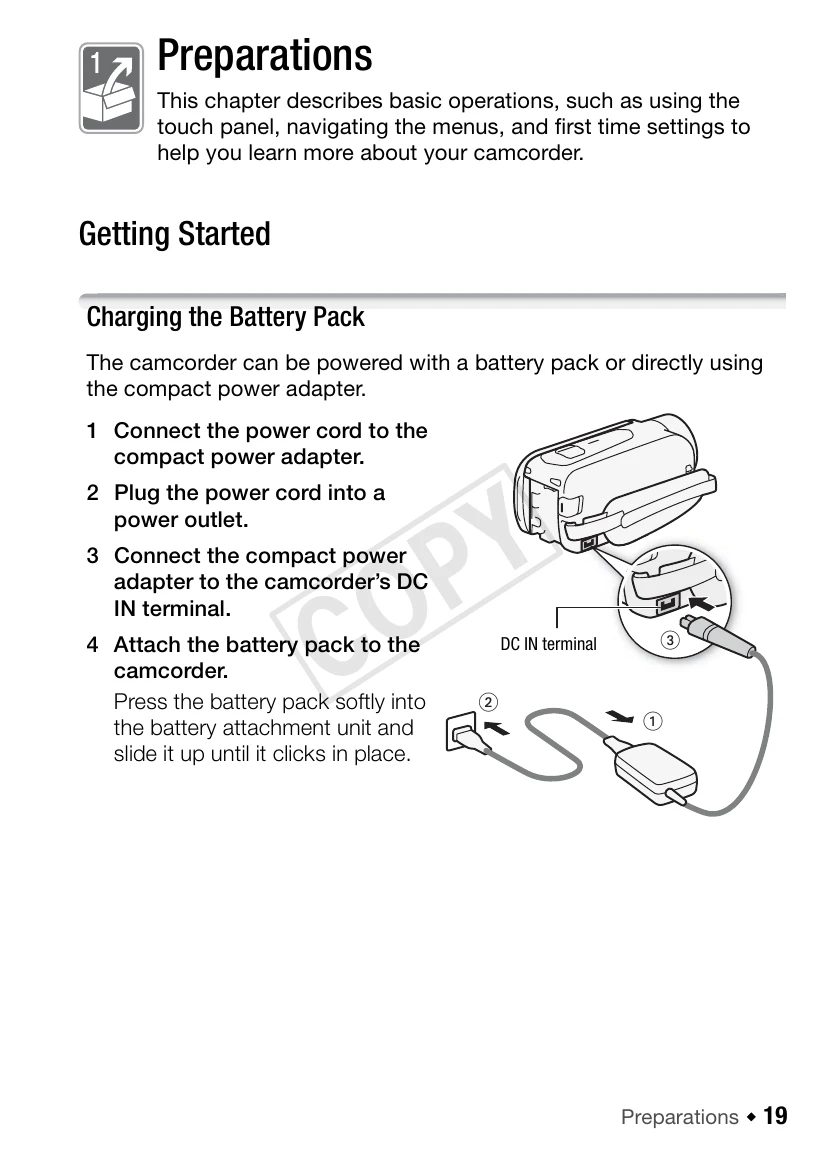
  • Charging the Battery Pack: Connect the compact power adapter to the camcorder's DC IN terminal and plug the power cord into a power outlet. Attach the battery pack by pressing it into the unit until it clicks. Charging starts when the camcorder is off.
  • Using a Memory Card: This camcorder supports SD, SDHC, and SDXC memory cards. For optimal performance, use cards rated CLASS 4, 6, or 10. Ensure your memory card is compatible with the camcorder.
  • Basic Operation: Open the LCD panel 90 degrees to turn on the camcorder. The initial setup screens will guide you through basic settings. Adjust the LCD panel position for comfortable viewing.
  • Wi-Fi Functions: Use your smartphone as a remote control, connect to your home network to upload recordings, or share videos on platforms like YouTube and Facebook.
  • Smart AUTO: This mode automatically selects the best scene mode for spectacular recordings without manual adjustments.
  • Video Snapshot: Shoot short scenes and arrange them into a video clip with your favorite background music.
  • Cinema-Look Filters: Apply professional filters to create unique movie looks.
  • Face Detection: The camcorder automatically detects faces and adjusts focus and settings for beautiful results.
  • Image Stabilization: Dynamic IS, Powered IS, and Intelligent IS help to stabilize shots and compensate for camcorder shake.

Troubleshooting and error codes

Trouble Possible Cause Remedy
The camcorder does not turn on. The battery pack is not attached or is depleted. Attach the battery pack or charge it.
The recording does not start. The memory card is full or write-protected. Replace the memory card or change its write-protect setting.
The image is shaky. Camcorder shake. Use Image Stabilization.
The sound is distorted. Wind noise. Use the wind noise reduction feature or shield the microphone.
Privacy Policy