Brand: CANON
Category: Camera
Document Type: Manual
Language: EN
Brand: CANON
Category: Camera
Document Type: Manual
Language: EN
Uploaded: Aug. 10, 2025, 12:29 a.m.
Manual Publish Date: 2012-07-01
None
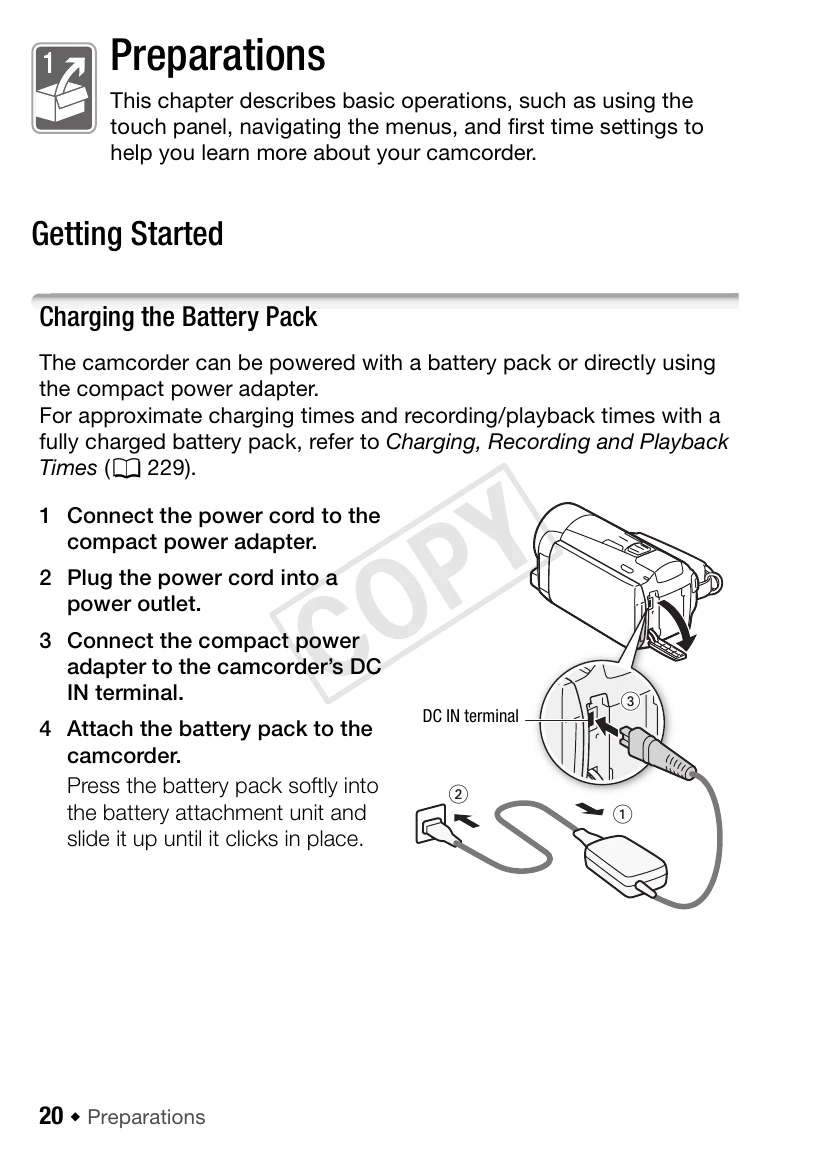
1. Connect the power cord to the compact power adapter.
2. Plug the power cord into a power outlet.
3. Connect the compact power adapter to the camcorder's DC IN terminal.
4. Attach the battery pack to the camcorder.
Charging will start when the camcorder is turned off.
1. Slide BATTERY RELEASE in the direction of the arrow and hold it pressed down.
2. Slide the battery pack and then pull it out.
| Problem | Possible Cause | Solution |
|---|---|---|
| The camcorder does not turn on. | The battery pack is not charged. | Charge the battery pack. |
| The battery pack is not attached correctly. | Attach the battery pack securely. | |
| The recording cannot be started. | The memory card is full. | Replace the memory card or delete unnecessary files. |
| The memory card is not formatted. | Format the memory card. |