Brand: CANON
Category: Camera
Document Type: Quick Start Guide
Language: EN
Brand: CANON
Category: Camera
Document Type: Quick Start Guide
Language: EN
Uploaded: Aug. 10, 2025, 12:28 a.m.
Manual Publish Date: 2017-01-01
Charging the Battery Pack:
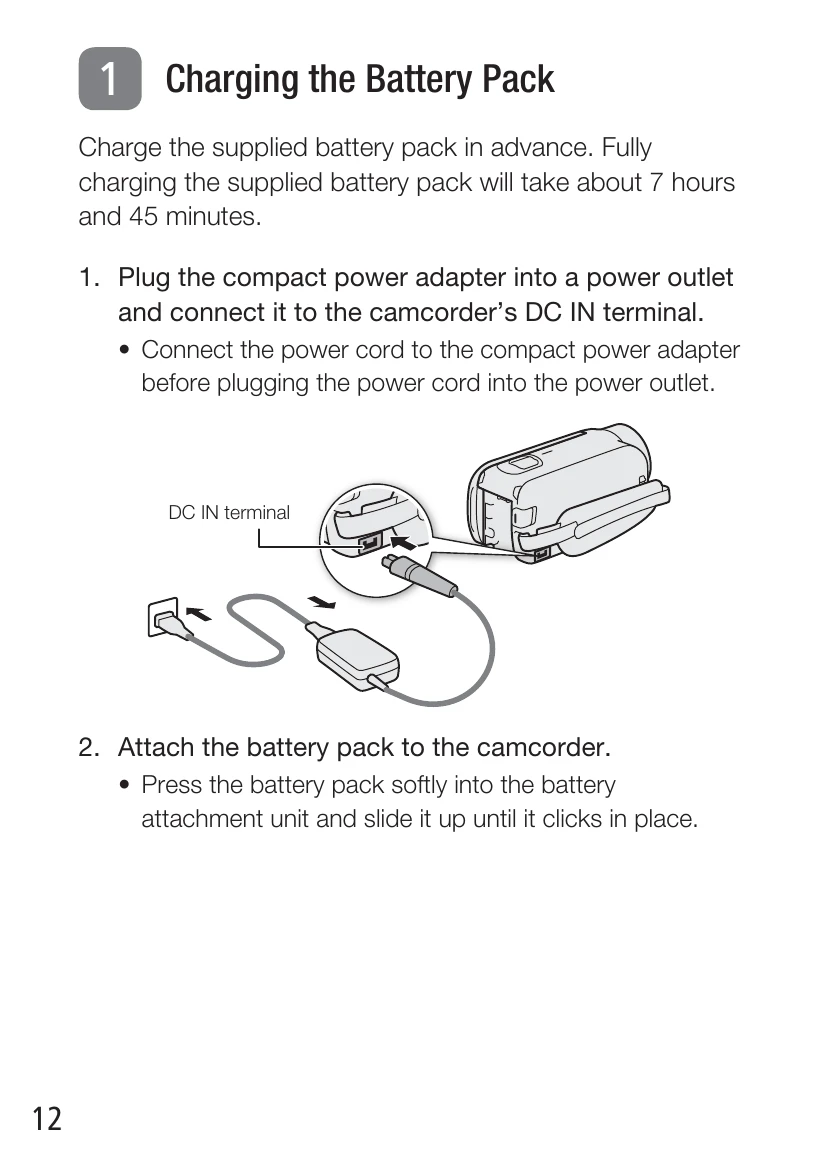
1. Plug the compact power adapter into a power outlet and connect it to the camcorder's DC IN terminal. Connect the power cord to the compact power adapter before plugging into the outlet.
2. Attach the battery pack by pressing it softly into the attachment unit and sliding it up until it clicks.
3. Charging starts when the camcorder is off. The POWER/CHG indicator turns red while charging and goes out when fully charged.
4. Disconnect the adapter from the camcorder and then the power outlet.
Inserting a Memory Card:
1. Open the LCD panel.
2. Press ON/OFF to turn off the camcorder.
3. Open the memory card slot cover and insert the memory card at a slight angle, label facing the lens.
4. Close the memory card slot cover.
Basic Setup:
1. Turn on the camcorder by opening the LCD panel or pressing ON/OFF.
2. Select the desired language and touch [▷].
3. Select the date/time format and touch [▷].
4. Set the date and time using the arrow buttons.
5. Touch [OK] and then [▷].
6. Select the movie format (AVCHD or MP4) and touch [▷].
7. Select memory for recording movies and photos, then touch [▷].
8. Touch [OK] to complete setup.
Shooting Video and Taking Photos:
1. Turn on the camcorder and open the lens cover.
2. For Video: Press START/STOP to record; press again to stop.
3. For Photos: Touch the photo icon to record a photo.
4. Close the lens cover and turn off the camcorder when finished.
Playing Back Video and Viewing Photos:
1. Press the playback button.
2. Touch the thumbnail of the scene or photo you want to play back.