Brand: Canon
Category: Camera
Document Type: Manual
Language: EN
Brand: Canon
Category: Camera
Document Type: Manual
Language: EN
Uploaded: Aug. 10, 2025, 12:26 a.m.
Manual Publish Date: 2012-07-01
Getting Started:
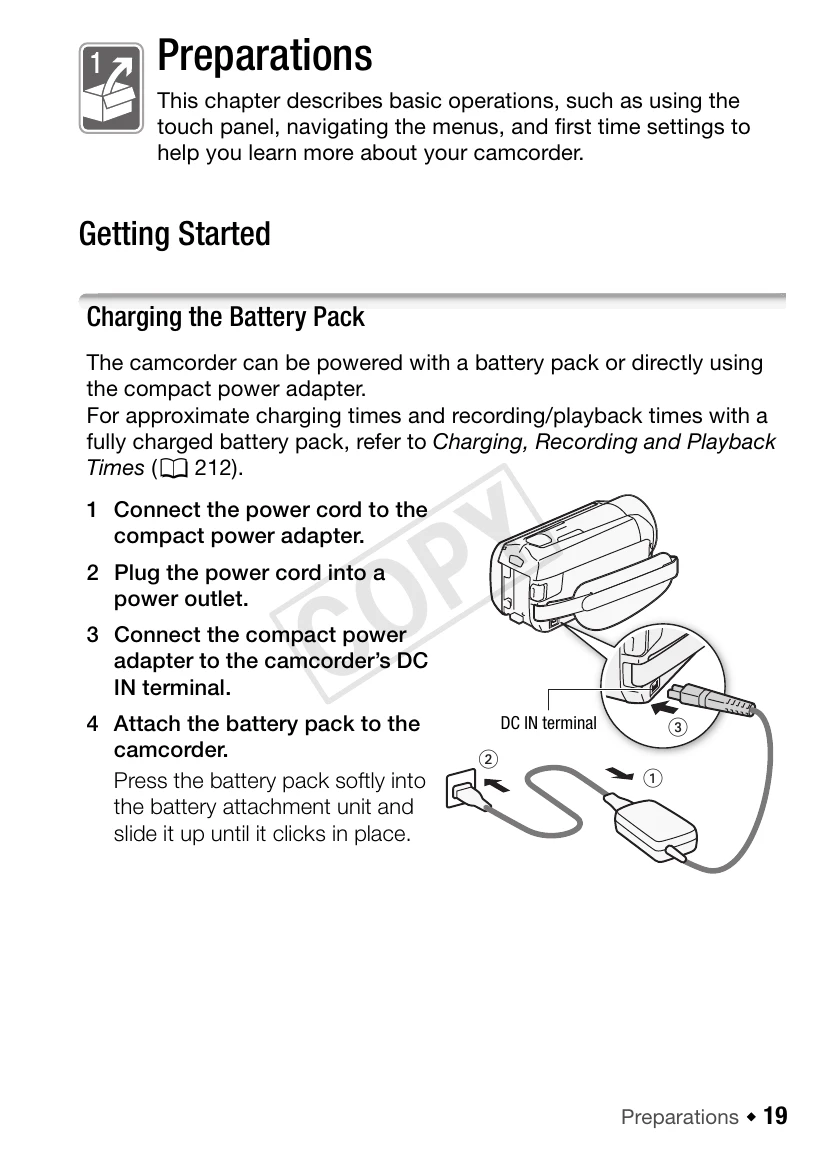
1. Connect the power cord to the compact power adapter.
2. Plug the power cord into a power outlet.
3. Connect the compact power adapter to the camcorder's DC IN terminal.
4. Attach the battery pack to the camcorder by pressing it softly into the battery attachment unit and sliding it up until it clicks.
Using the Grip Belt:
Adjust the grip belt for comfortable access to the zoom lever and START/STOP button. The stylus pen can also be attached to the grip belt.
| Problem | Camcorder does not turn on. | Battery pack not loaded correctly. | Load the battery pack correctly. |
|---|---|---|---|
| Battery pack is depleted. | Charge the battery pack. | ||
| Compact power adapter not connected properly. | Connect the compact power adapter properly. |