Brand: CANON
Category: Camera
Document Type: Quick Start Guide
Language: EN
Brand: CANON
Category: Camera
Document Type: Quick Start Guide
Language: EN
Uploaded: Aug. 10, 2025, 12:30 a.m.
Manual Publish Date: 2012-01-01
Canon warrants products for 12 months from the date of purchase, covering faulty manufacture, parts, or workmanship.
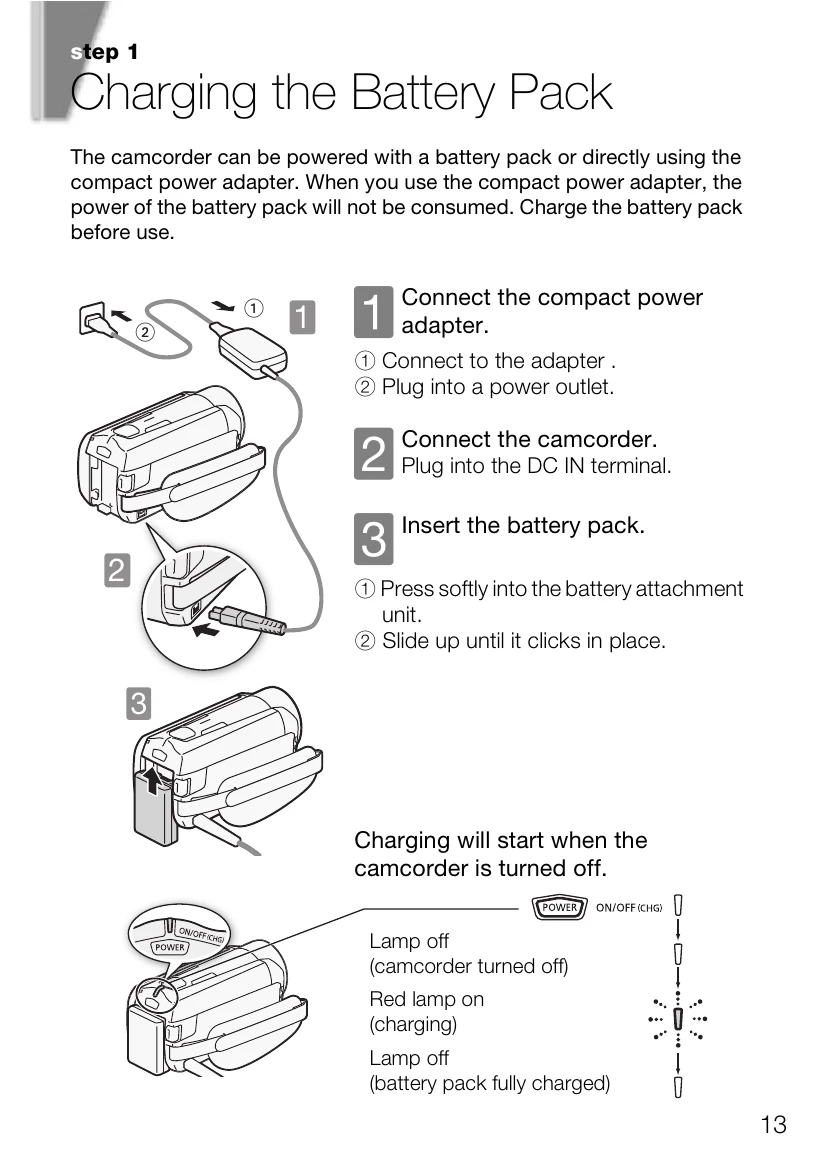
Charging the Battery Pack: Connect the compact power adapter to the camcorder and a power outlet. Insert the battery pack by pressing it softly into the battery attachment unit until it clicks. Charging starts when the camcorder is turned off.
Basic Preparations: Fasten the grip belt for easy access to controls. Open the LCD panel and adjust its angle. Familiarize yourself with the touch screen operations. Set the camera mode (AUTO, M, or ) and recording standard (AVCHD or MP4).
Setting Date/Time and Language: Turn on the camcorder using the POWER button. Set the date/time and preferred format. Select the desired language for menus and displays via the HOME menu and Other Settings.
Using a Memory Card: Turn off the camcorder. Open the memory card slot cover and insert a compatible memory card at a slight angle until it clicks. Close the cover securely. You can select built-in memory or a memory card for recording.
| Issue | Possible Cause | Solution |
|---|---|---|
| Camcorder does not turn on | Battery pack not charged or not inserted correctly. | Charge the battery pack or insert it correctly. |
| No image or sound | Connection to TV is incorrect or TV is not on the correct input. | Check connections and select the correct input on the TV. |
| Memory card error | Memory card is not inserted correctly or is incompatible. | Reinsert the memory card or use a compatible one. Initialize the memory card. |
| Data loss or damage | Camcorder turned off or power disconnected during recording/writing. | Ensure the ACCESS indicator is off before turning off the camcorder. |