Brand: Canon
Category: Printer
Document Type: Manual
Language: EN
Brand: Canon
Category: Printer
Document Type: Manual
Language: EN
Uploaded: Nov. 21, 2025, 7:50 p.m.
Manual Publish Date: 2017-04-01
| Issue | Symptom | Cause | Service Work |
|---|---|---|---|
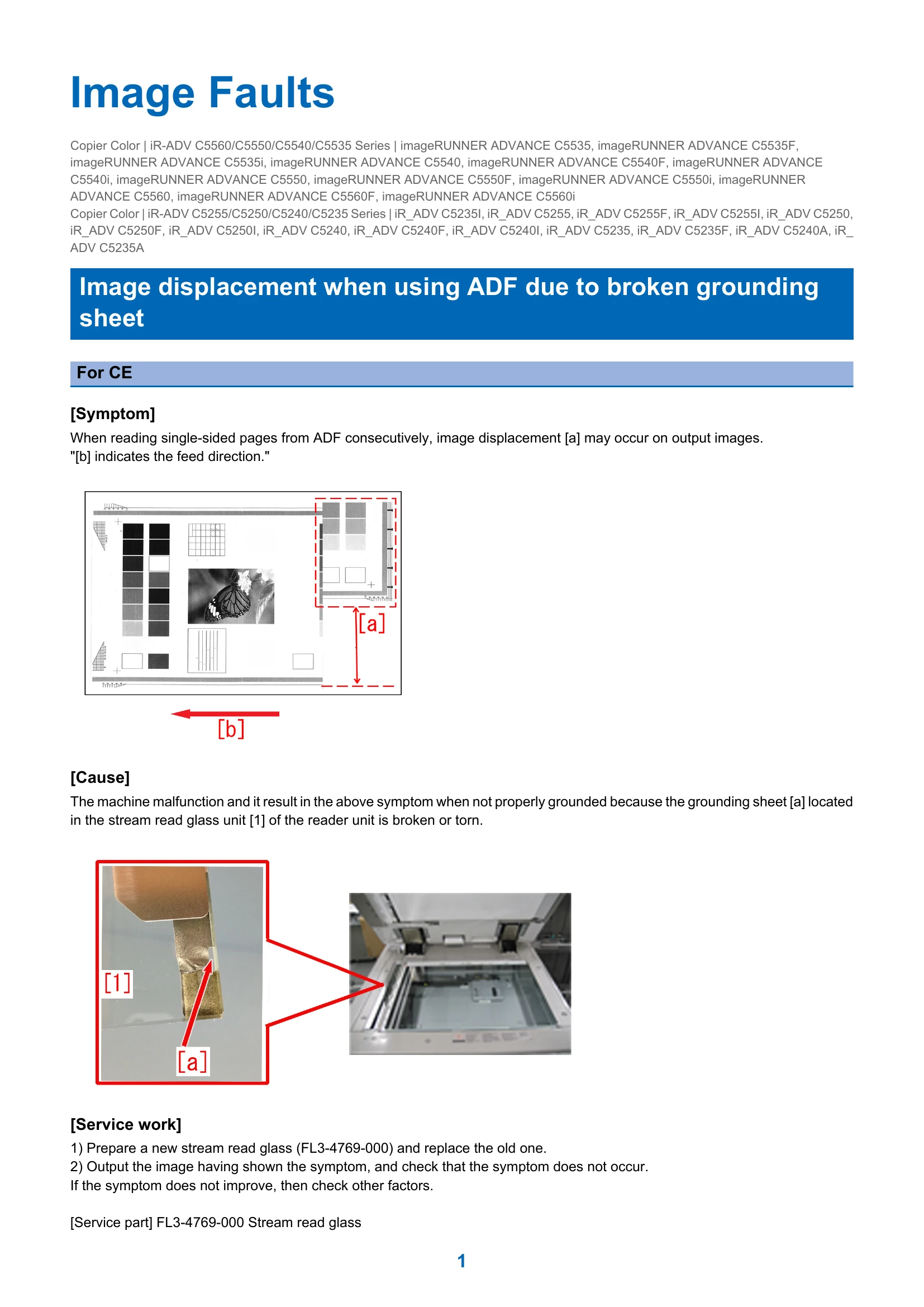
| Image Displacement (ADF) | Image displacement may occur on output images when reading single-sided pages from ADF consecutively. | Broken or torn grounding sheet in the stream read glass unit. | Replace the stream read glass unit. |
| Horizontal White Line (Halftone Image) | A horizontal white line may appear at 120mm from the leading edge of the sheet when printing a halftone image in Bk mode with Heavy 1 setting. | Paper rushing into the secondary transfer roller causes impact on the ITB and drum, leading to drum speed fluctuation. Difference in primary transfer operation also contributes. | Set Paper Settings to Heavy2 (129-150g/m2). |
| Horizontal Lines (94mm Pitch) | Horizontal lines with 94mm pitch may occur on a halftone image output. | Vibration of the main body causes uneven friction force on the drum surface, leading to differences in shaved surface condition over time. | Clean Inside Main unit via Service Mode. Repeat if necessary. |
| Repeating Image Failure (xx pitch) | Repeating image failure with consistent pitch intervals. | Rollers have foreign matters or flaws. | Check rollers and belts (Developing Cylinder, Photosensitive Drum, Charging Roller, Transfer Rollers, ITB, Fixing Film, Fixing Pressure Roller). |
| Poor Stacking/Wrinkles/Tear (Inner Finisher) | Poor stacking, wrinkles, or tear at the trailing edge of paper due to unfinished delivery to the tray. | Inappropriate position of the aligning plate of the processing tray unit. | Adjust the width of the aligning plate via Service Mode (SORTER > ADJUST > INF-ALG1/INF-ALG2). |
| Toner Leakage (Process Unit) | Waste toner may leak when pulling out the process unit. | Shutter spring of the process unit comes off when touched during removal, preventing the shutter from closing. | Check and attach the shutter spring. Ensure it is not touched during removal/installation. |
| "Insert Toner Container" Message | "Insert the toner container" may be displayed when starting the machine. | Half-insertion of front door SW connectors due to interference with the toner bottle front inner guide mold. | Check and fully insert the 4 connectors on the inner side of the toner bottle inner door. |
| Jam Code 0211/02112/110A (Buffer Pass Unit) | Jam codes related to buffer pass inlet or outlet sensors. | Timing belt on the rear side shifts and disengages the timing belt on the front side from the pulley. | Check and re-engage the timing belt, potentially using a flange and E ring. |
| Error Code E583-8001/E583-8002 (Finisher) | Errors related to Tray Auxiliary Guide Motor. | Malfunction of front/rear tray auxiliary guide due to shift in rack/pinion engagement or large clearance in the lower delivery roller mount. | Adjust the assembly of the front/rear tray auxiliary guide holder, potentially modifying the bushing of the lower delivery roller. |